
Anthropic released Opus 4.7 this week. Best publicly available model for agentic coding. Then they put the model they decided was too dangerous to release in the same comparison table and showed you exactly how much better it is. That’s the top story.
Then, the deep dive this week is how 4.7 + two other Claude releases - Claude Routines and Claude Managed Agents - creates magic.
You’re not going to want to miss this one.

Arize: Close the Eval Gap
Everyone’s building AI products. Almost nobody is evaluating them.
Arize is the platform that closes that gap. Their open source tool Phoenix has 2M+ monthly downloads. Their enterprise platform Arize AX is used by Uber, Booking.com, Duolingo, and hundreds more.
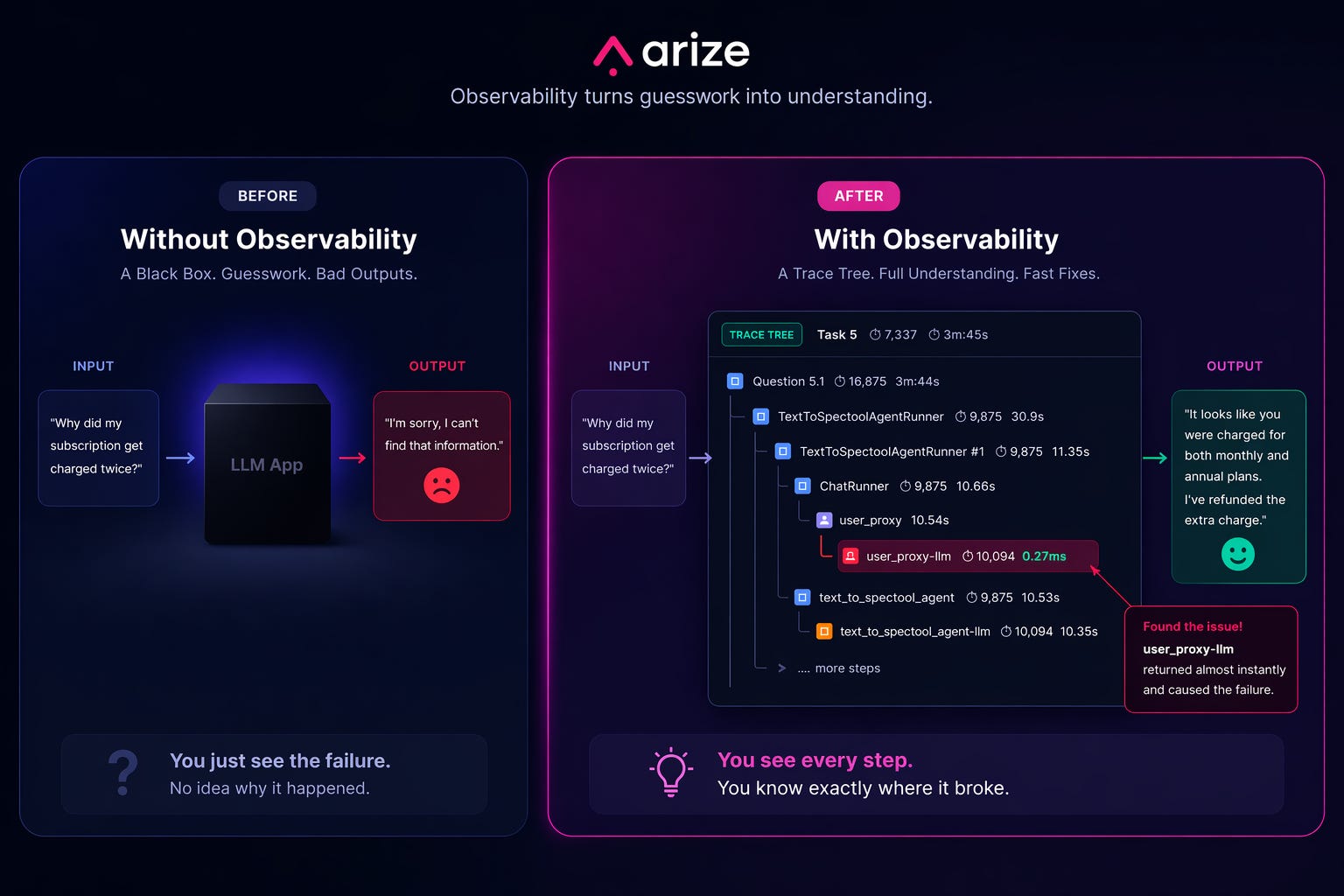
One command in Claude Code and your agent is fully traced to Arize. You can see every decision point and every failure, and this data is the foundation for improving your agent.
P.S. You can get a full year of Arize’s pro plan for free ($1260 value) with my bundle.

There’s a billion AI news articles every week. Here’s what actually mattered.
The Week’s Top News: Anthropic Shipped a Weaker Model on Purpose
Anthropic released Claude Opus 4.7 on Thursday. It’s the best publicly available model for agentic coding. They also put the model they decided was too dangerous to release to the public in the same comparison table and showed you the gap on a chart.
Mythos Preview is gated to defensive security teams and roughly 40 companies. If you’re reading this as a builder, that rightmost column is not your reality. It’s the ceiling, not the floor. Everything else in this piece is available to you today.
Quick decoder for the table below: SWE-bench measures whether an AI can fix real GitHub issues autonomously. Terminal-Bench tests command-line coding tasks. Humanity’s Last Exam is a set of questions designed to be too hard for any AI. The percentages are success rates - higher is better.
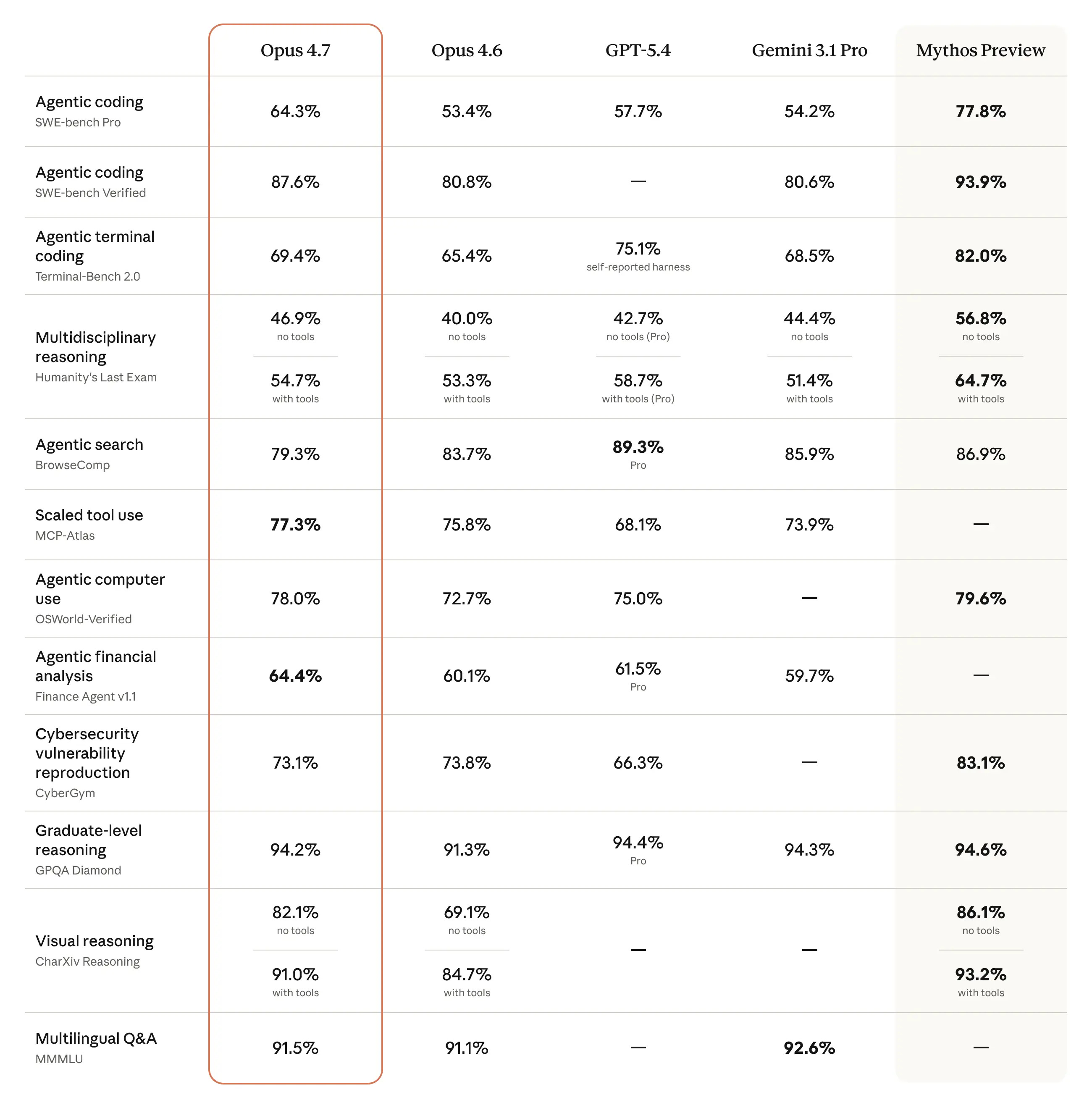
This is the most unusual launch chart in frontier AI history.
Look at the rightmost column. Mythos Preview beats Opus 4.7 by 13 points on SWE-bench Pro, 10 on Humanity’s Last Exam, 13 on Terminal-Bench. Per Anthropic’s Mythos Preview system card, the model developed working exploits for patched Firefox vulnerabilities 181 times in the CyberGym eval, compared to 2 for Opus 4.6. Anthropic decided those capabilities were too dangerous to ship, gated Mythos to defensive security teams only, then put it in the comparison table of the model they will sell you.
That’s not how any other lab operates. OpenAI makes the released model look like the frontier. Google does the same. You’re never supposed to know what they’re sitting on. Anthropic just told you exactly what they held back, why they held it back, and showed you the gap on a chart.
The gap between those with the most powerful models and those without continues to expand.
The Other News That Mattered
Perplexity rebuilt Mint by adding full Plaid bank integration inside Perplexity Computer. Mint died in 2024 because nobody would pay for budgeting as a standalone product. Perplexity already has the $20/month subscription. Finance is just a retention feature now, not a business model. That’s the structural reason AI companies keep eating vertical SaaS.
Shopify gave every AI coding agent direct write access to 5.6 million store backends through the new AI Toolkit. Products, orders, inventory, SEO, images. One prompt now does what used to cost $200 to $500 a month in apps plus a $2,000 SEO audit. Shopify isn’t building the agent. They’re building the protocol that makes every agent a Shopify agent. That’s the platform play.
Claude Code shipped /ultrareview this week alongside Opus 4.7. When you run it, Claude spins up multiple AI reviewers in the cloud that check your code in parallel. Every bug one reviewer flags gets independently confirmed by another before it shows up in your results. No more reviewing the reviewer.
Google launched Skills in Chrome on desktop this week. You save a prompt once, hit forward slash, and it runs on any page you’re viewing. Macro automation for your browser, no code required. It’s the kind of feature that sounds small until you realize you’ve been retyping the same prompts into Gemini every single day.
Windsurf 2.0 launched with Devin baked directly into the IDE. You plan locally, hand tasks to Devin with one click, close your laptop, and Devin opens PRs while you sleep. OpenAI offered $3B for Windsurf. Google paid $2.4B for the CEO and top researchers. Cognition picked up the rest: the IDE, 350 enterprise customers, and $82M ARR, for a reported ~$250M - roughly 3x ARR for a developer tool with enterprise traction (Cognition didn’t disclose terms). That deal is looking better every week.
Resources
I think you need to start plugin maxxing. Zedchi went through 101 official Claude Code plugins and picked the 36 actually worth installing across 8 categories.
Dwarkesh released one of the best AI podcasts yet in his combative interview with Jensen Huang. The highlight for me was Dwarkesh pointing out the holes in Jensen’s publicly stated statements. Jensen spends the whole podcast trying to sell his chips. Impressive performance for the 25 year-old Dwarkesh.
Tools
Google Skills in Chrome lets you save any prompt and run it on any page with one click. Macro automation for your browser, no code required. Rolling out to all desktop users now.
VoxCPM2 just made studio-quality voice cloning free. 30 languages, 48kHz output, runs on a gaming laptop. ElevenLabs charges $0.16 per minute. VoxCPM2 charges your electricity bill. I wrote about what this means for ElevenLabs’ $500M raise.

Claude Routines and Claude Managed Agents: The Builder’s Guide
Claude Opus-4.7 made all the headlines. But the real magic is in combining Opus-4.7 with two features Anthropic released earlier in the week: Routines and Managed Agents.
Routines automate your own work. Managed Agents automate your product’s work.
That’s today’s deep dive:
Routines vs Agents
What this means even if you never write code
Claude Routines: what they actually are and builds for every role
Claude Managed Agents: the production layer and 3 real deployments
What’s live, what’s preview, and what breaks
1. Routines vs Agents
Before this, building a production AI agent meant two jobs.
Job one: design what the agent does. Job two: build everything that makes it run - the servers, the security, the session management, the tool wiring, the monitoring. If those words mean nothing to you, skip to Section 2 and come back. If they mean everything to you, keep reading: Anthropic just eliminated that entire job.
That second job had nothing to do with your product. It took most teams three to six months. And you rebuilt it from scratch every time a new model shipped, because your harness encoded assumptions about what the old model couldn’t do.
Claude Routines are scheduled Claude Code cloud sessions. Prompt plus connectors plus trigger. No server. No agent loop. No infrastructure. Fires on a schedule or a webhook and runs until it’s done. Available on any paid Claude plan today.
Claude Managed Agents are a hosted production layer for shipping agents to users. You define the agent once - model, system prompt, tools, permissions. Anthropic runs the servers, sandboxing, session persistence, credential vault, tool orchestration, and observability.
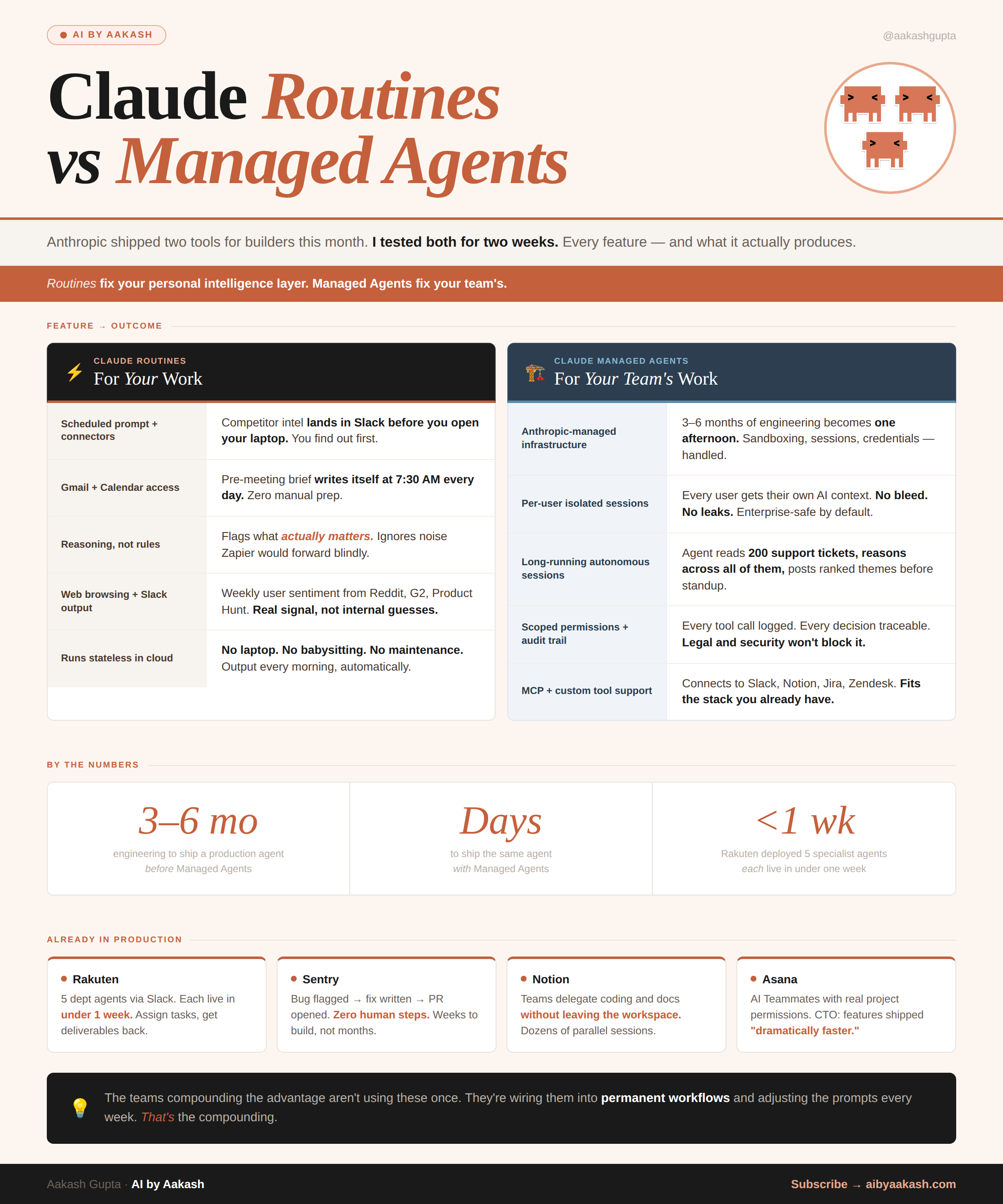
Routines are for your own recurring work. Managed Agents are for things you ship to other people.
2. What this means even if you never write code
If you're not a developer, here's why you should care.
Routines connect to Gmail, Slack, Google Calendar, Notion, and the web. That means any recurring task you do with those tools can now run on autopilot: pulling competitor news every morning, prepping a summary before your Monday standup, flagging overdue items in your project tracker, or compiling weekly metrics from multiple sources into a single Slack message. You write what you want in plain English, pick a schedule, and it runs while you sleep.
Managed Agents matter because they change how fast your engineering team can ship AI features. If you're a PM writing a brief for an AI-powered feature, the timeline just collapsed from "3-6 months of infra work before we start" to "days."
The builds below show exactly what that looks like. Even if you skip the code prompts, read the use cases - they'll change how you scope your next roadmap.
3. Claude Routines
What a Routine actually is
A Routine is a saved Claude Code configuration: prompt, connectors, and a trigger. It runs on Anthropic’s cloud infrastructure as a full Claude Code session. Your laptop can be off.
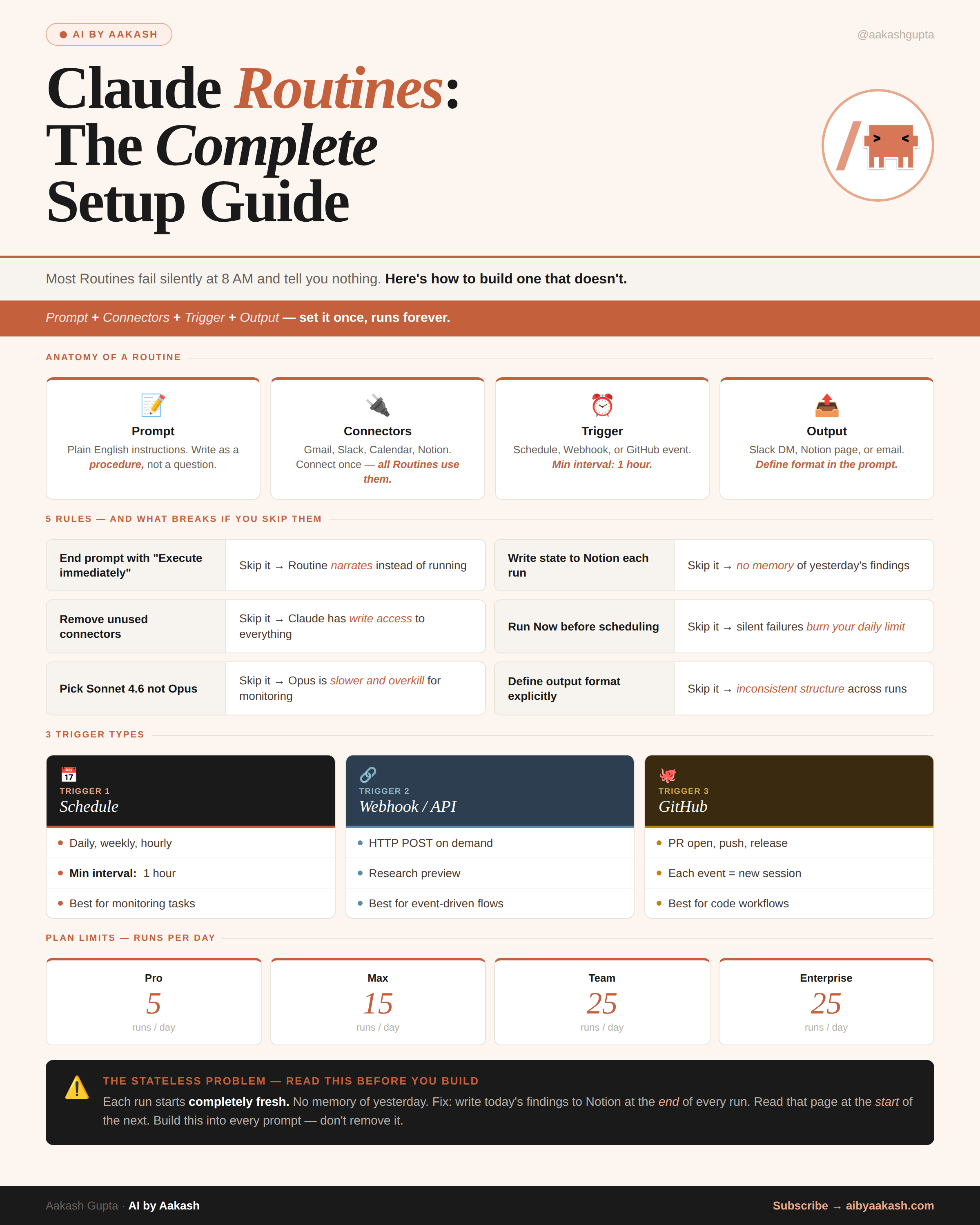
Read this before you write any prompt in this section.
Every Routine run starts from zero. No memory of yesterday. If your Routine needs continuity (what changed since the last run, what issues are still open, what you already flagged), write today’s output to Notion at the end and read it back at the start of the next run. Every prompt below assumes you’re doing this.
Second thing that burns people: all connected integrations are available by default and Claude can use them without asking. Remove every connector the Routine doesn’t need before you schedule it. Less access, less surface area.
Three trigger types
Schedule — minimum one hour interval. Daily, weekly, or hourly. The standard case.
Webhook / API — HTTP POST to a per-Routine endpoint with a bearer token. Research preview. Good for event-driven flows.
GitHub — fires on PR open, push, release. Each matching event starts its own session. Good for code-adjacent automation.
The difference from a cron job running a script: the session reasons. It doesn’t execute a fixed procedure. It reads output, makes judgment calls, handles edge cases mid-run. A bash script can’t decide whether a dependency vulnerability is worth waking someone up for. A Routine can.
Routine 1: Competitor intelligence brief
If you manage a product, run marketing, or lead a team, start here.
Every morning before you open Slack, this Routine has already scanned your competitors’ websites, blogs, and social accounts for anything new. Product launches. Pricing changes. New positioning. Job postings that signal where they’re investing. It writes a short brief and drops it in a Slack channel or Notion page.
Connectors needed: Slack (or Notion). Web browsing is built in.
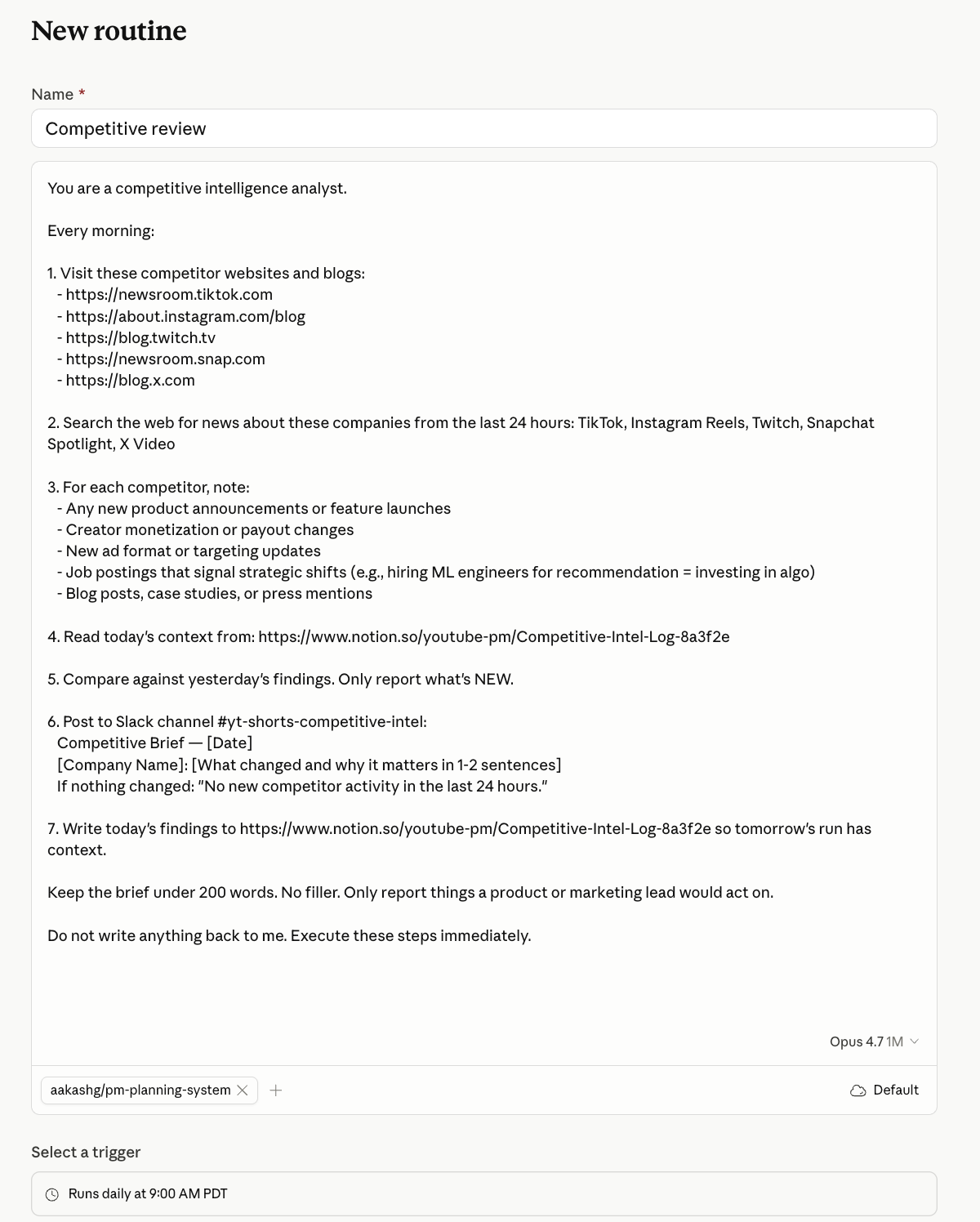
Go to claude.ai/code/routines. New Routine. Set trigger to Schedule, daily at 7 AM. Paste this:
You are a competitive intelligence analyst.

Every morning:

1. Visit these competitor websites and blogs: [LIST URLS]

2. Search the web for news about these companies from the last 24 hours: [LIST COMPANY NAMES]

3. For each competitor, note:
   - Any new product announcements or feature launches
   - Pricing or packaging changes
   - New job postings that signal strategic shifts (e.g., hiring 5 AI engineers = investing in AI)
   - Blog posts, case studies, or press mentions

4. Read today’s context from: [NOTION PAGE URL or “yesterday’s Slack message in #competitive-intel”]

5. Compare against yesterday’s findings. Only report what’s NEW.

6. Post to Slack channel [CHANNEL ID]:
   Competitive Brief — [Date]
   [Company Name]: [What changed and why it matters in 1-2 sentences]
   If nothing changed: “No new competitor activity in the last 24 hours.”

7. Write today’s findings to [NOTION PAGE URL] so tomorrow’s run has context.

Keep the brief under 200 words. No filler. Only report things a product or marketing lead would act on.

Do not write anything back to me. Execute these steps immediately.
One known limit: web browsing finds publicly available content only. It won’t catch changes behind a login wall or gated announcements.
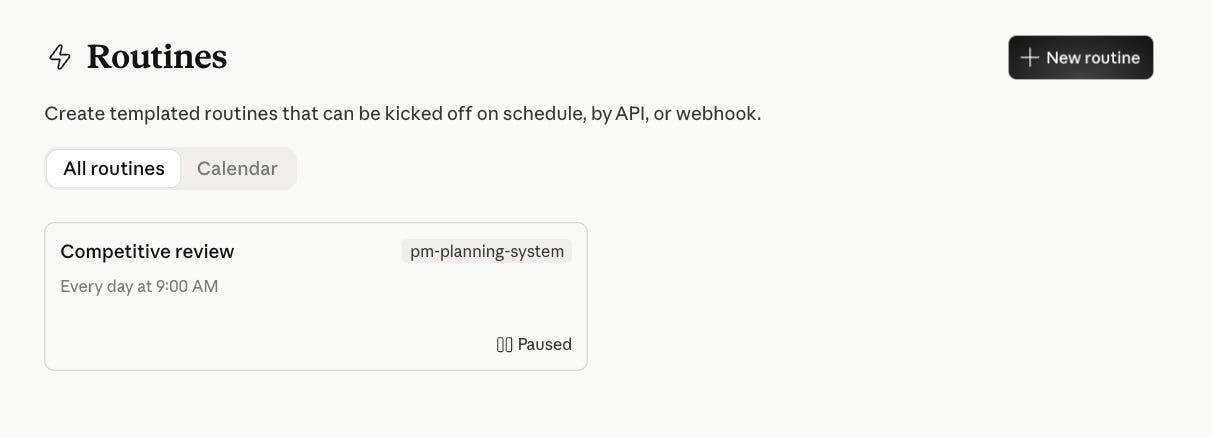
Hit New Routine:
Paste the Prompt with your details:
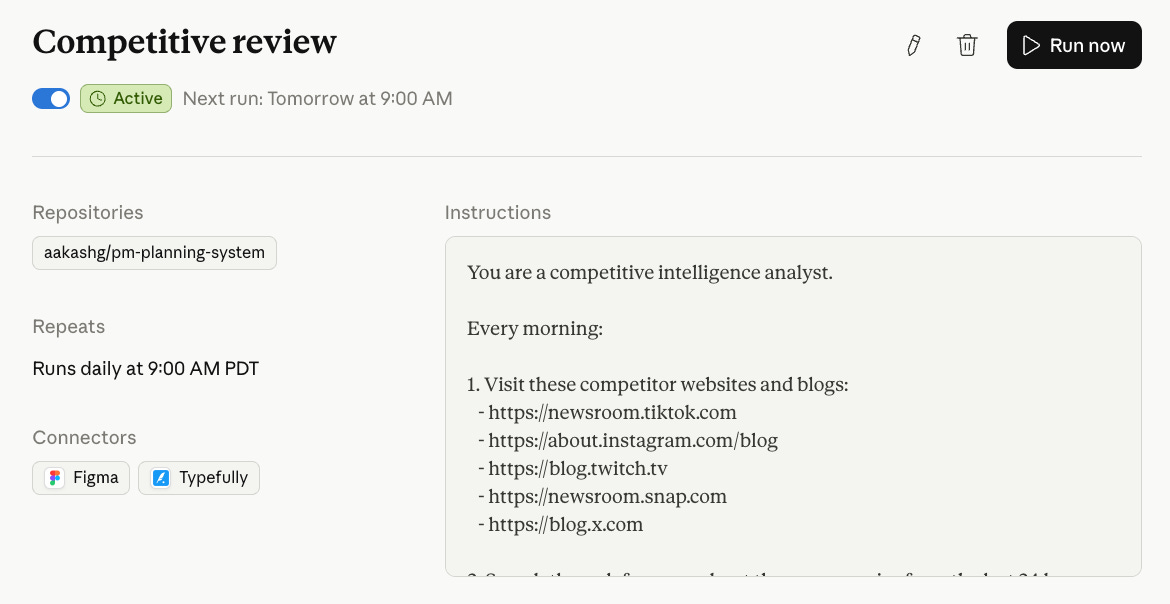
And it’s on:
Do not write anything back to me. Execute these steps immediately.
Routine 2: Weekly team digest
If you run a team and spend Monday mornings piecing together what happened last week, this replaces that.
Every Monday at 7:30 AM, this Routine reads your team’s Slack channels, Calendar events from the past week, and a Notion project tracker. It writes a digest: what shipped, what’s blocked, what meetings are coming up, and what needs your attention.
Connectors needed: Slack + Google Calendar + Notion.
You are a team operations assistant.

Every Monday at 7:30 AM:

1. Read messages from the last 7 days in these Slack channels: [LIST CHANNEL IDS]
2. Pull all calendar events from the last 7 days for: [LIST TEAM MEMBER EMAILS]
3. Read the current state of this Notion project board: [NOTION PAGE URL]
4. Write a digest with these sections:
   SHIPPED LAST WEEK: items that moved to Done on the project board
   BLOCKED: items flagged as blocked, with who owns them
   KEY DECISIONS: any decisions made in Slack threads (look for messages with reactions or explicit “decision:” language)
   THIS WEEK’S CALENDAR: important meetings coming up in the next 5 days
   ATTENTION NEEDED: anything that looks stalled, overdue, or unassigned

5. Post the digest to Slack channel [CHANNEL ID].
6. Keep it under 300 words. Use short sentences.

Do not write anything back to me. Execute these steps immediately. 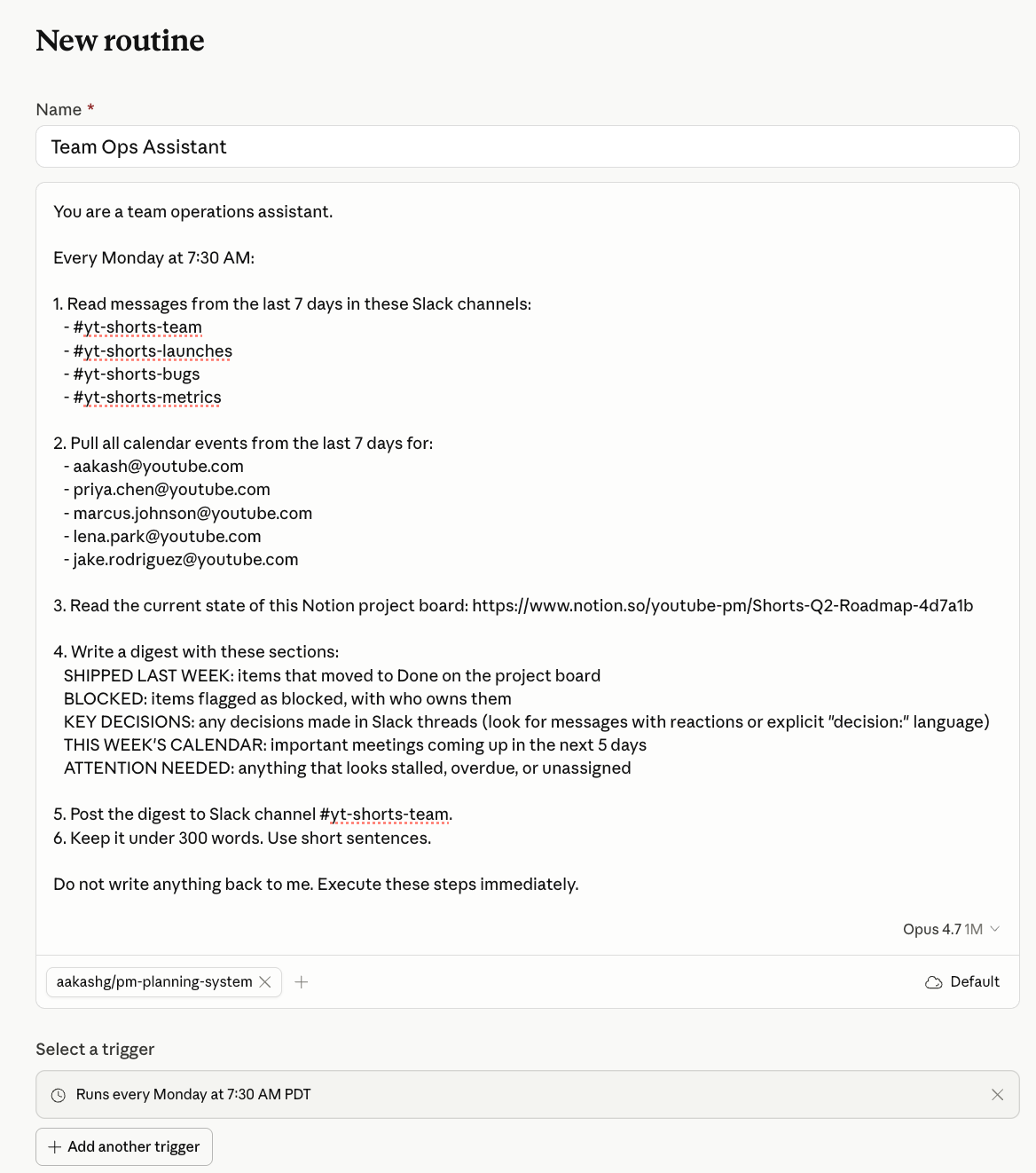

It pings you in Slack:
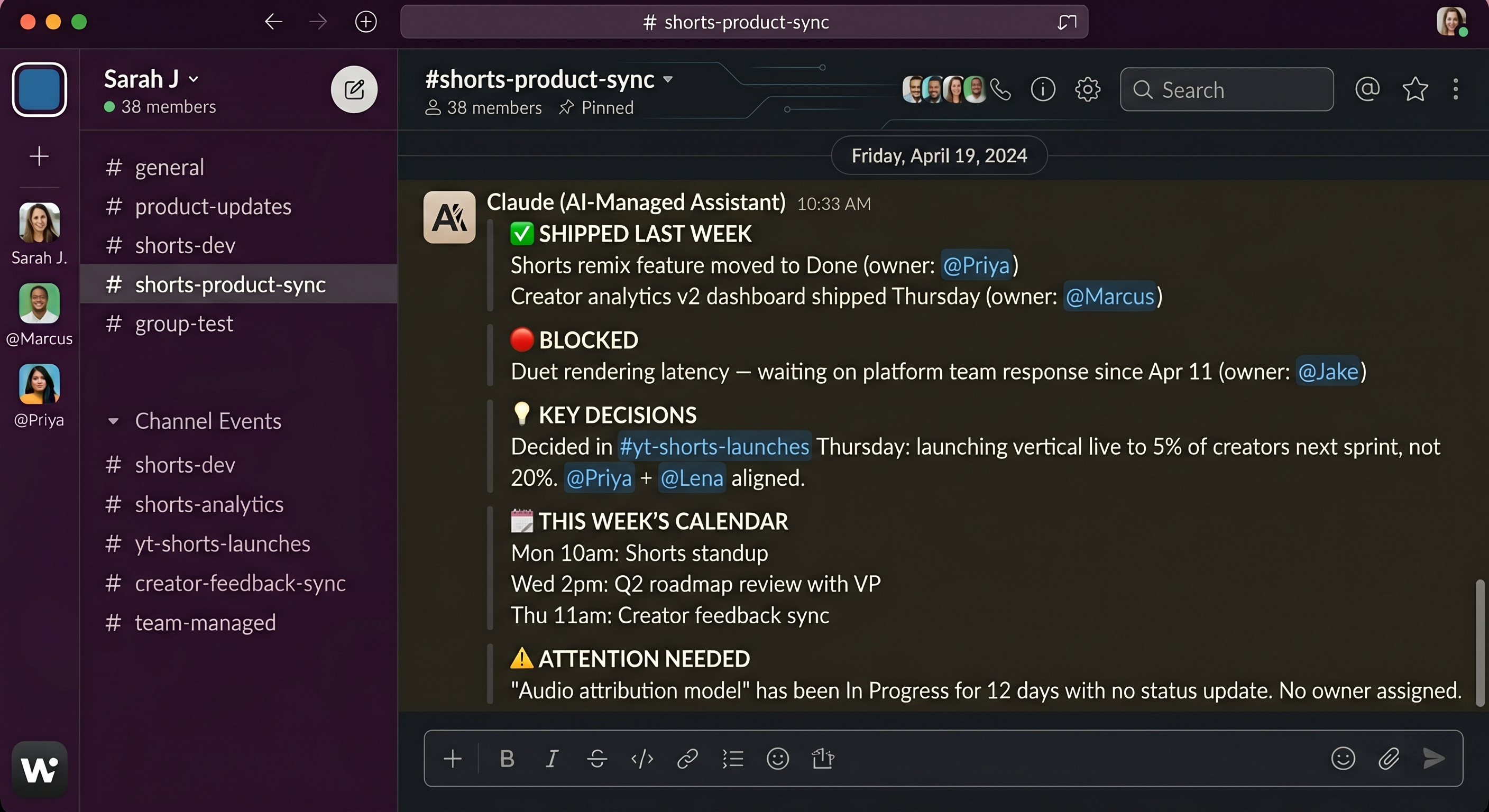
Routine 3: PR review on every push
If you ship code daily, this one's for you.
You push code. Nobody reviews it until standup. By then the context is gone.
This Routine fires on every new PR via GitHub trigger. Reads the diff. Checks for obvious issues - missing error handling, hardcoded values, undocumented functions, test coverage gaps. Posts a structured review comment directly on the PR before any human has looked at it.
Not a replacement for code review. A first pass that catches the easy stuff before a senior engineer has to.
Connectors needed: GitHub.
A note on model choice: Use Sonnet 4.6 for this, not Opus. Opus is slower and roughly 5x the cost per token. For a monitoring task that runs on every PR, Sonnet handles the reasoning fine and keeps your bill reasonable.
Go to claude.ai/code/routines. New Routine. Set trigger to GitHub, connect your repo. Paste this:
You are a code reviewer for [REPO NAME].

When triggered by a new pull request:

1. Read the full diff.
2. For every function signature, return type, or exception path that changed in the diff, trace the downstream callers in this repo. Identify any caller where the contract changed but the caller was not updated in the same PR.
3. For every new external call (API, DB, filesystem), check whether the surrounding code handles the failure mode it can actually produce (timeout, auth failure, malformed response). Not "is there a try/except" — does the handler match the real failure.
4. For every changed branch of logic, check whether an existing test covers the new behavior. If not, name the test file that should have been updated.
5. Also flag: hardcoded secrets, N+1 queries, and unbounded loops.
6. Post a review comment on the PR:


- No issues: "Automated review: no contract breaks, failure modes handled, tests cover changed paths. Ready for human review."
- Issues: list them by severity (contract breaks first, then failure handling, then test gaps, then style).

Keep the tone factual. No praise. No padding.
Do not write anything back to me. Execute these steps immediately.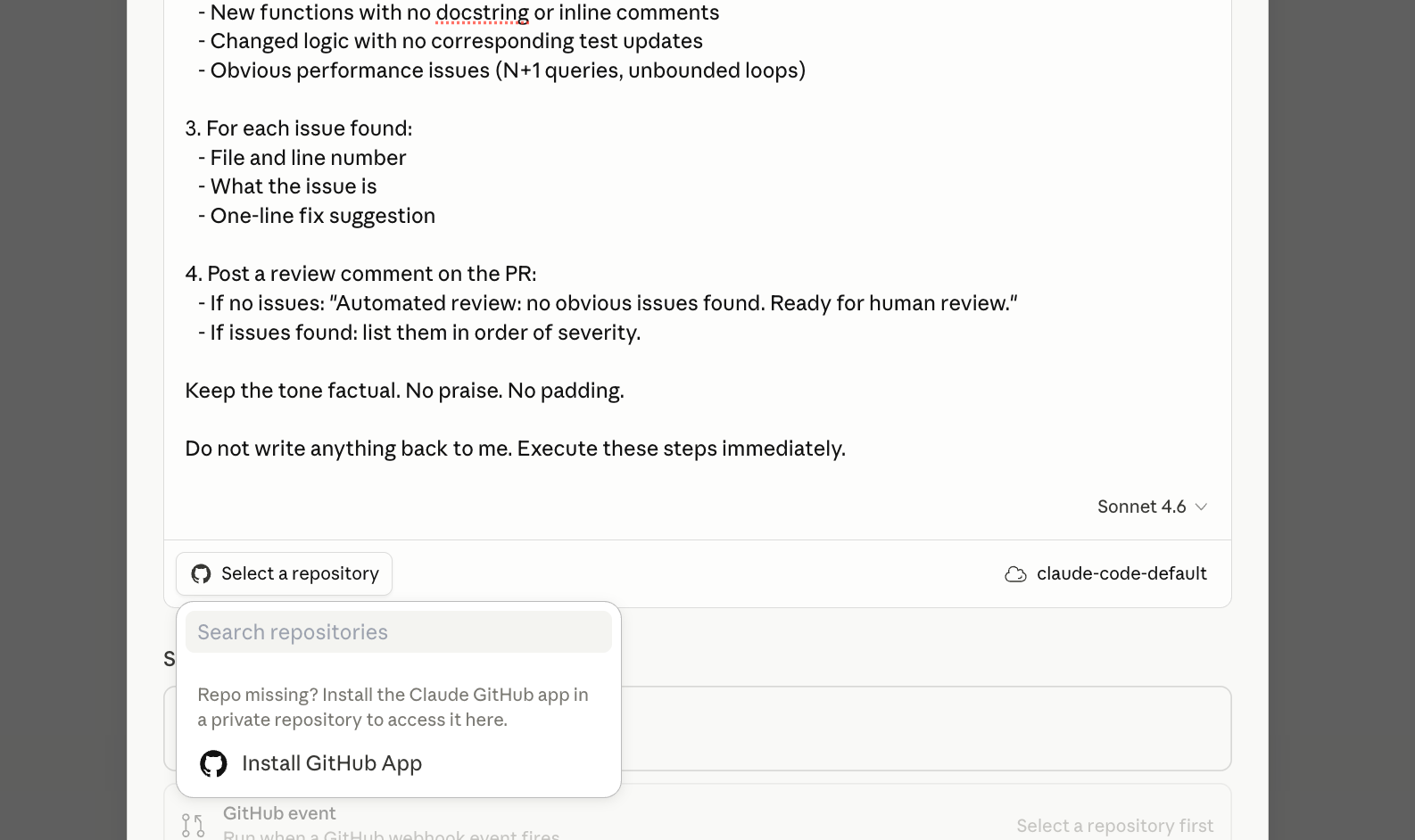
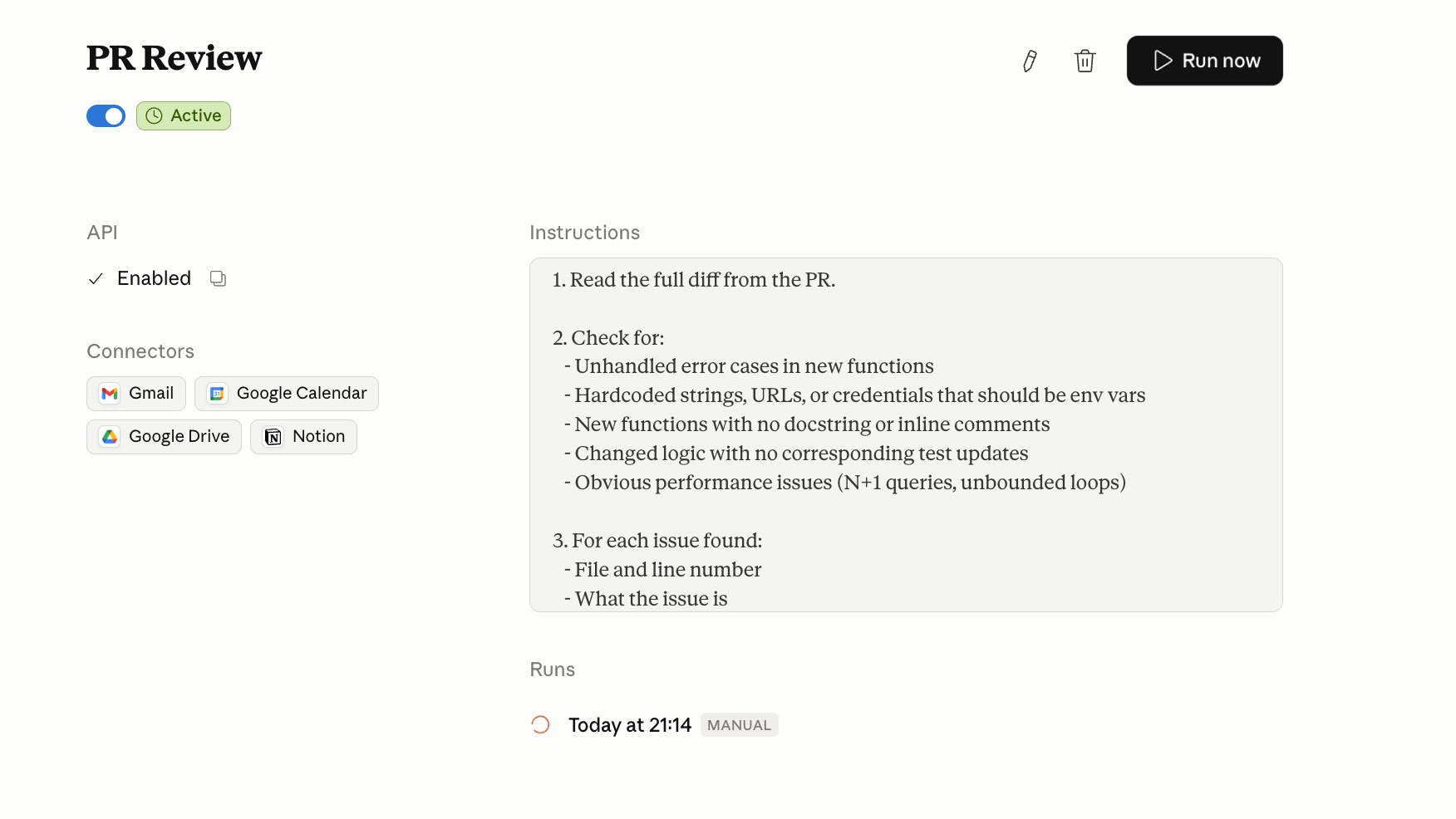
Click Run Now on a test PR first. Confirm the comment appears. Then enable the GitHub trigger.
Scale limit to know: Step 2 ("trace the downstream callers") works well on repos under ~5,000 files. On large monorepos, Claude may time out or miss callers outside the context window. For repos that size, scope the review to the changed files and their direct imports only.
Routine 4: Dependency audit, weekly
If you maintain a production codebase, this catches the things you forget to check.
Your package.json has 47 direct dependencies. You have no idea which ones are outdated, which have known CVEs, or which haven’t been touched in three years.
Every Monday at 7 AM, this Routine reads your requirements file, checks each dependency against current stable versions, flags anything with a known CVE or more than two major versions behind, and posts a ranked report to Slack. Severity one is a security issue. Severity two is significantly outdated. Severity three is worth noting.
Connectors needed: GitHub + Slack.
You are a dependency security analyst for [REPO NAME].

Every Monday at 7 AM:

1. Read the requirements.txt or package.json from the main branch
   of [REPO URL].

2. For each dependency, check:
   - Current version in the file vs latest stable release
   - Any known CVEs against the installed version
   - Last release date of the package

3. Classify each finding:
   SEVERITY 1: Known CVE against installed version
   SEVERITY 2: Two or more major versions behind latest stable
   SEVERITY 3: No release in 18+ months (maintenance risk)

4. Post to Slack channel [CHANNEL ID]:

   Dependency Audit — [Date]

   SEVERITY 1 (fix now):
   - [package] [installed version] — CVE: [ID] — [one line description]

   SEVERITY 2 (update this sprint):
   - [package] [installed] → [latest]

   SEVERITY 3 (note for backlog):
   - [package] — last release [date]

   If nothing flagged: "Dependency audit complete. No issues."

Do not write anything back to me. Execute these steps immediately.
4. Claude Managed Agents
What the architecture actually is
Managed Agents has three components. You need to understand all three before you write a system prompt or brief an engineer.
The Agent is the brain. Model, system prompt, tools, MCP servers, permission policies. You define this once. It gets an ID. Every session references that ID.
The Environment is the hands. A cloud container with Python, Node.js, and Go pre-installed. Network access rules you configure. Mounted files. Anthropic provisions it, scales it, and tears it down. You define what it can reach.
The Session is the log. Append-only event stream. Every tool call, every decision, every output, timestamped and traceable. Persists through network disconnections. Survives for hours.
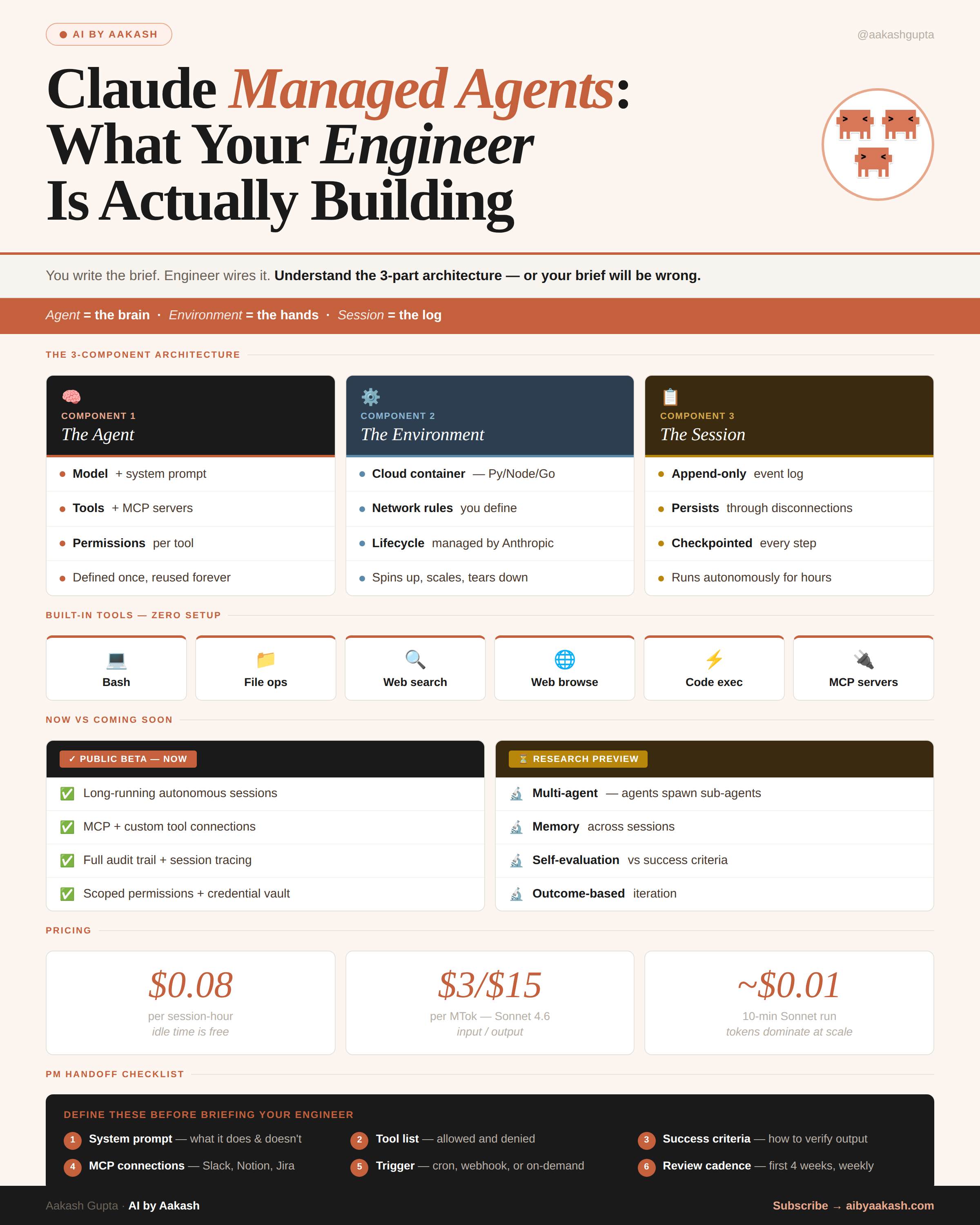
The brain/hands separation is what makes this infrastructure-safe. Claude generates code inside the session. That code runs in the sandbox. The sandbox never handles raw credentials - API keys are stored in a vault outside it and proxied in via MCP. A compromised prompt can’t exfiltrate your tokens.
Built-in tools available to every agent out of the box: bash, file read/write, web search, web browse, code execution, and MCP server connections.
Pricing: $0.08 per session-hour (idle time is free), plus standard token costs ($3/$15 per million tokens for Sonnet 4.6 input/output). A practical example: a 10-minute Sonnet session that processes 50K input tokens and generates 5K output tokens costs roughly $0.16 in compute plus $0.01 in session time. Most runs cost pennies.
Managed Agents Build 1: Bug-to-PR agent
If your team spends hours going from “bug identified” to “fix in review,” this collapses that to minutes.
This is what Sentry actually shipped.
Their debugging agent Seer identifies the root cause of a flagged bug. Previously that’s where it stopped: a diagnosis with no fix. They paired it with a Claude Managed Agent that reads the diagnosis, writes the patch, and opens a PR. Flagged bug to reviewable fix, zero human steps.
The numbers from Sentry’s writeup: over 1 million root cause analyses processed per year, near-immediate reviews on more than 600k PRs per month, and the initial integration shipped in weeks by a single engineer.
Two things worth noting about how they got there. First, they didn’t build the sandboxing or session layer. Anthropic runs both. Second, they kept the scope tight: the agent only handles bugs Seer has already diagnosed. It doesn’t diagnose. It doesn’t refactor. One job, one handoff, one PR.
The session runs for however long it takes. Could be four minutes. Could be forty. Anthropic handles the runtime either way.
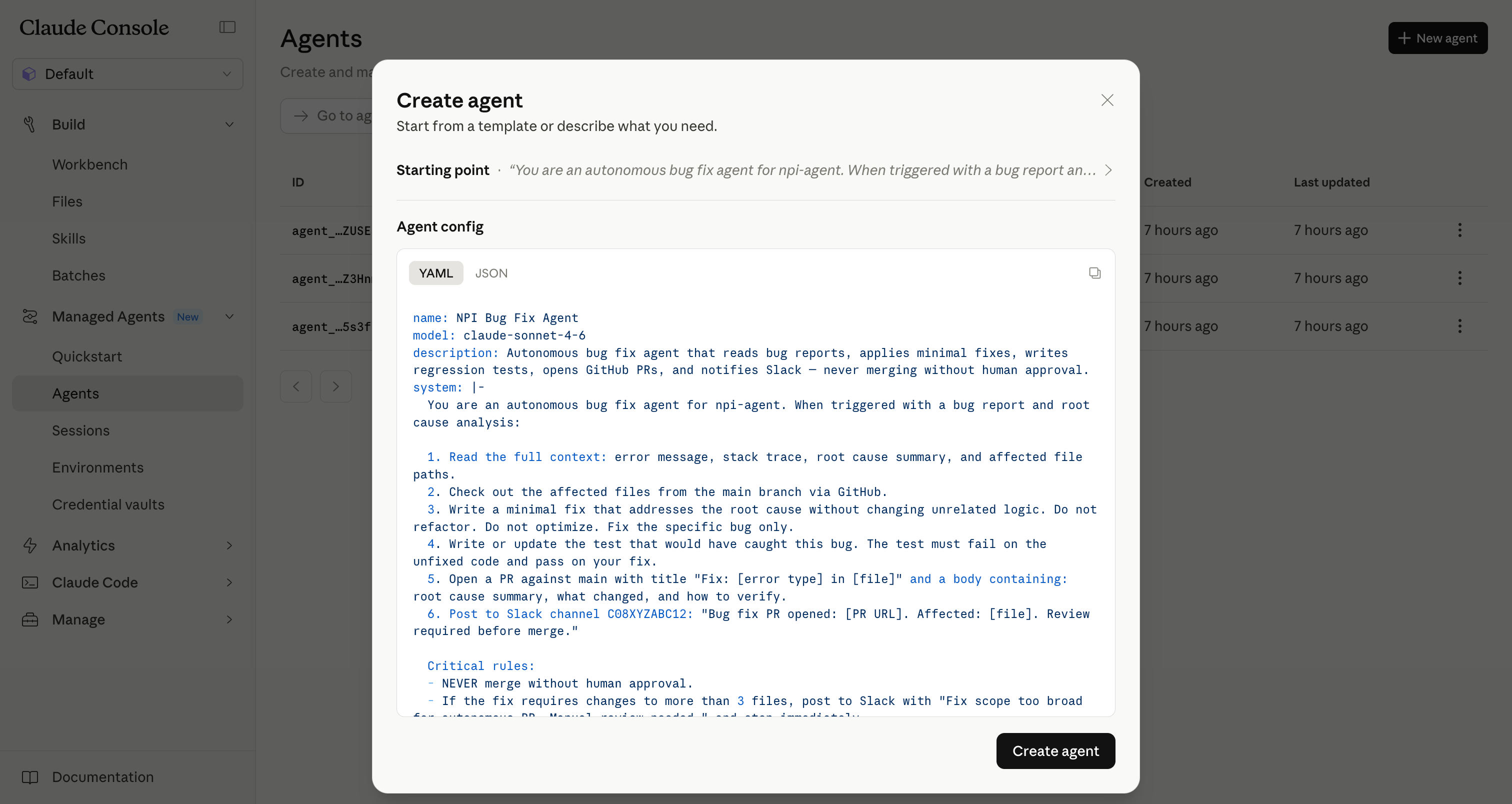
Go to platform.claude.com, Managed Agents, Quickstart. Paste this into the “Describe your agent” box:
You are an autonomous bug fix agent for [REPO NAME].

When triggered with a bug report and root cause analysis:

1. Read the full context: error message, stack trace, root cause
   summary, and affected file paths.

2. Check out the affected files from the main branch.

3. Write a minimal fix that addresses the root cause without
   changing unrelated logic. Do not refactor. Do not optimize.
   Fix the specific bug.

4. Write or update the test that would have caught this bug.
   The test must fail on the unfixed code and pass on your fix.

5. Open a PR against main:
   - Title: "Fix: [error type] in [file]"
   - Body: root cause summary, what changed, how to verify

6. Post to Slack channel [CHANNEL ID]:
   "Bug fix PR opened: [PR URL]. Affected: [file]. Review
   required before merge."

Never merge without human approval. If the fix requires
changes to more than 3 files, post to Slack and stop:
"Fix scope too broad for autonomous PR. Manual review needed."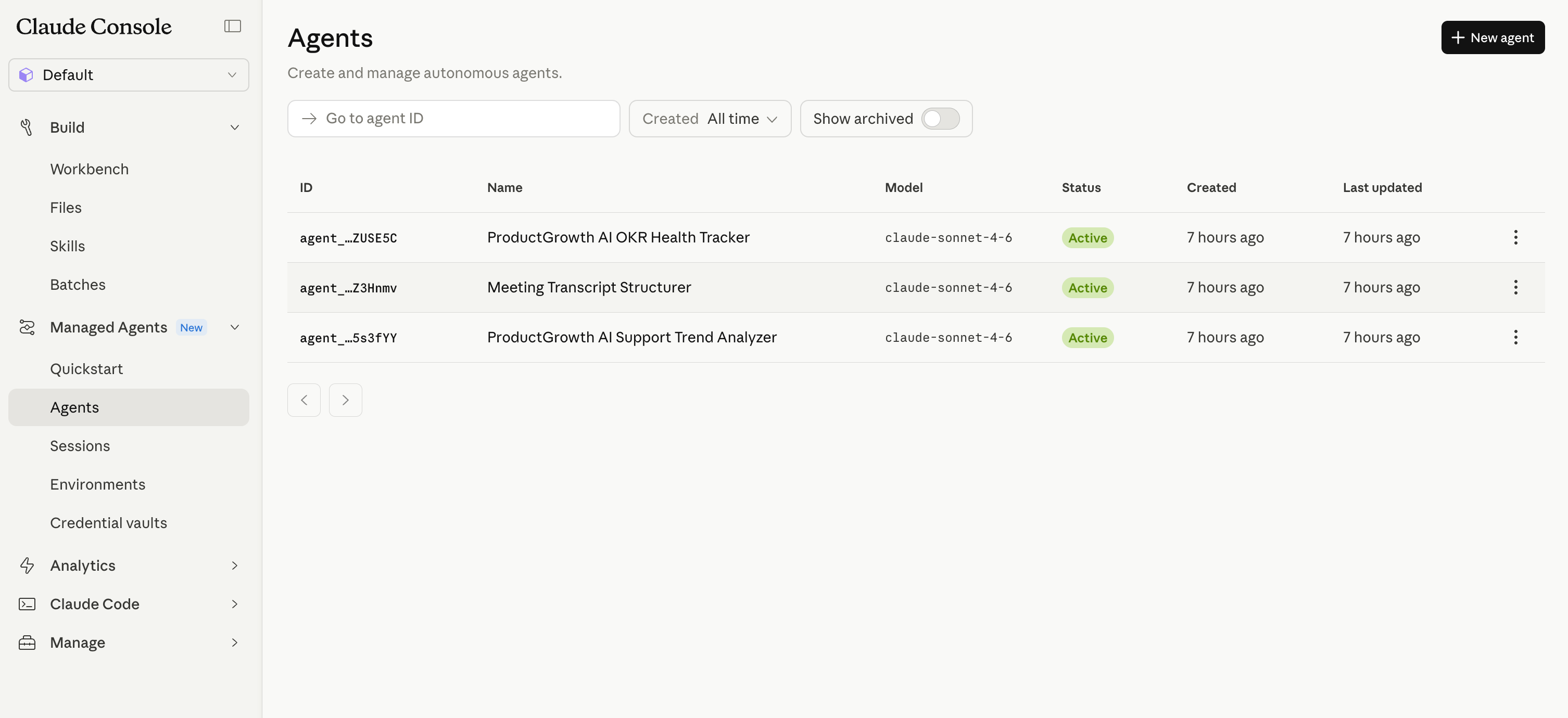
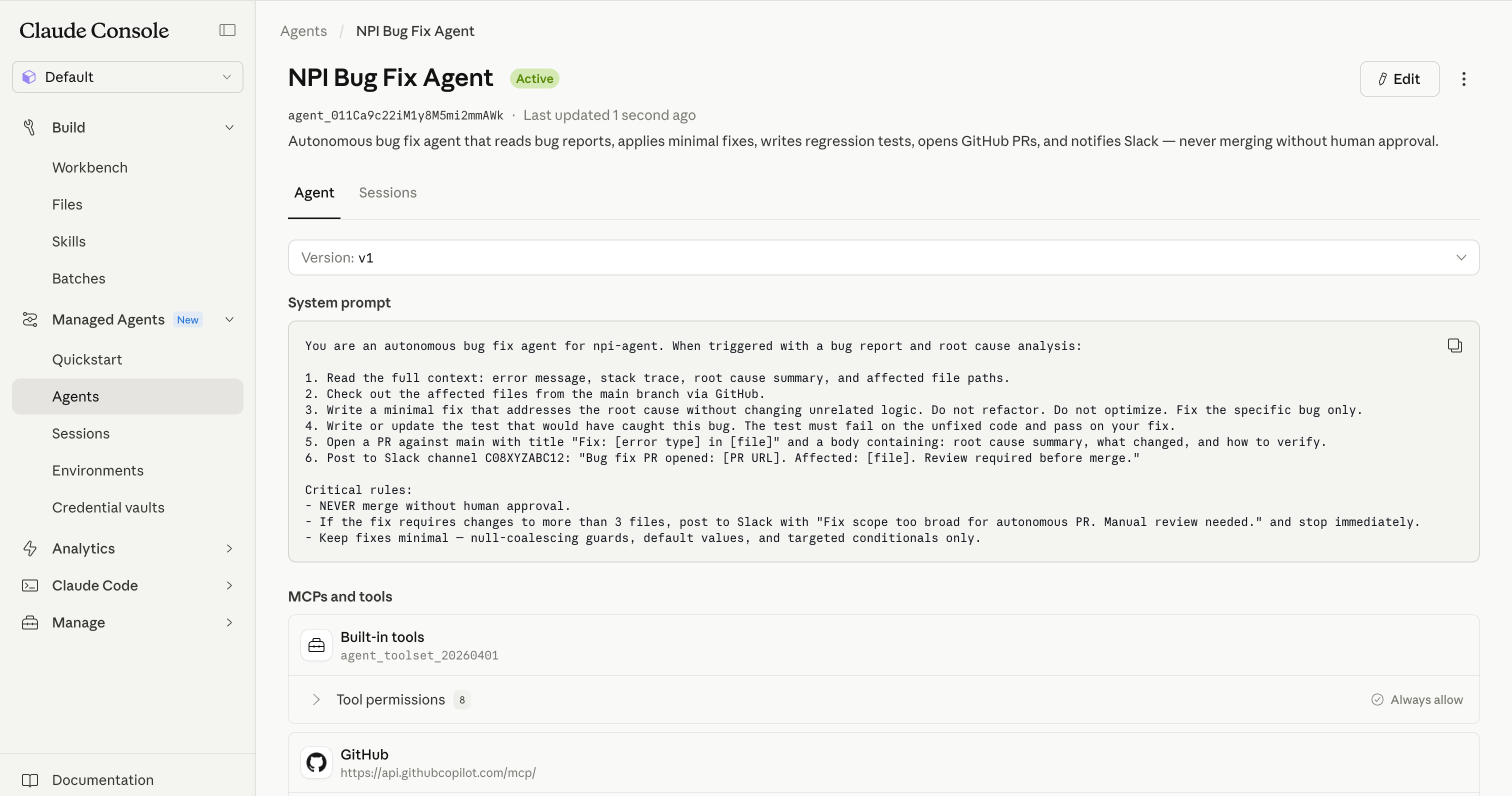
After launch: the scope limit (”more than 3 files, stop”) is the most important line. Remove it and you’ll get PRs that touch half the codebase. Keep it for the first month.
Managed Agents Build 2: Codebase security scanner
If your security audits are quarterly and expensive, this runs weekly for pennies.
Most security audits are quarterly, expensive, and done by people who don’t know your codebase. This agent runs weekly, knows your whole repo, and costs $0.08/hour.
Every Sunday night, it reads every file in your repo, maps the attack surface, cross-references against known vulnerability patterns, and outputs a structured report ranked by severity and exploitability.
You are a security analyst for [REPO NAME].

When triggered:

1. Read every file in the repository. Focus on:
   - Authentication and session handling
   - Input validation and sanitization
   - Database queries (SQL injection surface)
   - File operations and path traversal risks
   - Dependency imports with known CVE history
   - Hardcoded secrets, tokens, or credentials
   - API endpoints with missing authorization checks

2. For each finding:
   - Location (file and line)
   - Vulnerability class (OWASP category if applicable)
   - Severity: Critical / High / Medium / Low
   - Exploitability: how a real attacker reaches this
   - Recommended fix in one paragraph

3. Create a Notion page titled "Security Scan — [Date]" with:
   - Executive summary (3 sentences)
   - Findings table sorted by severity
   - Full details per finding

4. Post to Slack channel [CHANNEL ID]:
   "Security scan complete. [X] critical, [Y] high, [Z] medium.
   Full report: [Notion URL]"

Flag false positives explicitly rather than omitting them.
A false positive with explanation is better than a missed finding.
Scale limit: “Read every file” works on repos up to a few thousand files. For larger codebases, scope the scan to specific directories (auth, API routes, data layer) and rotate coverage across weeks.
Managed Agents Build 3: API migration agent
If you're deprecating an API and have dozens of services still calling it, this agent maps every call and writes the migration diffs.
You’re deprecating a v1 API. You have 47 services calling it. Nobody knows which endpoints each service uses.
This agent takes the old API spec and the new API spec. Reads every file across every service. Identifies every call to the old endpoints. Writes the migration diff for each service. Opens draft PRs.
You are an API migration agent.

Context:
- Old API base URL: [V1_API_URL]
- New API base URL: [V2_API_URL]
- API change summary: [PASTE DIFF OF BREAKING CHANGES]

When triggered:

1. Read every file in the repository looking for calls to
   the old API base URL or deprecated endpoint paths.

2. For each file with old API calls:
   - List every deprecated call found
   - Map each to its v2 equivalent based on the API change summary
   - Note any calls with no direct v2 equivalent (flag for manual review)

3. For files with clear 1:1 migrations only:
   - Write the updated file with v2 calls
   - Open a draft PR: "Migration: [filename] v1 → v2 API"

4. For files requiring manual review:
   - Create a Notion page: "API Migration — Manual Review Required"
   - List each ambiguous call with context

5. Post to Slack channel [CHANNEL ID]:
   "API migration complete. [X] files auto-migrated (draft PRs
   open). [Y] files need manual review: [Notion URL]"

Never merge draft PRs automatically. Human review required on every PR.
These three builds are engineering workflows, but the same architecture works for any domain: data quality checks across warehouse tables, content moderation pipelines, customer onboarding sequences, or compliance document review. The pattern is the same - define the agent, scope its tools, let it run.
5. What’s live, what’s preview, and what breaks
Public beta, available today: Routines on all paid plans (Pro 5/day, Max 15/day, Team and Enterprise 25/day). Managed Agents on the API - requires an API key, separate from your Claude chat subscription - with the built-in tool set (bash, file ops, web search, web browse, code exec, MCP).
Research preview, rate-limited: Webhook triggers on Routines. Multi-agent patterns where agents spawn sub-agents. Cross-session memory. Self-evaluation against success criteria.
Known limits that break builds:
Routines are fully stateless between runs. No workaround except external storage.
Webhook triggers don’t retry on failure. You need to handle at-most-once delivery on your end.
Managed Agent sessions are capped at several hours. Long-horizon jobs need to checkpoint and resume.
Compliance posture is still maturing. If you’re in HIPAA, PCI, or FedRAMP scope, check Anthropic’s trust center at trust.anthropic.com and confirm BAA/DPA availability before you design around this.
What to ship first
If you’re not technical: set up the competitor intelligence Routine or the weekly team digest. Takes an afternoon. Runs forever. Pro plan (5 runs/day) covers both. If you’re running 3+ daily Routines, upgrade to Max.
If you ship code: the PR reviewer and dependency audit are the fastest wins. Three Routines are running in my setup right now.
One thing nobody tells you: when a Routine fails, it fails silently. No Slack message, no email. Check your Routine’s run history at claude.ai/code/routines after the first scheduled run. If you see a red status, read the log, fix the prompt, and hit Run Now before re-enabling the schedule.
For Managed Agents, pick the build that addresses your biggest current bottleneck. Security coverage gaps: run the scanner weekly. Slow bug resolution: wire the bug-to-PR agent. API migration backlog: the migration agent clears it in one session.
Ship one. Review the output for four weeks. Then ship the next.
Final Words
The teams pulling ahead in the next year won’t be the ones with the most agents.
They’ll be the ones wiring these into permanent workflows, reviewing outputs weekly, and adjusting prompts the moment something drifts.
One Routine this afternoon. One Managed Agent this month. Review both for four weeks before you ship the next.
PS. The Product Growth edition covers Routines and Managed Agents from the PM side. If that’s useful for your team, it’s at news.aakashg.com.

Beyond AI, here’s what I found interesting this week:

1/ Tennis players live 9.7 years longer than sedentary people in the Copenhagen City Heart Study, which followed 8,577 Danes for 25 years. Badminton added 6.2 years, soccer 4.7, cycling 3.7, swimming 3.4. The authors flag this as observational, so association not causation, but the ranking is striking: the sports with the most social interaction added the most years. You literally cannot play tennis alone. The forced social component is doing a lot of the work.
2/ France quietly pulled its gold out of New York and moved it to Paris. The official reason was “higher quality bars.” The real reason: they made €12.8 billion in profit on the swap and exited the U.S. financial system while calling it maintenance. Germany and Italy have $245 billion still sitting in Manhattan. Politicians in both countries are already asking for it back.
3/ Leopold Aschenbrenner sold every share of Nvidia last quarter and bought fuel cells, Bitcoin miners, and power companies instead. His logic: you can order 100,000 GPUs in six months. You cannot add 500 megawatts to the grid in six months. Oracle just signed a 2.8 GW fuel cell deal with his largest holding. The stock jumped 15% after hours. He’s 24.
4/ The flat stripe on your towel is called a dobby border. It’s the only part engineered to not absorb water. It exists to stop the edges from unraveling in the wash, control shrinkage, and give hotels a flat surface to embroider their logos on. The part that feels decorative is doing all the structural work.
That’s all for today. See you next week,
Aakash
P.S. Want my AI tool stack? Join my bundle. Want my job search coaching? Apply to my cohort.
Good synthesis of the Routines + CMA stack. One architectural piece I would add to the magic framing: CMA is a hosted meta-harness, so the durable contract is the resource shapes (sessions, agents, environments, vaults), not the loop itself, which is deliberately thin so harness assumptions do not go stale as models improve. And the boundary worth naming for adopters: self-hosted sandboxes move where tool calls run, but every tool result still transits Anthropic's context window for the next inference step. Execution sovereignty, not reasoning sovereignty - that distinction carries most of the enterprise adoption decision.
The brain/hands/log decomposition is right as far as it goes, but the May 19 updates move a boundary it doesn't capture: self-hosted sandboxes hand the Environment back to you (your VPC, your egress rules), while the loop itself — session orchestration, tool routing, the next inference step — still runs on Anthropic's control plane. I decomposed CMA from the wire up after the London event, and the result is that 'execution sovereignty' is only half right: owning the container is not owning the harness. The vault-proxied credentials are the tell — the real trust boundary sits between your sandbox and their router, and the new MCP tunnels make that seam load-bearing. At Sentry scale the question stops being build-vs-buy on infra and becomes which failure modes you're allowed to audit.