
Hermes just crossed 100K GitHub stars in seven weeks. Faster than LangChain, faster than AutoGPT, faster than anything open-source I have tracked.
Everyone is fixating on the growth numbers. The real story is what they are actually using it for.
I’ve been running Hermes for six weeks. Today’s deep dive is your complete guide to what makes it different from every AI tool you already use.
And before that, we’ll have a word from our sponsor and the week’s AI news.

The Chatbot Tax
Last year you added Claude or ChatGPT to Slack. Two people use it daily. Everyone else opens it twice a month. The Monday metrics deck still gets built by hand. That’s the chatbot tax.
Viktor lives inside Slack and Teams alongside the rest of your team, plugs into 3,000+ tools, and ships actual work. A landscaping owner is running 63 Viktor workflows across collections, payroll, and equipment reports. A $10M DTC brand had Viktor build a Klaviyo audit, a 2026 cash flow model, and a checkout debug report in week one. Every action goes through your team for approval first. 11,000+ teams now trust it.
Try Viktor free, $100 in starting credits.

There’s a billion AI news articles every week. Here’s what actually mattered:
The Week’s Top News: Claude Just Moved Into Your Creative Tools
Claude launched connectors for Blender, Autodesk Fusion, Adobe, Ableton, SketchUp, Splice, and more this week.
Most people I know still think of Claude as a writing and coding tool. That changed this week. If you spend your days in design software, 3D tools, or a DAW, Claude is now inside those tools with you. Not in a separate tab. Not something you copy-paste between. Actually inside your workflow, acting on your real files.

The Autodesk Fusion integration is the one that stopped me. You describe a change to your 3D model in plain language and Claude executes it inside Fusion. That is it. The thing that used to require knowing which menu, which panel, which parameter, now requires knowing what you want. That is a different kind of tool.
The Blender one I keep thinking about for a different reason. Blender has had a full automation layer since 2011. Anyone who has tried to use it knows the problem: you needed someone who could write Python AND knew Blender’s internals well enough to actually do something useful with it. That person is hard to find and expensive to hire. That barrier is now a chat window. Rename objects, fix UV maps, batch changes across an entire scene. No code required.
Here’s where I land: Anthropic announced patron-level support for the Blender Development Fund alongside the connector launch. €240K/year, dedicated to Blender’s Python API, the layer the connector itself depends on. Then today, after community pushback, Blender reversed course and accepted the funds as a one-time donation instead. Anthropic agreed to it.
Read that sequence carefully. The Blender community is wary of AI companies funding the tools they depend on. Anthropic still wrote the check. The integration is shipping either way. The bet on open-source 3D infrastructure is real even when the donation structure changes shape.
The connector is the thing that matters here, not the funding mechanism. Anyone who works in 3D should try it this week.
The Other News That Mattered
Sundar Pichai announced that Gemini now generates and downloads Word docs, Excel sheets, PDFs, and presentations directly from chat, for free, for all 750M Gemini users. Microsoft charges $360/user/year for Copilot to do the same thing. Only 3.3% of Microsoft’s 450M M365 users have paid for Copilot so far. I wrote about why this breaks the entire Copilot pricing thesis and why the market has not caught up yet.
OpenAI and Microsoft rewrote their deal and the AGI clause is gone. The provision that would have let OpenAI exit its Microsoft obligations the moment it declared AGI has been removed completely. OpenAI still pays Microsoft 20% of revenue through 2030 regardless of any technical milestone. My read: Microsoft gave up leverage and got certainty on a $135B stake. The quiet winner is Amazon, which can now formally take on the OpenAI workloads Azure exclusivity was blocking.
Cursor launched its SDK this week. The same agents that power the Cursor app can now run inside your own products, pipelines, and backend systems. Rippling and Notion are already using it to catch bugs and open fixes automatically without anyone prompting anything. Cursor crossed $2B ARR. The SDK is how they stop being a product you open and start being infrastructure you run on.
xAI launched Grok Imagine Agent Mode (beta) with zero announcement. One prompt, one infinite canvas, and the agent plans, generates, edits, and iterates on its own until it is done. Films, manga sets, product ads. Users just started posting it.
Resources
Two Anthropic engineers broke down exactly how to prompt Claude for better outputs. If you use Claude every day, this is worth 10 minutes. Most people are still prompting it like a search engine.
If you use Claude Code and keep running into limits, read this first. Pawel Huryn mapped the four reasons people hit limits that have nothing to do with Claude, with copy-paste fixes for each. The limits are more generous than people assume. The harness is usually the problem.
Tools
The Claude Blender connector deserves its own mention beyond the main news. The thing that makes it worth paying attention to is not what it does. It is what it replaces. The bottleneck in 3D workflows was never Blender’s capability. It was always finding someone who could speak both Python and Blender fluently at the same time. That skill set is gone as a requirement now. Anyone who works in 3D should try this week.

The AI Agent That Doesn't Forget You
Look at that blue line.
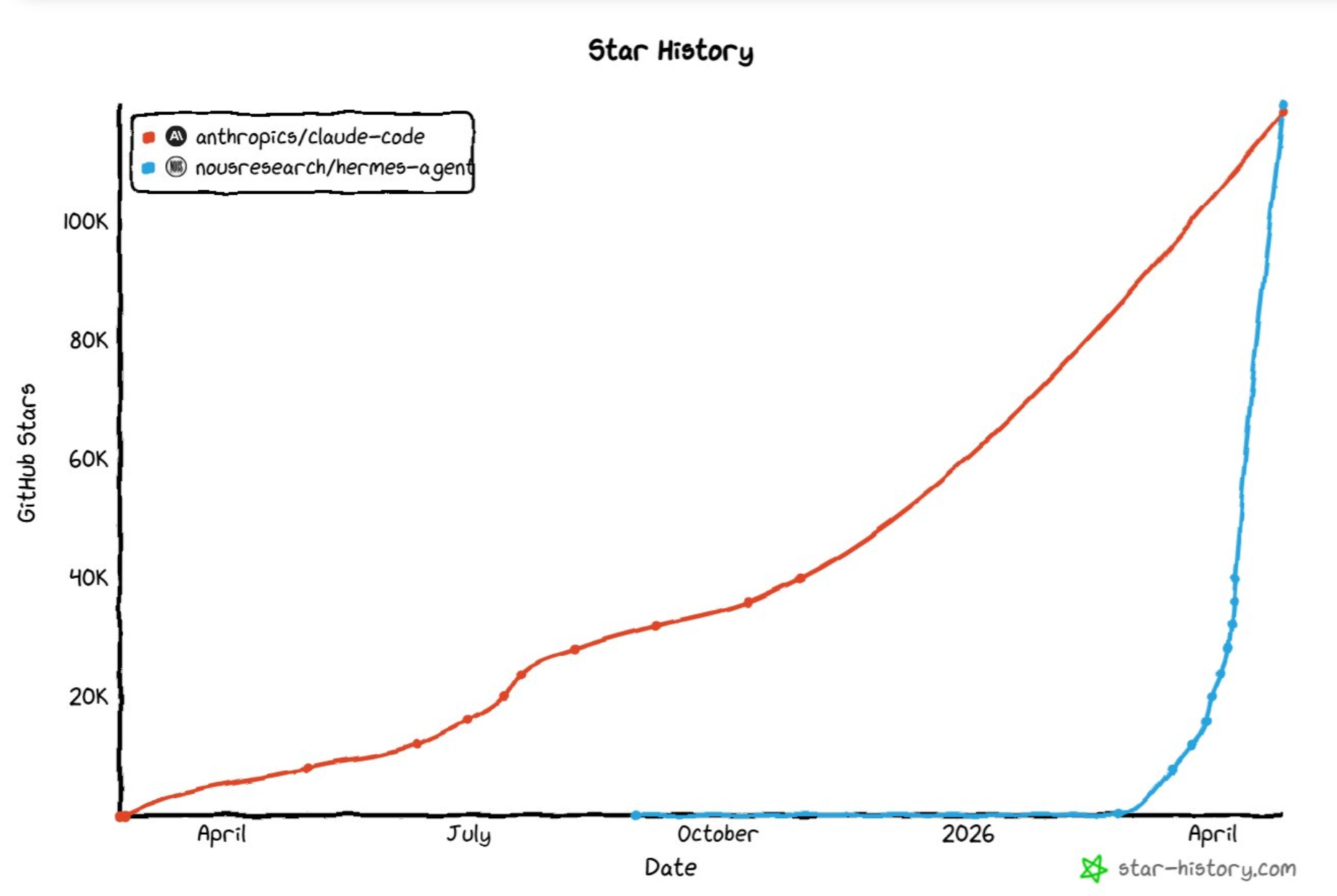
Hermes, from Nous Research. Released February 25. 100K GitHub stars in seven weeks. Six weeks of running it later, here is what makes it different from every AI tool you already use.
In January 2026, a security audit found 512 vulnerabilities in OpenClaw, the agent most developers had been running. One of them let an attacker take full control of your machine through a single malicious link (CVE-2026-25253). Developers left. But the ones who switched to Hermes kept telling me the same thing: they did not stay because of the security. They stayed because it was the first agent that kept working after they closed their laptop.
Here is the thing every AI tool you use today has in common. It only works when you are there. You open ChatGPT, ask a question, get an answer. You close it, and it stops. Nothing happens until you come back and ask something again.
Hermes is built around a completely different idea. It runs in the background, executes tasks on a schedule, and gets better at those tasks every time it runs them. You set something up once and it keeps going. Week after week. Without you.
That is the thing no other AI tool does. And it is the thing I want to show you today.
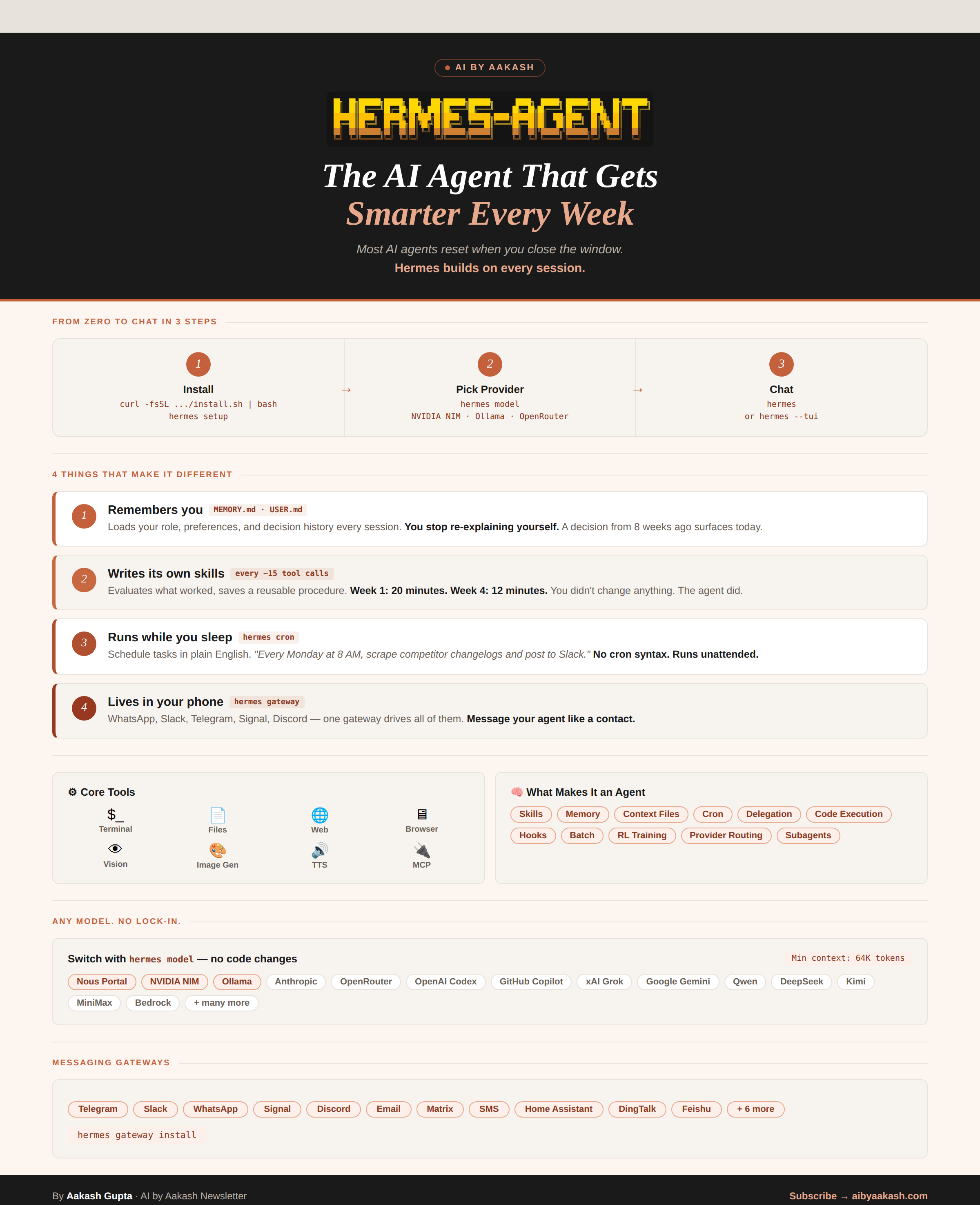
Here’s what you need to know:
What makes this possible
Setting it up (20 minutes, then it runs forever)
Use case 1: A weekly briefing that arrives before you wake up
Use case 2: A health coach that actually knows your patterns
Use case 3: Generate images from your phone
Three honest limitations
1. What makes this possible
Two things sit underneath everything Hermes does.
SOUL.md is a short file you write once. It is your standing brief to the agent. Who you are, what matters to you, how you like answers delivered. Mine has things like: I have two kids, my wife is vegetarian, I follow F1 and the NBA, keep answers short unless I ask otherwise.
You write it once. It loads automatically before every session, every scheduled task, every message it sends you. Forever. You never explain yourself again.
The learning loop. Every time Hermes runs a task, it evaluates what worked and saves an improved version of the procedure. The briefing it sends you in week six is sharper than week one. Not because you changed anything. Because it has been running the same task six times and quietly improving each time.
ChatGPT Tasks can fire a prompt on a schedule. That is where the overlap ends. The procedure never improves between runs. The same query goes out Sunday after Sunday with no memory of what worked last week, no skill stored from the last successful execution. And it lives inside ChatGPT. If you want it to reach you in WhatsApp, Telegram, or Slack, you build that yourself. Hermes is the first consumer agent built around the idea that the value compounds the longer it runs.
2. Setting it up
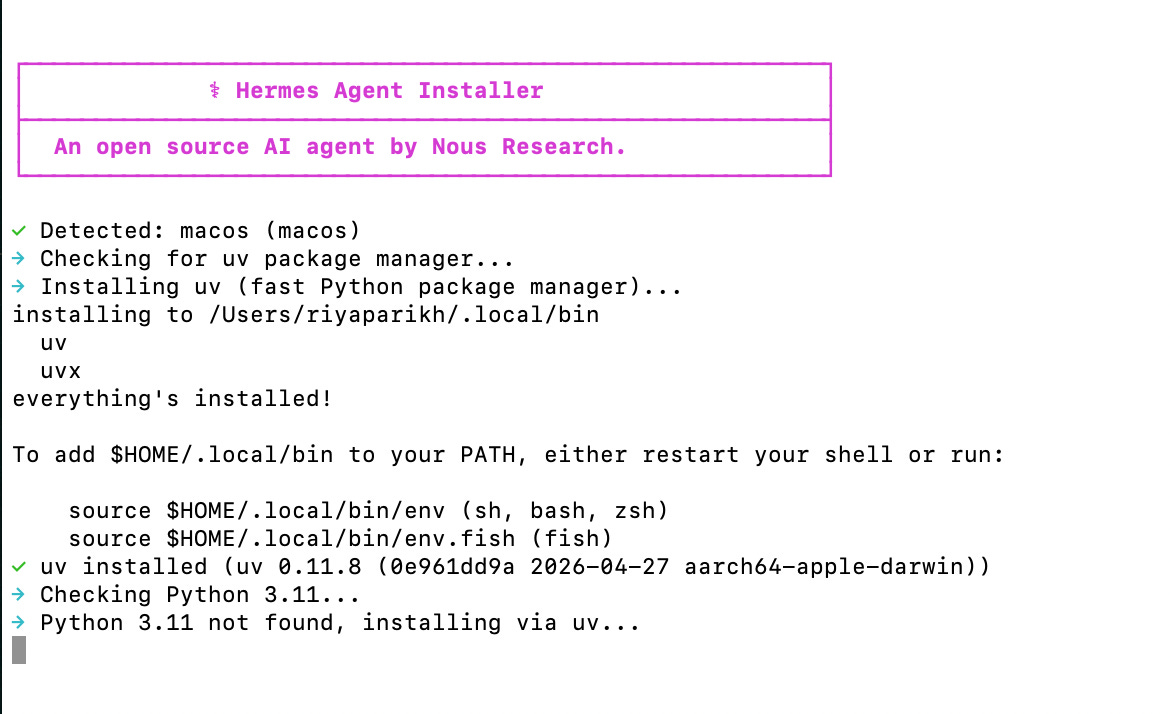
Hermes runs on Mac, Linux, and Windows (WSL2). One command installs everything:
curl -fsSL https://raw.githubusercontent.com/NousResearch/hermes-agent/main/scripts/install.sh | bash
hermes setup
The installer detects your OS, sets up Python if needed, and walks you through the rest. About five minutes.
Step 1: Pick a model.
Free Option A: NVIDIA NIM. NVIDIA hosts over 100 open-weight AI models in the cloud at build.nvidia.com/models. No GPU. No credit card. Create a free developer account, click any model, and click Get API Key.
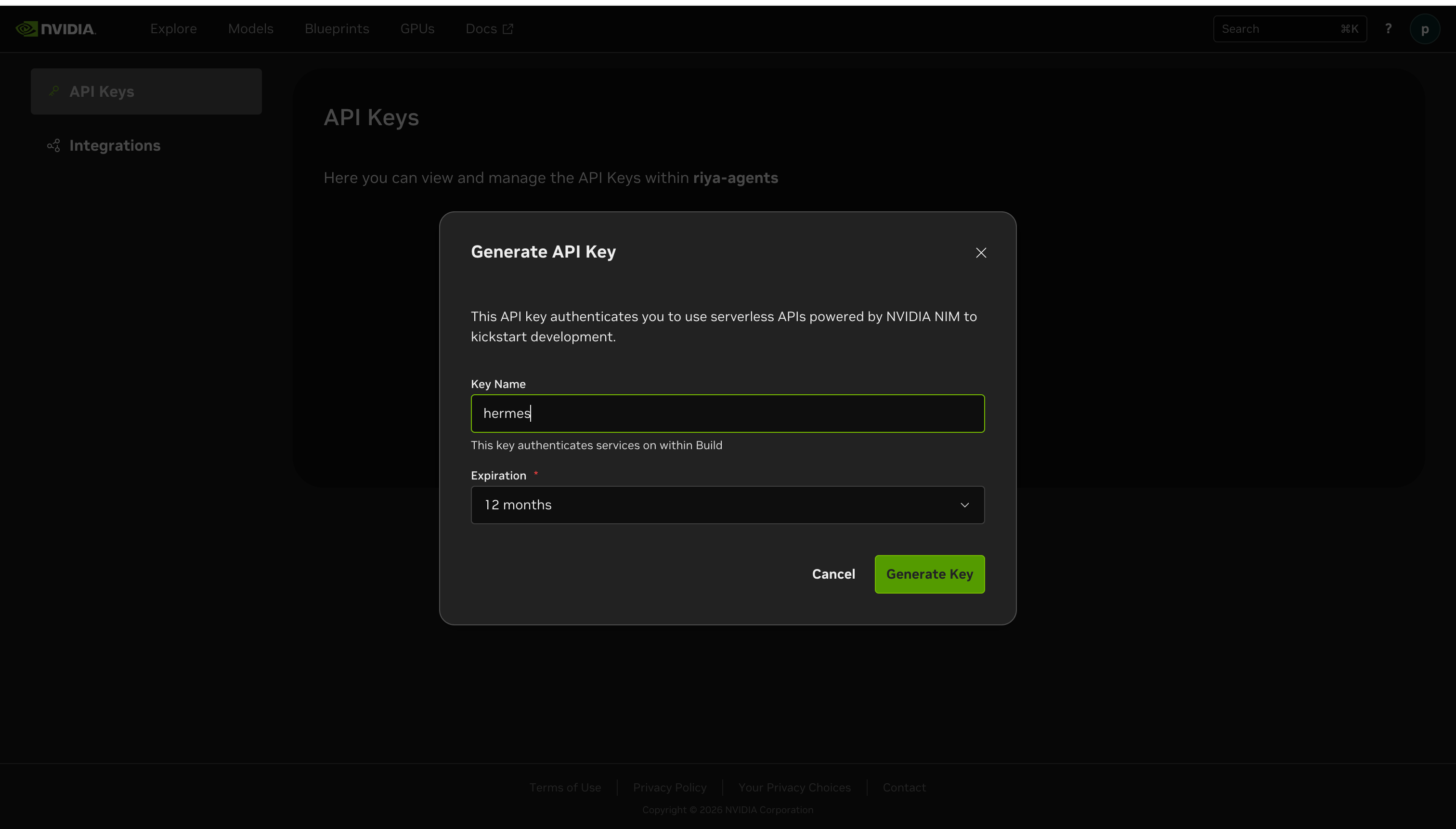
hermes model
# Select: Custom endpoint
# Base URL: https://integrate.api.nvidia.com/v1
# API key: nvapi-xxxxxxxxxxxx
# Model: meta/llama-3.1-70b-instruct
# Context length: 65536
Free Option B: Ollama. Runs entirely on your laptop. Nothing leaves your machine. One line most people miss — Hermes needs a 64K context window minimum and Ollama defaults to 4K. Skip this and things break silently:
OLLAMA_CONTEXT_LENGTH=65536 ollama serve
ollama pull llama3.1:8b
hermes model
# Base URL: http://localhost:11434/v1
# API key: ollama
# Model: llama3.1:8b
# Context length: 65536
Already paying for Claude, GPT-4o, or Gemini? Run hermes model and pick your provider. No new cost.
hermes model
# Select: Anthropic → uses your ANTHROPIC_API_KEY
# Select: OpenAI   → uses your OPENAI_API_KEY
# Select: Google   → uses your GOOGLE_API_KEY
Step 2: Connect your phone.
This is the step most people skip. Without it, Hermes only exists when you are sitting at your terminal. With it, it reaches you anywhere.
Hermes works with WhatsApp, Telegram, Slack, and Signal from a single gateway process.
WhatsApp needs no developer account.
During hermes setup, select WhatsApp. A QR code appears in your terminal window.
Open WhatsApp on your phone. Go to Settings → Linked Devices → Link a Device. Point your camera at the QR code. Done. Your agent now lives in your WhatsApp contacts.
# In ~/.hermes/.env — restrict to your number only:
WHATSAPP_ALLOWED_USERS=+1XXXXXXXXXX
I link my personal WhatsApp number directly. Once paired, the agent shows up under Linked Devices exactly like WhatsApp Web.
Telegram is faster if you just want to try it first. Open Telegram, search for @BotFather, type /newbot, follow the prompts, copy the token.
# In ~/.hermes/.env:
TELEGRAM_BOT_TOKEN=your-bot-token
TELEGRAM_ALLOWED_USERS=your-telegram-user-id
Send /start to your bot. Five minutes total.
Step 3: Start the gateway.
hermes gatewayThis keeps Hermes connected to your phone. Right now it only runs while your terminal is open. To make it run permanently, surviving reboots:
hermes gateway installThis is the line that makes the Sunday 7am briefing actually land at 7am. Without it, your agent stops the moment you restart your computer.
Step 4: Back up before you touch anything.
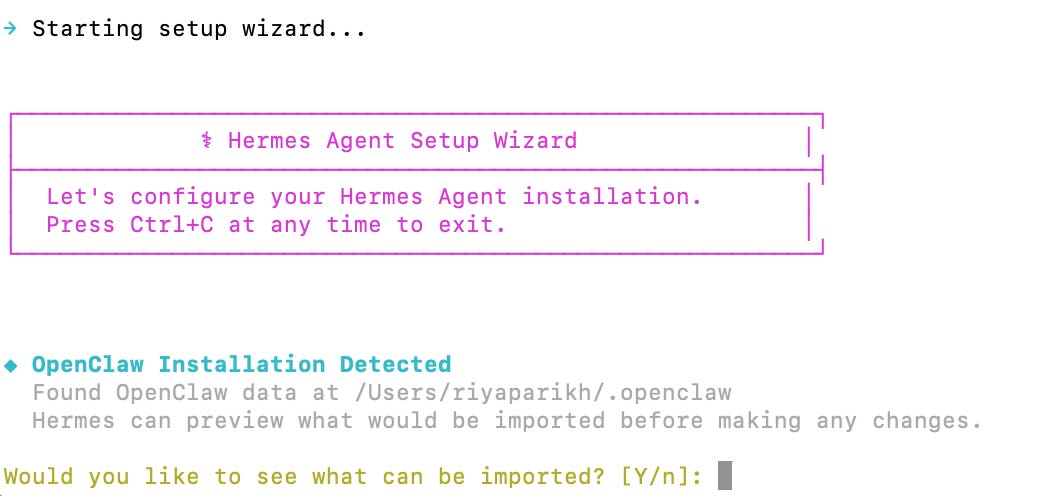
hermes backup --quickMigrating from OpenClaw?
hermes claw migrateHermes detects your OpenClaw installation automatically. Everything transfers except API keys, which it skips deliberately for security.
3. Use case 1: A weekly briefing that arrives before you wake up
Every Sunday morning, before my family is up, my WhatsApp gets a message. I did not send it. I did not schedule it manually each week. I set it up once and it has arrived every Sunday since.
This is what it looks like:
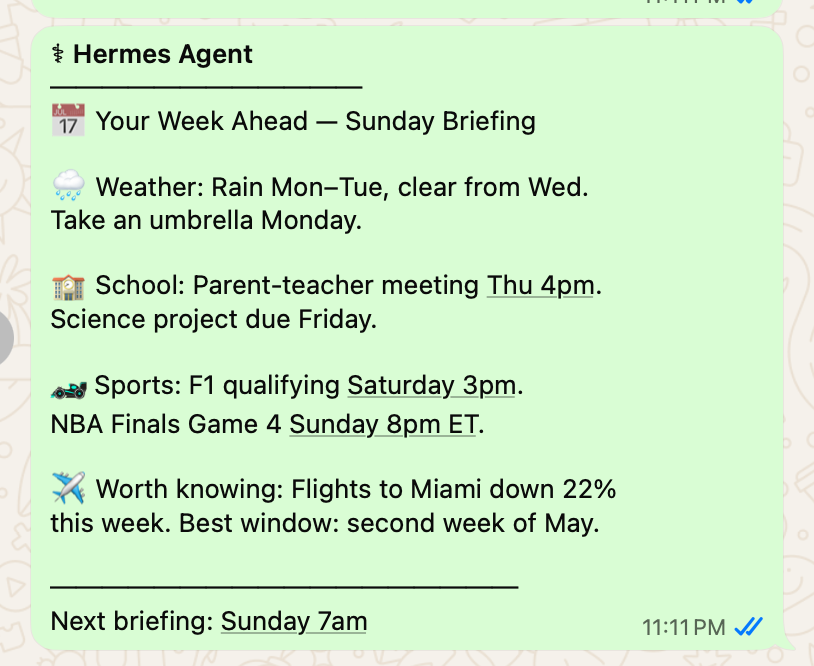
I set this up in one message to Hermes:
“Every Sunday at 7am, check the school calendar, the week’s weather, F1 and NBA schedules, and flight prices to Miami. Send me a summary on WhatsApp.”
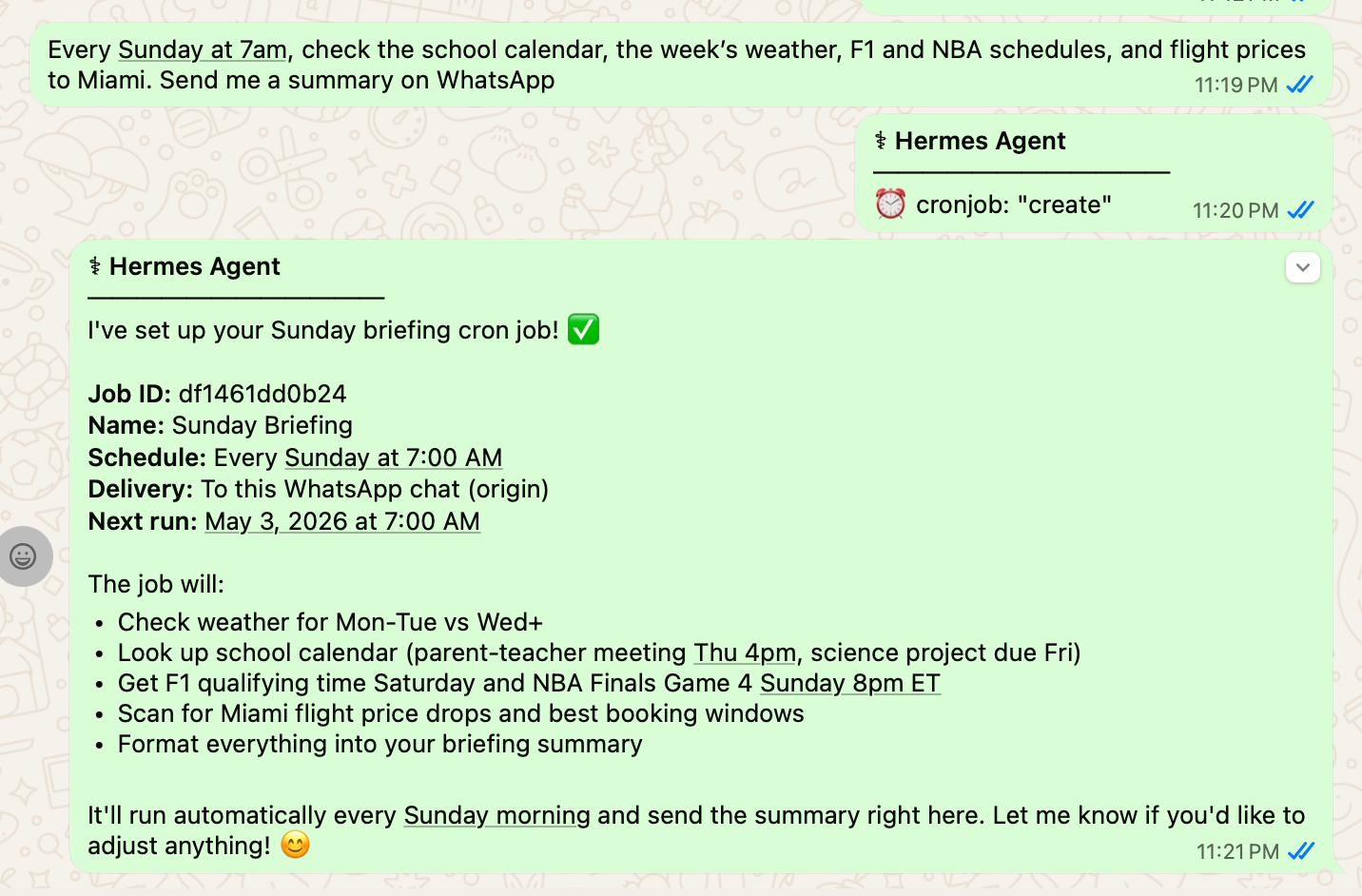
That was the entire setup. It has been running every Sunday since. I have not touched it.
ChatGPT Tasks can deliver a Sunday briefing. What it cannot do is get sharper at it. Run a ChatGPT Task for eight weeks and week eight is the same as week one. The prompt is fixed. The procedure does not improve. There is no record of which sections you read first or which ones you skipped. Hermes watches all of that and adjusts.
And here is what changes over time. In week one the briefing was basic. By week eight it had learned I care about flight prices specifically in the second week of each month, that I want sports results only for teams I mentioned, and that I like the weather section first because I am getting dressed when I read it. It figured all of that out from watching how I responded each week.
Week one: useful. Week eight: it feels like something that knows your life.
4. Use case 2: A health coach that actually knows your patterns
Everyone has tried a fitness app. You log your workout for four days, miss one, the streak breaks, and you never open the app again. The apps track. They do not think.
I started messaging Hermes my health data the same way I would text a friend. After a run: “30 min run, felt good.” After a bad night: “Slept 5 hours, woke up twice.” After skipping the gym: “Missed today, long day at work.”
After five weeks of this, on a Sunday evening, my WhatsApp buzzed with something I did not ask for:
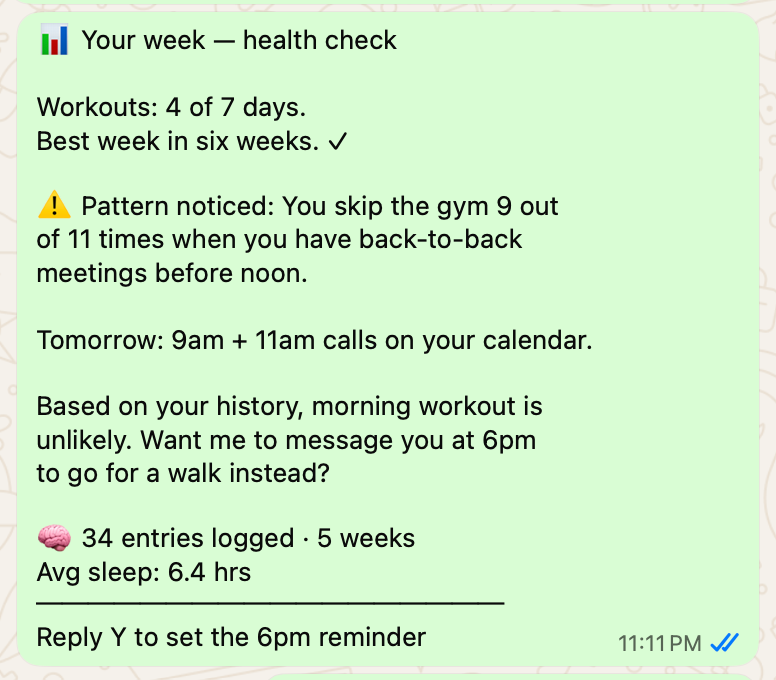
I did not ask it to find that pattern. I did not ask it to message me proactively. It had been watching 34 log entries across five weeks, connected the skip days to the meeting days, and surfaced it before the day even arrived.
That is the thing no app does. Apps record. Hermes watches.
By week six, it had learned that I sleep better when I stop eating before 8pm, that my workouts are longer on days I have had at least seven hours of sleep, and that I almost always skip Friday exercise if I skipped Wednesday too. It sent me a nudge on Wednesday: “You skipped Monday. Based on your pattern, skipping today makes Friday very unlikely too.”
A health app shows you your data. Hermes tells you what your data means before you need to ask.
This is the use case where compounding is most visible. Month three is genuinely more useful than month one because it knows you better. It has more data, more patterns, more history to work from. A price alert fires once. A health tracker that has been watching you for twelve weeks never stops getting sharper.
5. Use case 3: Generate images/videos from your phone
Nous shipped a ComfyUI skill last week. ComfyUI is the most powerful open-source media generation tool out there, but using it normally means sitting at a computer wiring nodes together every time you want an image.
One install:
hermes install comfyuiNow you message Hermes the image you want from WhatsApp. It builds the workflow, runs it on your laptop, sends the result back. No app to open. No nodes to wire. No data leaving your machine.
The difference from ChatGPT image generation: it runs on your own hardware. Every image is free and private after the local setup. The difference from running ComfyUI directly: you do not have to be at the computer.

6. Three honest limitations
Your machine has to be on. Scheduled tasks need your laptop running when they fire. If it is closed at 7am Sunday, the briefing waits until you open it. macOS has a setting called Wake for Network Access that wakes the machine automatically before a scheduled job. Worth enabling. The other option is running Hermes on a $5 VPS, which is the path I would recommend if you want any of this to actually work without you babysitting it.
The learning loop can learn the wrong thing. It pattern-matches on what you respond to. If you accidentally reply enthusiastically to one bad briefing, it doubles down. There is no “unlearn” command. You either edit the underlying skill file directly or wipe the memory and start over.
Privacy depends on your model choice. The Sunday briefing knows my kids’ school schedule. The health coach has 34 entries of my sleep and workouts. If you point Hermes at GPT-4o or Claude, that data is going to OpenAI or Anthropic on every run. Run Ollama locally if that bothers you. You give up some quality, you get full privacy.
That’s it for today’s deep dive.
I wrote the full version for PMs with three product-specific workflows and a starter kit you can drop in and run today. it’s at news.aakashg.com.

I am co-hosting the AI Skills Virtual Conf on May 14, free, on Zoom.

30 speakers from Meta, Google, AWS, Scale AI, Bolt, DeepMind, and more. The whole thing is built around practical use cases, not theory. What actually works in 2026, how companies are deciding which AI tools to adopt, and what the real AI stack looks like for founders and small teams.
I am giving a session on how to use Claude specifically for job search: positioning, applications, interview prep, the whole thing.
If any of that sounds useful, register for free here. May 14, 8 AM SF / 11 AM NYC / 4 PM London.
That’s all for today. See you next week,
Aakash
P.S. Want my AI tool stack? Join my bundle. Want my job search coaching? Apply to my cohort.
The uncomfortable part of Hermes is that the same thing making it useful also makes it hard to trust. Most software fails generically, a personal agent fails differently. It can learn *your* wrong pattern.
It may learn that because you opened one briefing first, you care about that topic most. Because you replied quickly once, you want more of that kind of nudge. Because one week was chaotic, it starts treating an exception like a preference. That is the real product challenge here.
The Gemini number is the one I can't stop thinking about. 750 million users getting document generation for free while Microsoft charges $360/year for essentially the same capability, and only 3.3% of their base has paid for it. That's not a competitive gap. That's a pricing thesis falling apart in real time.
Microsoft built Copilot on the assumption that productivity AI is a premium feature people will pay a subscription for. Google just made it a free feature of a product people already use. The 3.3% adoption rate was already a warning signal. Now it's a ceiling, because the marginal user who hasn't paid $360 yet just got offered a free alternative from a company they already trust with their documents.
The Cursor SDK announcement is the other one that deserves more weight than a bullet point. Going from product to infrastructure is the move that separates tools from platforms. $2B ARR as an app is impressive. $2B ARR as infrastructure that other companies build on top of is a different asset class entirely. That's the same transition Stripe made when it stopped being a checkout button and started being the payments layer.