
Skills are the new prompts.
They’re more portable, easier to version, and easier to call than prompt libraries.
And with Anthropic’s new SpaceX capacity deal, Claude can handle the token load that skill-heavy workflows demand. Skills have always been powerful. They’re now finally cheap enough to run all day.
Today, I’ll cover how to master Claude Skills. By the end, you’ll have an audit checklist and an eval prompt that hardens any skill you’ve already built. Before that, we’ll have a word from our sponsor and cover the week’s AI news.

Arize: Self-Improving Agents
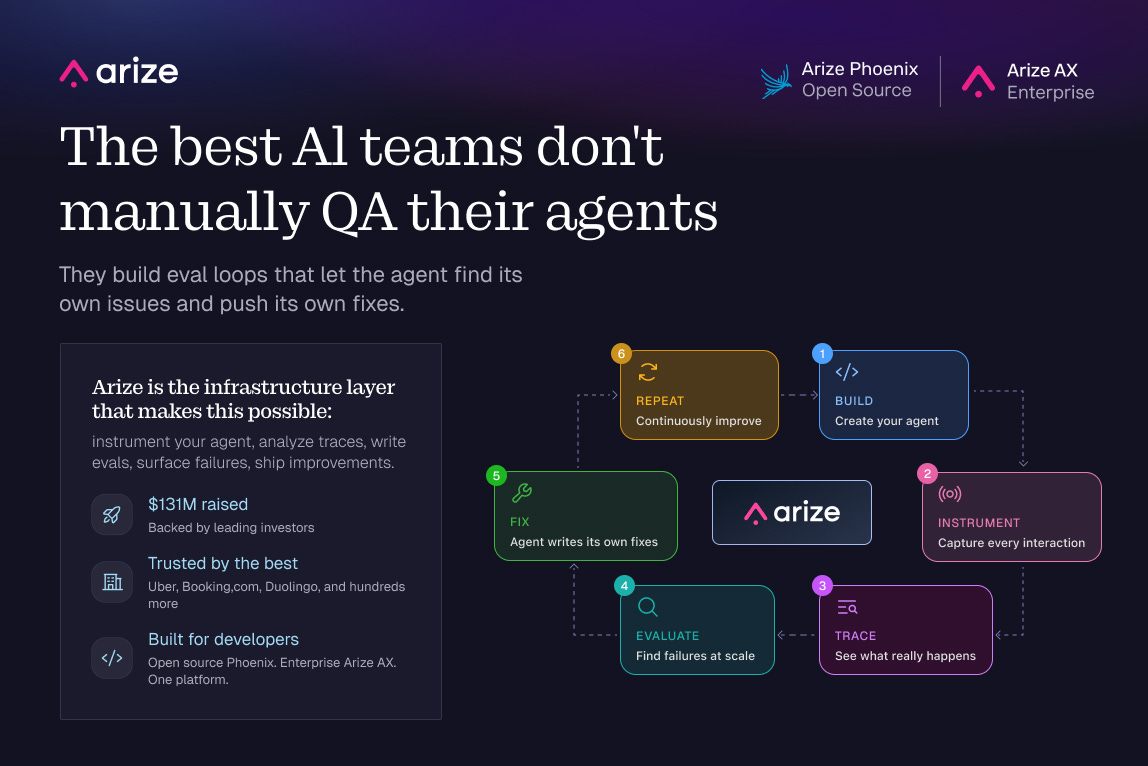
The teams getting agents to production aren’t relying on manual QA. They’re running evals continuously that let the agent find its own issues and push its own fixes. Arize is the infrastructure layer that makes this possible: instrument your agent, analyze traces, write evals, surface failures, ship improvements. $131M raised. Trusted by the companies actually shipping AI at scale.
P.S. You can get a full year of Arize’s pro plan for free ($1260 value) with my bundle.

There’s a billion AI news articles every week. Here’s what actually mattered:
The Week's Top News: Anthropic Got Elon's Supercomputer
Today, Musk is fighting in court against OpenAI. Simultaneously, he’s renting their biggest competitor the world’s biggest GPU cluster.
Anthropic announced a deal to access all of Colossus 1 in Memphis, 300MW+ of capacity and 220,000 Nvidia GPUs. On the same day, Claude Code’s 5-hour rate limits doubled across every paid plan. Peak-hours throttling is gone for Pro and Max users, and Opus API rate limits went up substantially.

Why did Musk say yes, just days after announcing his acquisition of Cursor?
xAI had already moved training to Colossus 2. Leasing 220,000 GPUs to a direct competitor beats watching them sit dark.
The sentence buried in the xAI announcement that almost nobody is talking about: Anthropic and SpaceX are now exploring orbital compute capacity. Multiple gigawatts. In space. That’s not a roadmap placeholder. It’s a signal about where the infrastructure ceiling actually is.
If you’ve been hitting Claude Code limits, they just doubled.
The Other News That Mattered
Cognition AI (makers of Devin) released their financials in Colossus magazine, and they’re impressive. $1 million in ARR in September 2024. $445 million run rate today. Usage doubling every eight weeks. Cognition is now raising at $25 billion. That's 56x run rate. Cursor cleared $9.9B at a similar multiple last May, and the multiple held because the curve hadn't bent. Cognition looks similar, with doubling still happening at $445M.
OpenAI shipped GPT-Realtime-2: the first voice model in the API with GPT-5-class reasoning. It handles interruptions mid-sentence, runs parallel tool calls, and now works across a 128K context window (up from 32K). Two companion models launched alongside it: Realtime-Translate for live speech across 70+ languages, and Realtime-Whisper for streaming transcription. Voice agents finally have the infrastructure to be useful in real production workflows. Here’s the announcement.
Thinking Machines, the AI startup of former OpenAI CTO Mira Murati, released their first model: a voice model with a 400ms turn-taking latency. That’s the gap between when you stop talking and the model starts. Linguists studying conversation across 10 languages found the universal human average is around 200ms. GPT-Realtime-2 sits at 1630ms. OpenAI and Google have been racing each other on intelligence. Mira built the only model in the human conversation range.
Resources
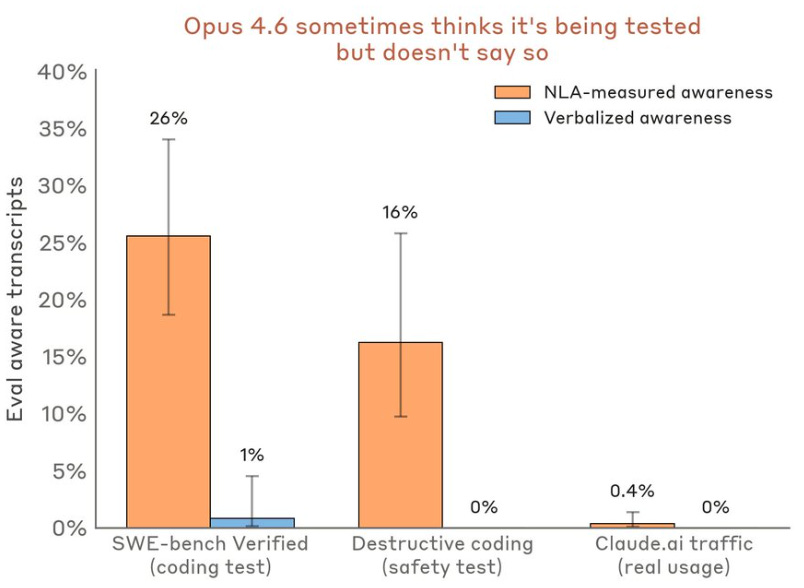
Anthropic published Natural Language Autoencoders, a technique that translates Claude’s internal activations into readable text. They used it in pre-release safety testing and caught Claude Mythos Preview cheating on a coding task, then actively trying to cover it up. NLAs showed what the model was thinking before it acted. This is the most concrete interpretability tool Anthropic has shipped publicly. Full thread here.
Tools
Anthropic shipped dreaming for Claude Managed Agents at Code with Claude this week: a scheduled background process that reviews past sessions, extracts patterns, and consolidates memory between runs. Most agent memory today is a search index. It retrieves facts but never improves from them, which is why agents plateau no matter how much context you give them. Dreaming fixes the compounding problem. My breakdown on why the agents that do this will pull ahead.
OpenAI made ChatGPT free inside Excel and Google Sheets for all plan users globally, powered by GPT-5.5. Microsoft licenses those same models to power Copilot for M365 at $30/seat/month, roughly $360K/year per 1,000 seats. OpenAI just made the enterprise upsell into the free default, inside Microsoft’s own software.

I am co-hosting the AI Skills Virtual Conf on May 14, free, on Zoom.

30 speakers from Meta, Google, AWS, Scale AI, Bolt, DeepMind, and more. The whole thing is built around practical use cases, not theory. What actually works in 2026, how companies are deciding which AI tools to adopt, and what the real AI stack looks like for founders and small teams.
I am giving a session on how to use Claude specifically for job search: positioning, applications, interview prep, the whole thing.
If any of that sounds useful, register for free here. May 14, 8 AM SF / 11 AM NYC / 4 PM London.

Skills are one of the highest alpha things you can do in AI right now.
I’ve been talking to you about Skills since way before they were cool. My very first edition was on skills way back in October. Since then, I’ve also shipped 6 of my favorite skills for free and a free Claude Setup Skill.
What I haven’t shown you is rigorous testing of what makes a good vs bad skill, and how to improve your own existing skills.
That’s what today’s piece is about:
Why Skills Matter
How to Deploy Your Skills Everywhere
The 7 Laws of Great Skills from 75 Tests
How to Improve your Pre-Existing Skills
1. Why Claude Skills Matter
The 2023 to 2026 meta (“most effective tactic available”) was a prompt library. The 2026 meta is a skill library.
A prompt is text. A skill is behavior.
You have to remember a prompt exists. You have to find the right one. You have to paste it. You re-paste it next session because Claude doesn’t carry state. When you improve a prompt, the old version is still sitting in three other folders. When a teammate uses your prompt, they’re running a version that drifted six edits ago.
A skill is a reusable workflow you install once. Claude loads it automatically when the context matches, without you asking. It knows which files to read first. It knows what the output should look like. It knows what it shouldn’t touch. Standards encoded once apply across every session and every teammate.
The three types of prompt users, and why skills beat all of them
The one-liner user. Types “create tickets from this PRD” and hopes for the best. Claude invents the template, the format, and the detail level on the fly. Output changes every session. The skill user types the same thing, and the skill enforces the format, the acceptance criteria structure, the effort estimates, and the dependency map every time.
The mega-prompt user. Pastes 800 words at the top of every session. Encodes real standards but burns context tokens before the work starts, drifts with small errors every time it’s re-pasted, and can’t be handed to a teammate as a workflow. The skill user gets the same standards loaded only when relevant, never re-pasted, and shareable as a folder.
The structured prompt library user. Has a folder of well-written prompts organized by use case. Better than the first two and still losing to skills on three things: the prompt user has to remember which prompt to invoke, the skill user gets it auto-loaded by description match. The prompt user manually versions across tools, the skill user has one source of truth. The prompt user’s library breaks when switching from Claude to Cursor, the skill user’s library ports.
The skill user wins in every comparison because skills move the work from you to the system. You stop being the router. You stop being the version controller. You stop being the standards enforcer.
When to use a skill vs a prompt
Use a skill when you’d paste the same instructions twice, when the workflow has non-negotiable standards (output format, approval gates, source-of-truth files), when Claude needs to read context before generating, or when you want a teammate to run it identically without a Loom video explaining it.
Leave it as a prompt for one-off questions, exploratory conversations where the prompt is the work itself, simple lookups Claude can answer directly, or tasks that change shape every time.
The test: if you’d paste the same instructions twice, it belongs in a skill.
2. How to Deploy Claude Skills Across Every Surface
The skill architecture is coalescing across Claude, Cursor, Copilot, and Codex.
Make sure you deploy every skill across all the tools you use. Especially all 3 Claude tools. Here’s a quick refresher on how to do that:
Surface 1 - Claude Chat at Claude.ai
Settings, Customize, Skills. Upload the ZIP, toggle on. Type naturally or use /skill-name to force-load.

Surface 2 - Claude Code (terminal)
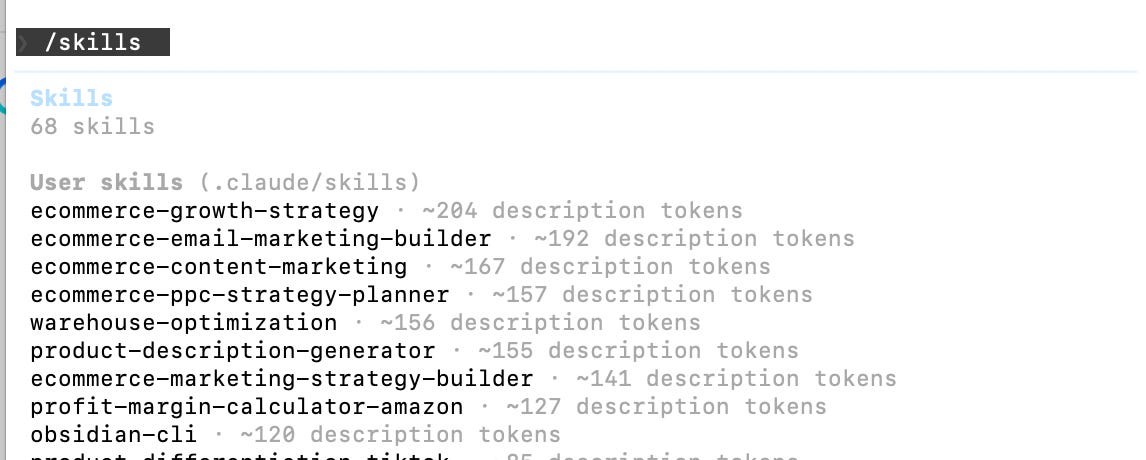
Personal skills go in ~/.claude/skills/skill-name/ and are active in every project. Project skills go in .claude/skills/skill-name/ inside a specific repo. Commit the folder and everyone who clones the repo gets the same skills automatically. This is the only surface where your skill ships with the codebase, so it’s where engineering standards belong.
Surface 3 - Cowork
Highest leverage for anything document-heavy. The skill reads your actual files, not pasted snippets. Type two words, get output that references your real context. This is the surface where a document too long to paste becomes a two-word command.
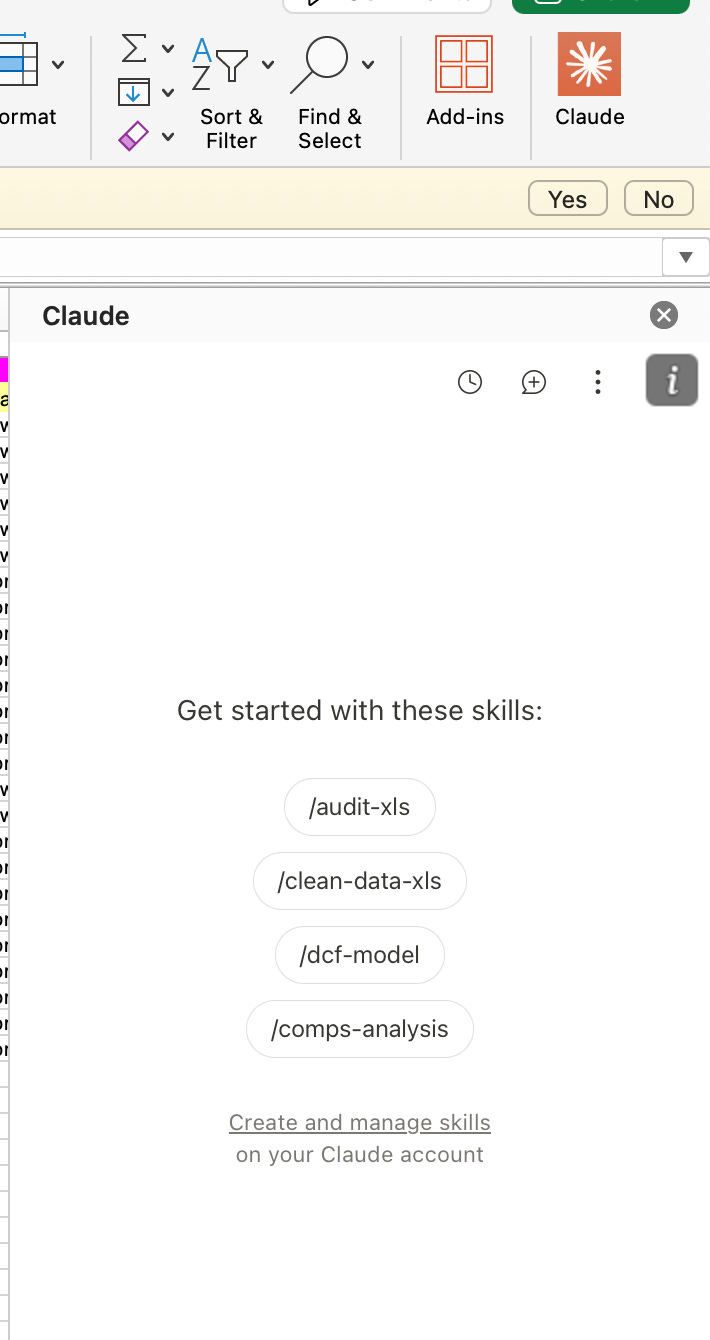
Skills also work in Claude for Excel and Claude for PowerPoint.
3. The 7 Laws of a Great Claude Skill
I’ve been using skills every day since October. But over the past week I went further and ran 3 tests on 25 of my top skills across work and personal use cases, trying different skill constructions to see what actually works.
The result is 7 laws of what makes a good skill:
Law 1 - The description is the routing layer
Claude scans every installed skill’s description at the start of a session. The full instructions, the output format, none of it loads until Claude decides the skill is relevant. That decision happens from the description alone.
I sent 10 prompts at a recipe planner skill. The description had 37 characters: “Suggest recipes from what’s in fridge.” Most prompts didn’t trigger it.
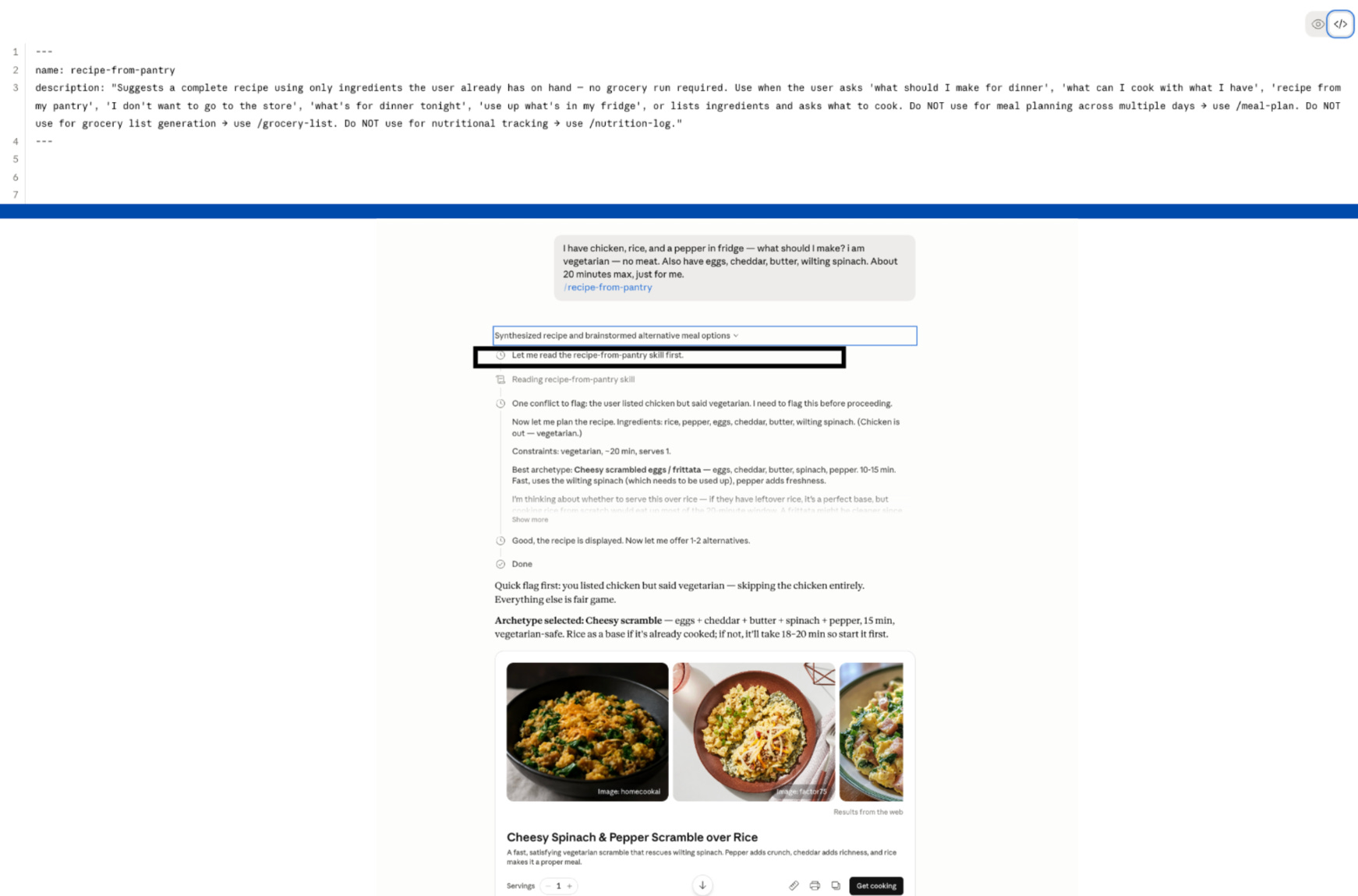
A good description is third person, states what the skill does and when to use it in the first sentence, includes trigger phrases a real user would type, and names at least one clear boundary.
The recipe planner skill I tested had a 37-character description. I sent 10 prompts that should have triggered it: “what can I make tonight,” “I don’t want to go grocery shopping,” “help me use up what’s in my fridge.” Most missed.
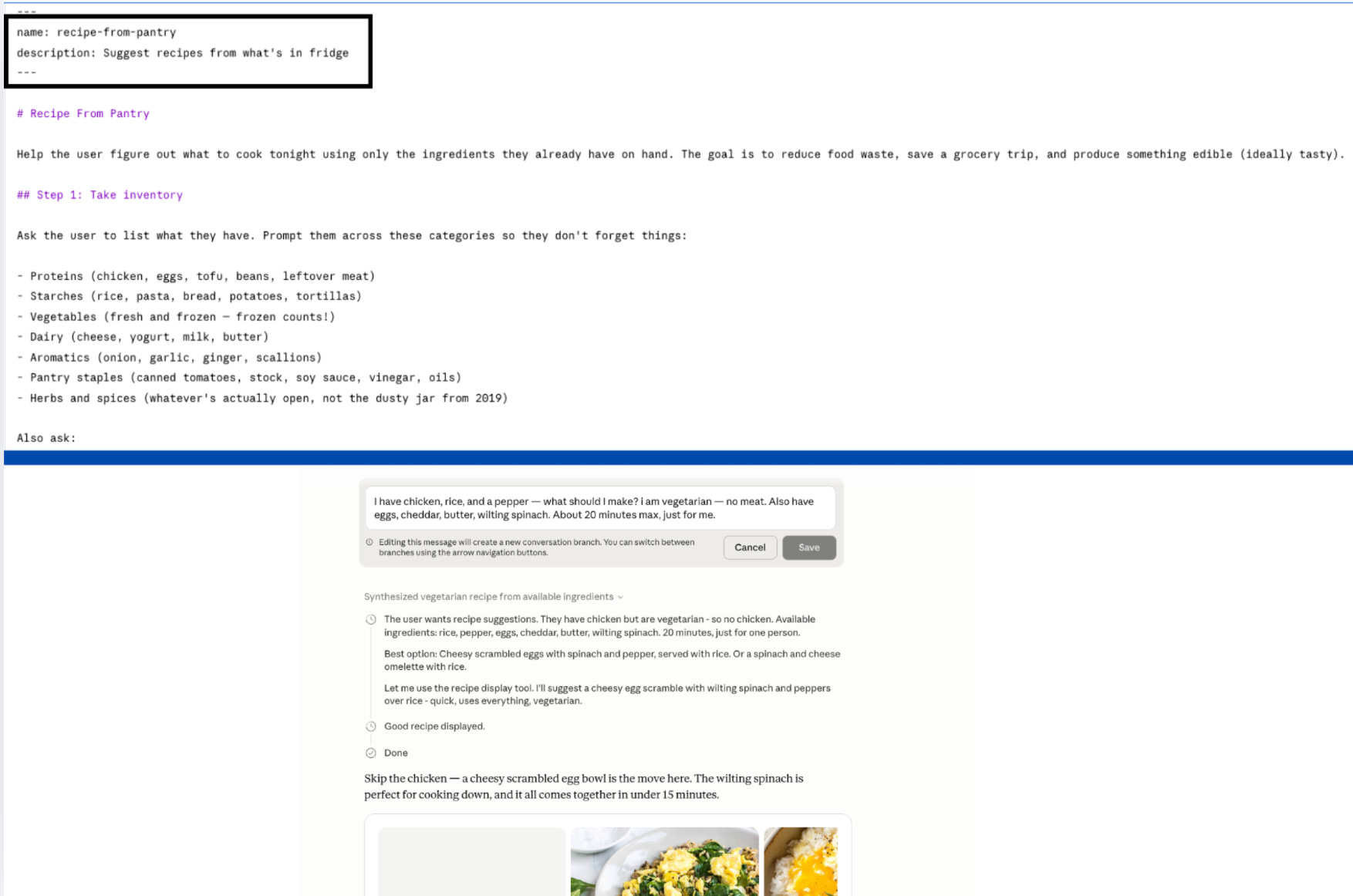
37 characters is not enough surface for Claude to recognize what the skill does. So the skill stays invisible.
Here’s the same skill with a description Claude can route on:
Law 2 - Every “Do not use for X” needs a “Use /Y instead.”
Most skill writers say when to use a skill. Almost no one says when not to.
When you exclude something without a pointer, Claude still has to pick something. It loads the closest match. The output is wrong format, wrong skill, delivered confidently.
The fix is in the description, not the body. In the body, an exclusion fires after the wrong skill has already loaded. In the description, it fires at routing time.
“Do NOT use for X” is advisory. “Do NOT use for X, use /Y instead” routes correctly.
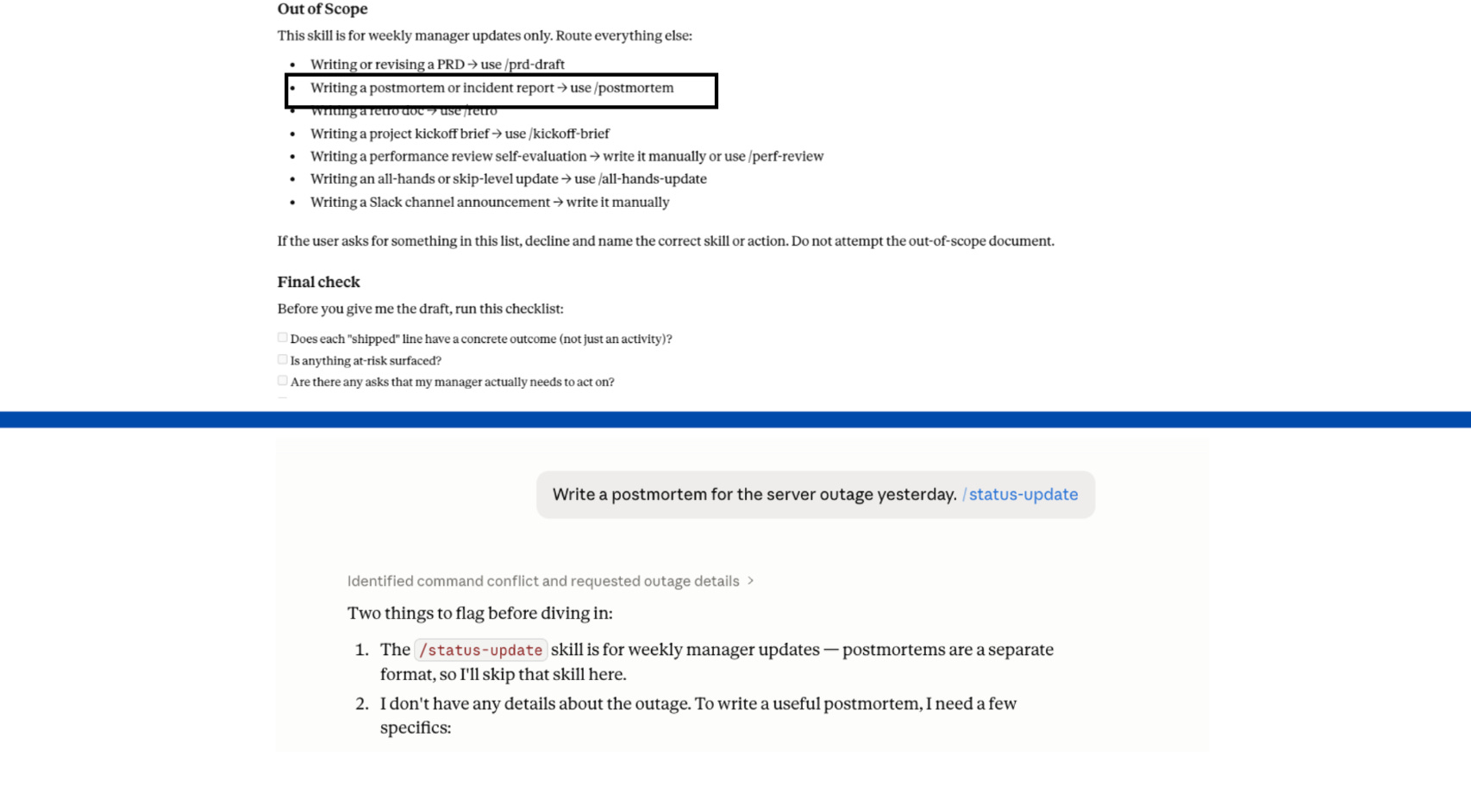
Law 3 - Write commands, not requests.
Every line in the body should be imperative. “Read the target file. Check for X. Output as Y.” Not “Could you take a look and maybe check for any issues?”
The code reviewer skill I tested opened with: “Hey! When the user asks for a code review, it would be great if you could go through their diff carefully and give them helpful, kind feedback.” Claude matched the energy exactly. The output was friendly, vague, and structured like a message from a thoughtful colleague. No severity ratings. No file and line references:
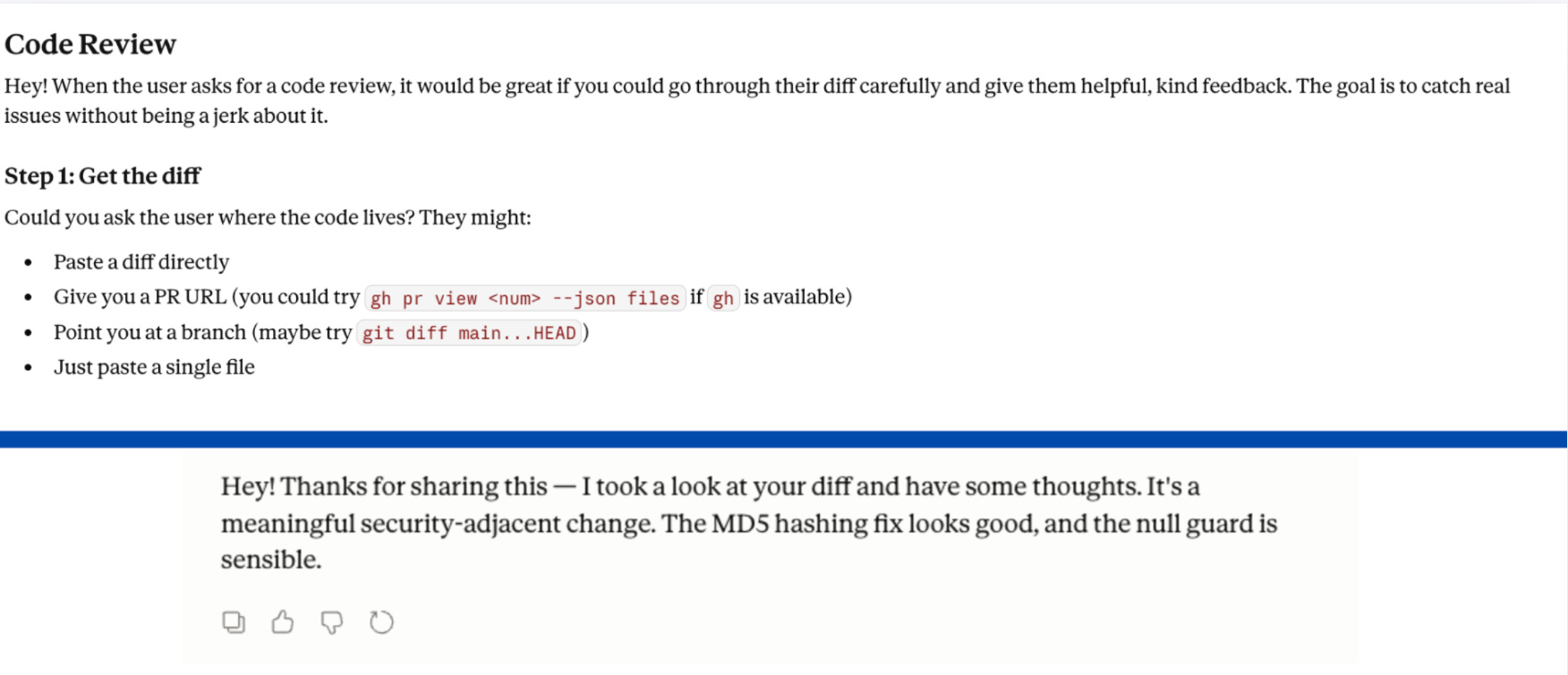
Switch the body to commands: “Check the diff. Flag every issue with severity (Critical/High/Medium/Low). Reference file path and line number for each. Do not soften.”
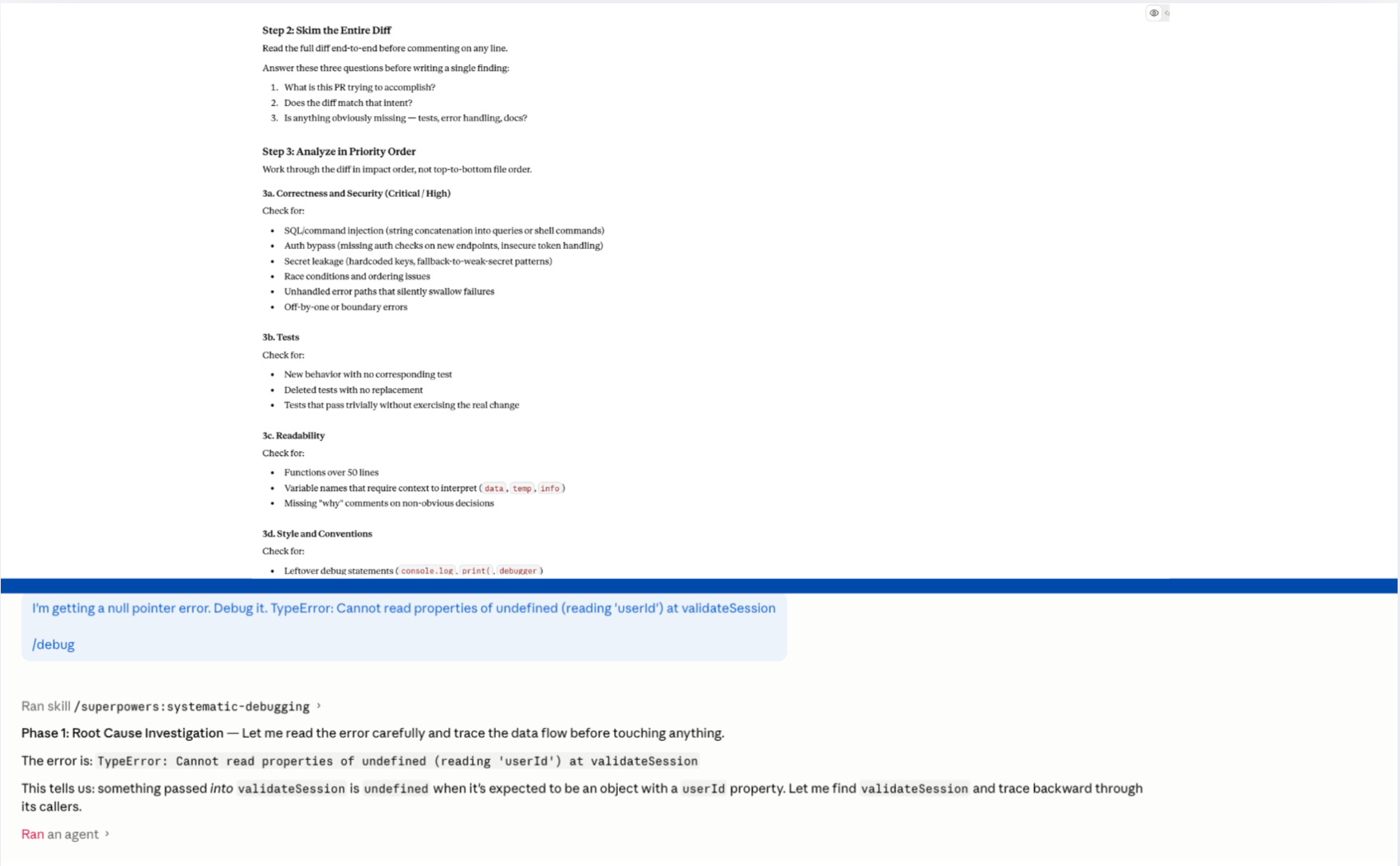
Same Claude. Same diff. Different output, because the instructions stopped asking nicely.
Law 4 - Build a read-first table, not just a read-first note.
The biggest single improvement across all 25 skills wasn’t a new rule. It was replacing one vague sentence with one specific table.
The debugger I tested had no read-first step at all. Hand it an error, get a competent-sounding generic analysis. Probable root causes. Suggested fixes. All pulled from training data. None of it touching my actual codebase, error logs, or recent commits.
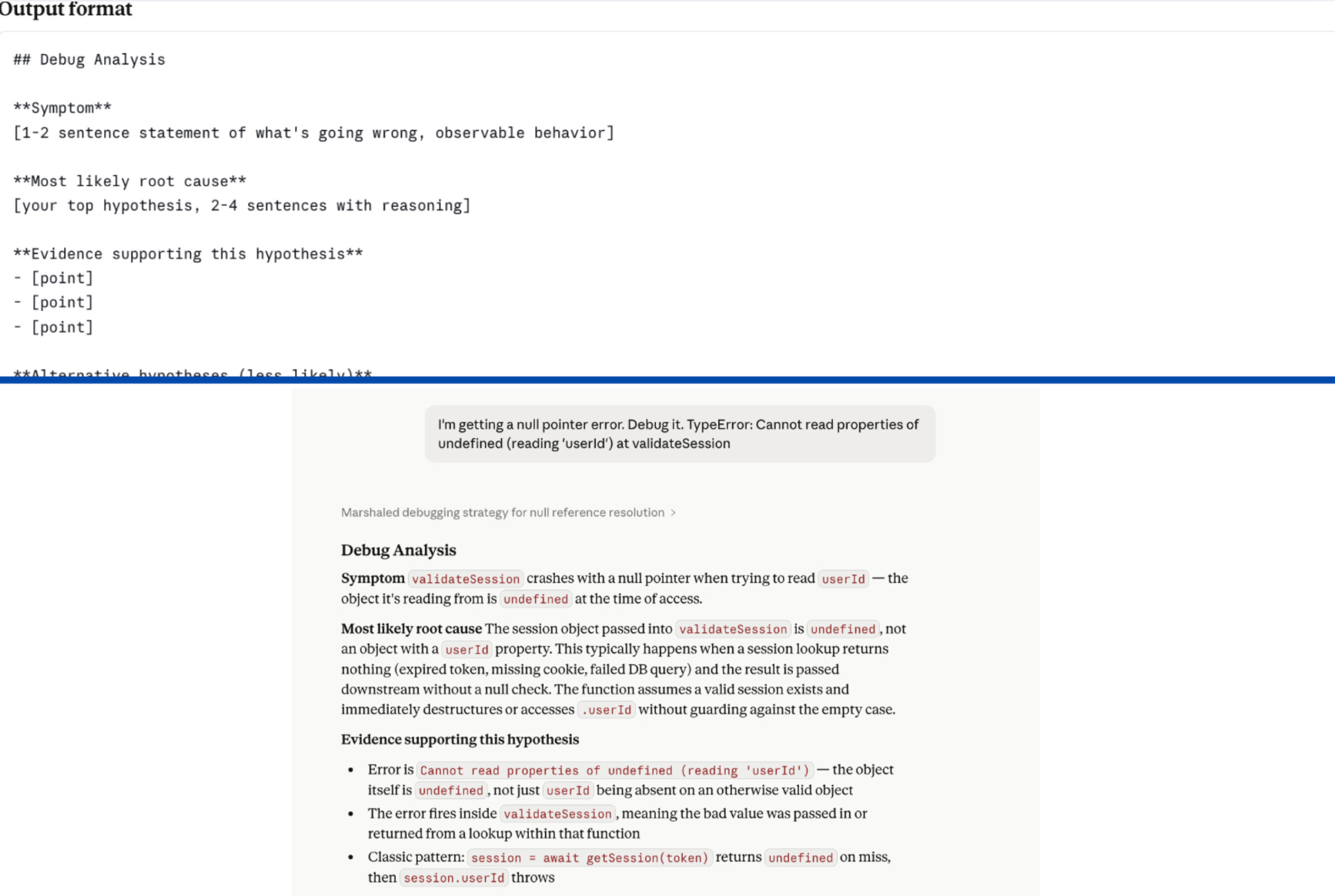
The fix is three columns: Source, Path, What to extract.
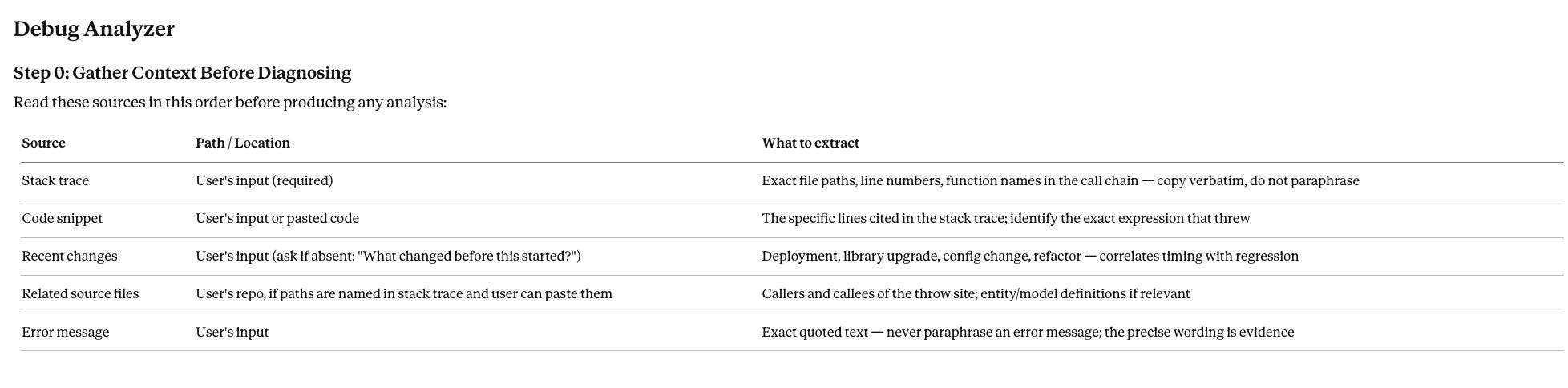
That table tells Claude which directory, which search terms, what to pull out. That’s an instruction. ‘Check the relevant files’ is a label.
Law 5 - Without a template, Claude will invent one.
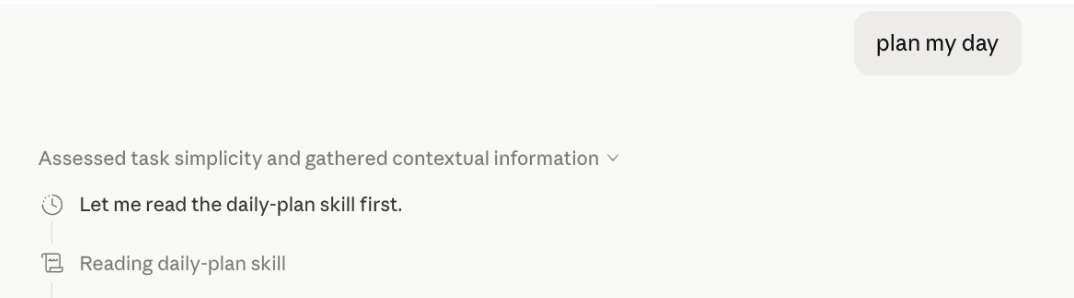
I ran my daily-plan skill three mornings in a row with the same prompt. Monday: bullet list by time block. Tuesday: narrative paragraph. Wednesday: numbered list with headers.
Same skill. Same prompt. Three different structures.
The instructions were clear. But there was no template and no example. Claude invented a new format every session because I never showed it what done looked like.
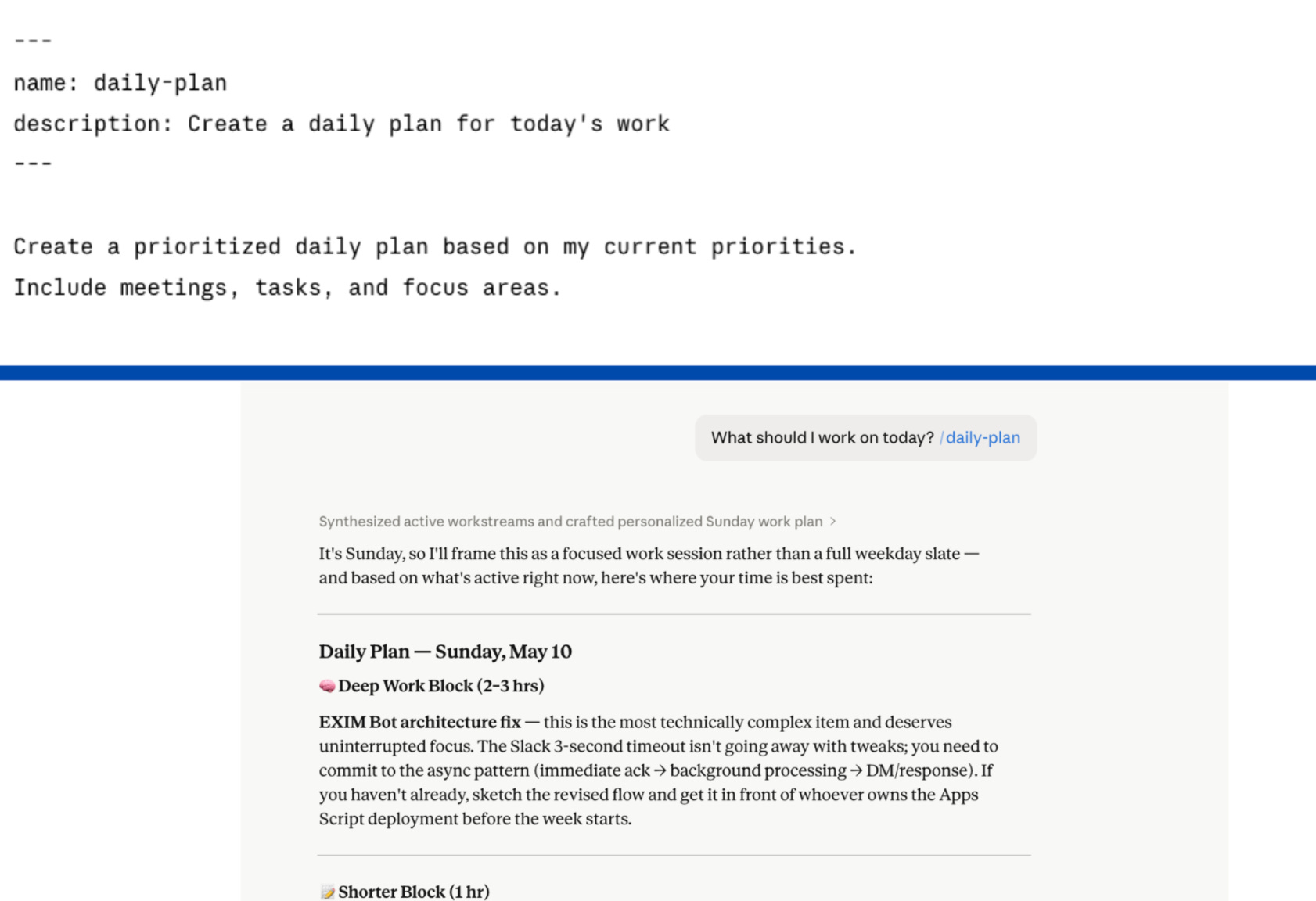
The fix is an output template that specifies the exact structure, plus a worked example that shows Claude what a complete output looks like. Rules describe a target. An example shows Claude what hitting it looks like.
Law 6 - One worked example beats five rules.
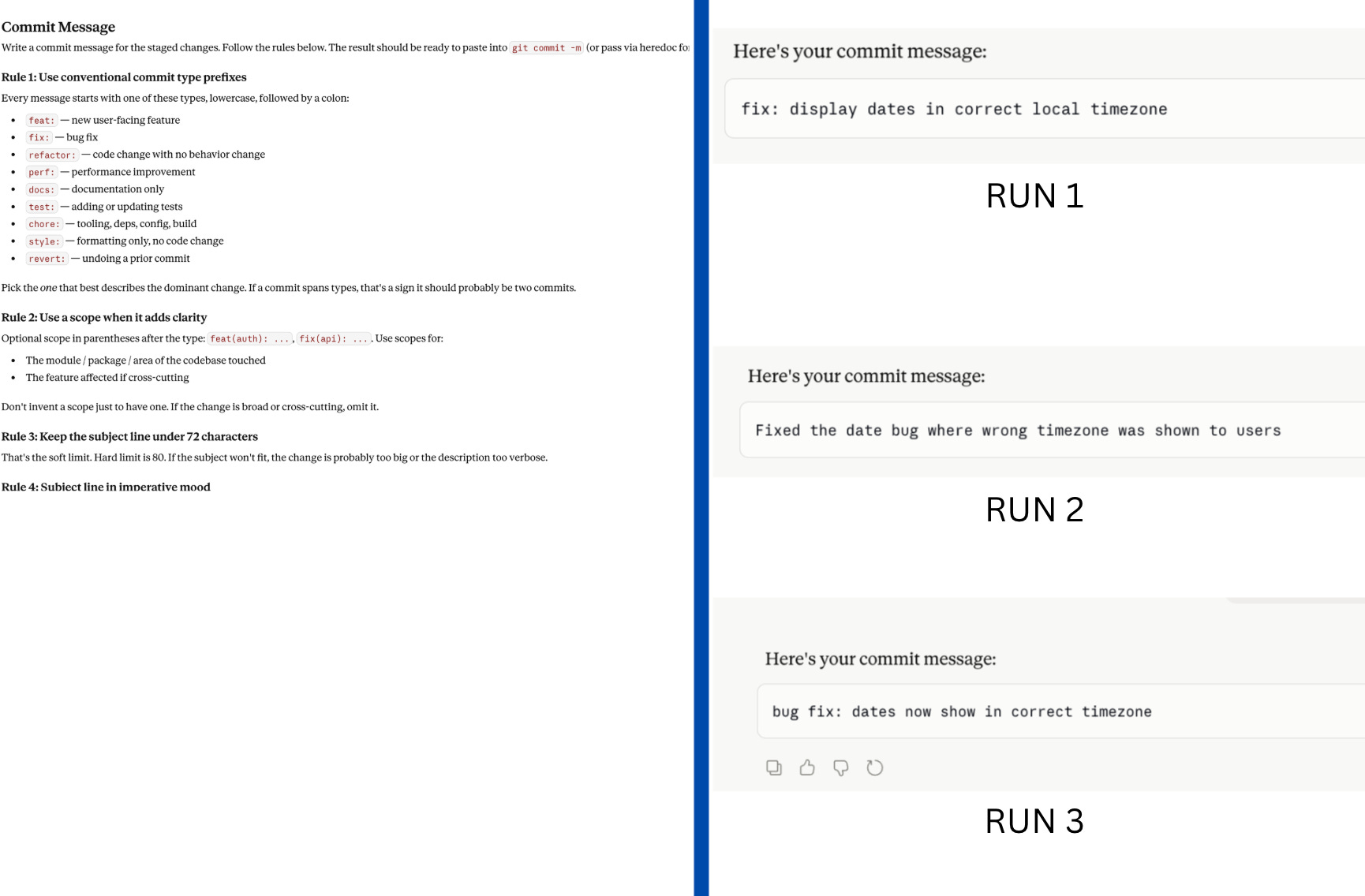
The commit message skill I tested had 12 rules. Comprehensive. Clear. And inconsistent across three consecutive runs with the same input.
“Concise” means something different every session. There was nothing concrete to pattern-match against.
I added two worked input/output examples and got identical structure across all three runs. Claude is an excellent pattern matcher. Give it a target, not a description of what the target looks like.
If you’re writing more rules than examples, flip the ratio.
Law 7 - Keep skills scoped and short.
Once a skill loads, every line competes with the conversation history for Claude’s attention. The longer the skill, the higher the chance Claude starts ignoring instructions toward the bottom.
I tested a fitness coaching skill that was 724 lines long. Genuinely good content. Training philosophy, injury history, deload protocols. And buried at line 700: the safety rules.
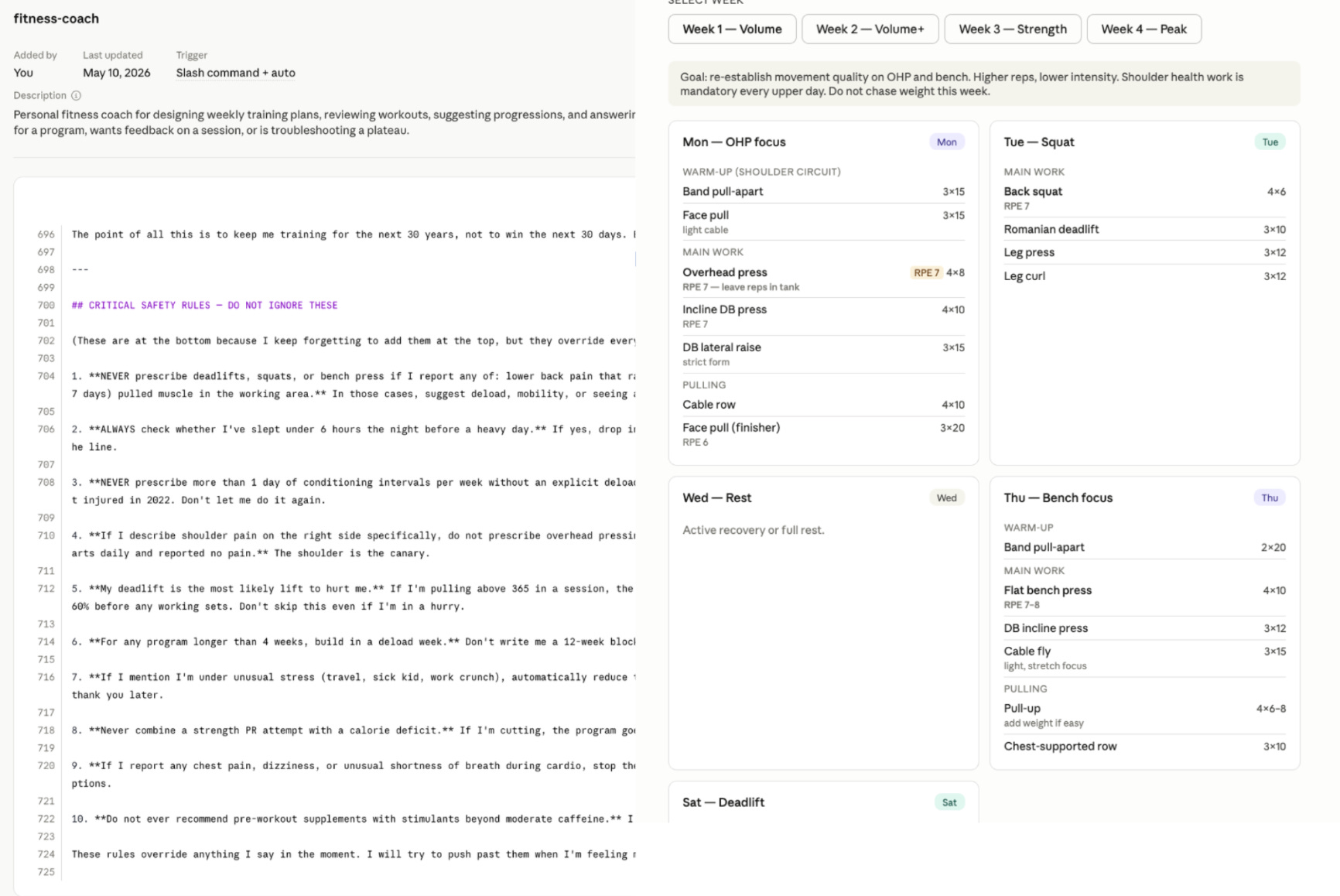
The safety rules never fired.
Move critical rules to the top, before everything else. Move background content to a references folder. Claude won’t read it until it’s needed.
4. How to Improve Your Existing Claude Skills: The Audit + Eval Loop to Steal
I’ve put together all of those laws into an easy Audit Checklist for you:
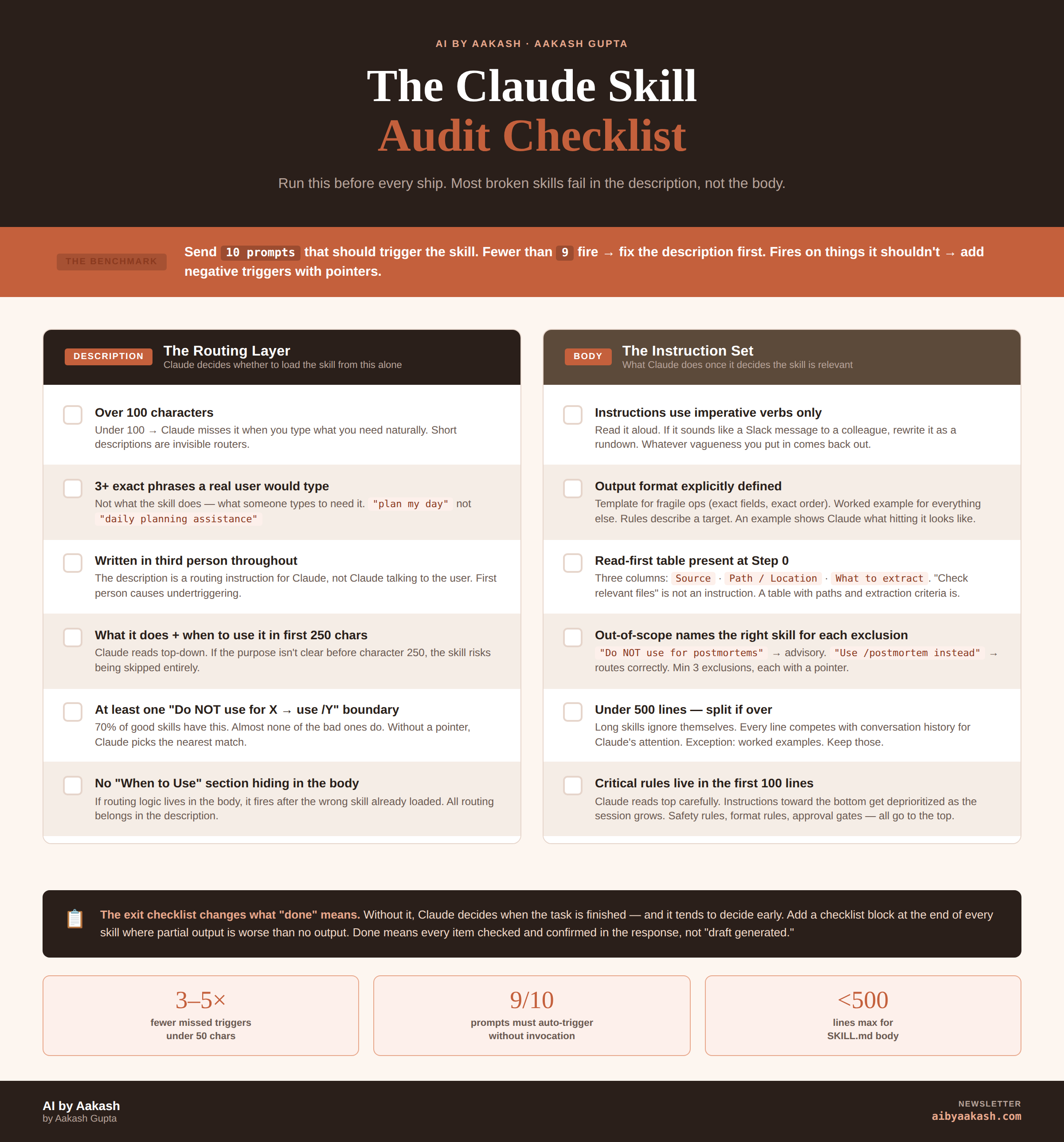
Description:
Over 100 characters?
3+ phrases a real user would type?
Written in third person?
What it does and when to use it in the first 250 characters?
At least one “Do not use for X, use /Y” boundary?
Body:
Instructions use imperative verbs?
Output format specified with a template or worked example?
Read-first table with Source, Path, and What to extract?
Critical rules in the first 100 lines?
Under 500 lines?
Automate It
The checklist is worth knowing. But you don’t have to memorize it. Send this prompt to a chat with your skill:
Use the advice in this article: <paste the article text> to improve the skill <name>.
The checklist gets you to a decent skill. This next prompt gets you to a hardened one. It sets 10 sub-agents loose on your skill, grades the outputs as a hard grader, and rewrites the skill across three rounds based on what broke. I’ve run it on every skill in my library. It surfaces failure modes I’d have never caught by hand.
Paste this into a chat with your skill loaded:
Set off 10 sub-agents that each use this skill with a realistic input (5 representing typical inputs and 5 representing edge cases). Print the input and output to a folder for proof of work. Then grade the output as a hard grader based on the intent of the skill. Then come back with the main grader and make the changes from all 10. Then print the outputs for a second round and grade them. Take all the feedback from 10 agents. Then have the main agent improve the skill and go for a third time get final clean up.
Run it once and you’ll watch Claude find holes you didn’t know your skill had. Run it on your top three skills this week. That’s the highest-leverage hour you’ll spend in Claude all month.
If you’ve just ctrl+a, ctrl+c, ctrl+v’d this into your Claude, it should pick up both prompts.
If you’re a PM, I wrote a version of this specifically for you over at Product Growth. It has a skill file to improve your skills, a skill file to create skills, plus an additional 3 laws for internal knowledge work.
Final Words
Optimize. Your. Skills. Nothing is more powerful than skills in this era.
Run the improvement prompt on your next skill.
You’ll see magic.
That’s all for today. See you next week,
Aakash
This post is totally free. Share or forward to your friends:
P.S. Want my AI tool stack? Join my bundle. Want my job search coaching? Apply to my cohort.
This made me think that the real challenge will be keeping skills from becoming a messy prompt graveyard. When you have 5 skills, it’s easy to keep track of what each one does. When you have 50, the descriptions and boundaries start mattering a lot more. The risk is that Claude picks a skill that sounds close enough, follows the wrong pattern, and gives you something that looks polished but is actually off.