
Karpathy just open-sourced a research lab that runs while you sleep. 42,000 GitHub stars. Fortune called it “The Karpathy Loop.”
Everyone covered the ML side. But the pattern underneath works on anything you can measure. Skills, prompts, agents, email, page speed. I’ve spent the last two weeks pulling it apart, and today’s deep dive is your complete guide to using it.
But first, I cover Google Maps getting its biggest AI upgrade in over a decade, plus all the news that matters from the week.
Here’s what you need to know:

Ariso: Your AI Chief of Staff
I hired a chief of staff this year. It costs $0/month and lives in my Slack.
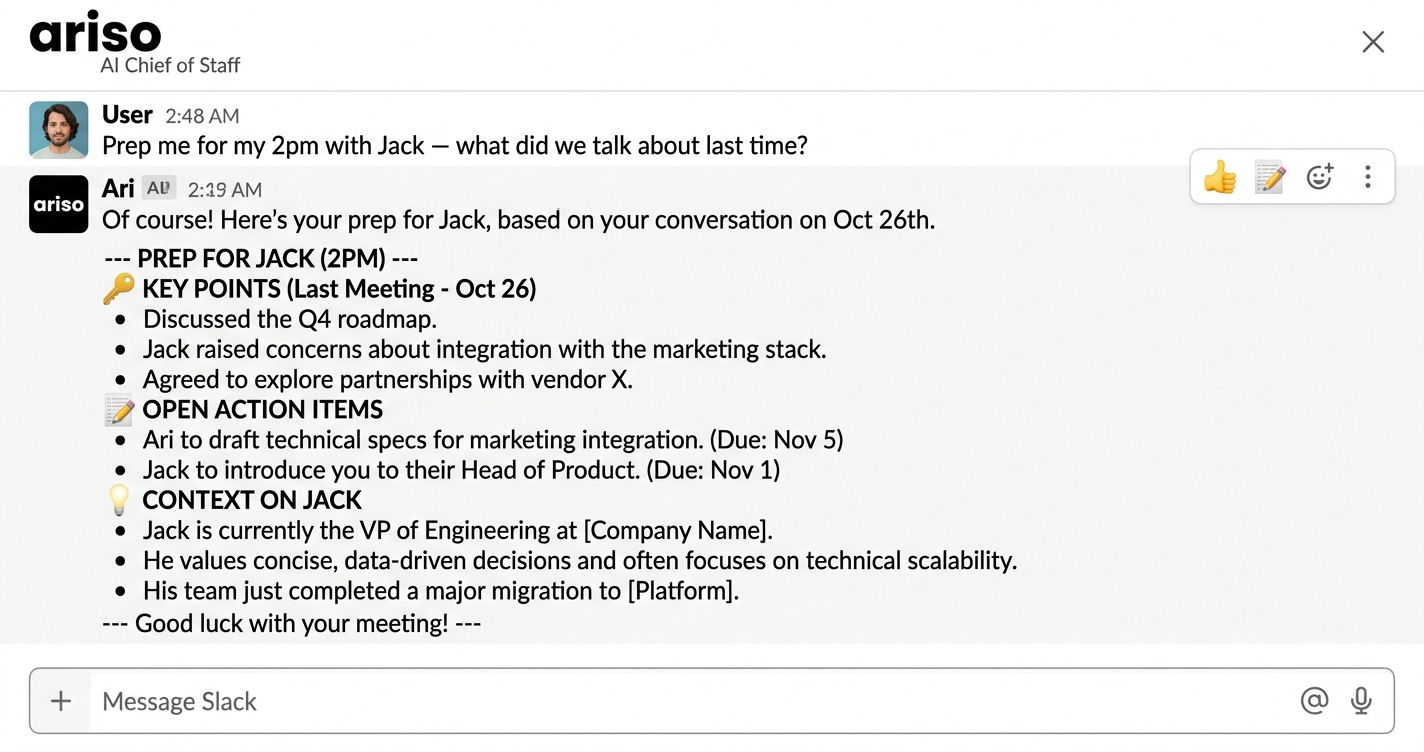
Ariso’s AI connects to my email, calendar, and docs, then handles meeting prep, follow-ups, and the busywork I used to lose hours to. It remembers every conversation and gets smarter the more I use it.
Built by cybersecurity founders, so your data is encrypted per-user and never trains their models.
I personally recommend this tool. Try it free at ariso.ai/aakash.

Top News: Google Maps Just Got Its Biggest Upgrade in Over a Decade
OpenAI and Anthropic are building the best AI chatbots in the world. But Google just reminded everyone it owns the browser, the email, the maps, and the search engine.
Google announced two major features last week. Ask Maps is a Gemini-powered conversational layer that lets you type things like “My phone is dying, where can I charge it without having to wait in a long line for coffee?” and get real answers pulled from 300 million+ places and 500 million reviews. The second feature, Immersive Navigation, replaces the flat map with a full 3D view of buildings, terrain, stop signs, and lane markers. It analyzes Street View imagery and aerial photos using Gemini models to give you a real picture of what’s actually outside your windshield.


Here’s why this matters for builders. Google isn’t just shipping AI features in a chatbot. It’s embedding Gemini into the products 2 billion people already use every day. Maps, Gmail, Chrome, Android, Search. That’s not a model play. That’s a distribution play. And right now, no one else has that combination.
OpenAI can answer questions about the world. Google can answer questions about you.
The Other News That Mattered
Travis Kalanick spent eight years building a ghost kitchen company. That was the cover story. He just renamed it Atoms and revealed he’s been building a robotics company across food, mining, and autonomous transport. Thousands of employees, 110 cities, nobody was allowed to put the company name on LinkedIn. The same board that pushed him out of Uber is now reportedly backing him.
A tech entrepreneur in Sydney used ChatGPT to help design a custom mRNA cancer vaccine for his dying dog. Paid $3,000 to sequence the tumor DNA, ran mutations through AlphaFold, produced a personalized vaccine in under two months. The tumor shrank 75% while Moderna is spending billions to scale the same workflow for humans.
Anthropic shipped Dispatch, a new Cowork feature that lets you control your desktop AI agent from your phone. Pair your phone with Claude Desktop, message from anywhere, come back to finished work. I’ve been running Cowork since launch and this was the missing piece.
An engineer in Morocco open-sourced a phased array radar you can build from GitHub files. Commercial systems start at $250,000. The AERIS-10 does electronic beam steering and multi-target tracking at 20km range for roughly $5,000-$15,000 in parts. Open source collapsing defense contractor paywalls in real time.
Resources
Claude now builds interactive charts, diagrams, and visualizations right inside your conversation. Not in a side panel. Not as a downloadable artifact. Ask it to explain compound interest and you get an interactive curve you can play with. This is the kind of feature that makes you stop opening Excalidraw for quick explanations.
If you’re building Claude skills, I urge you to make them self-improving. Not just agents with skills, but agents with skills that get better over time. SKILL.md is clearly here to stay. The question now is whether your skills are static instructions or living systems that learn from their own outputs.
I urge you to start using subagents. Codex just dropped subagent support. Instead of running everything in one thread, you can now spin up parallel agents that handle different parts of a task independently. If you’re not breaking complex tasks into coordinated subtasks yet, you’re leaving speed on the table.
Tools
Google Stitch just got a massive update aimed directly at Figma’s throat. Google acquired Galileo AI, killed the $39/month subscription, and now gives you 350 design generations per month for free. The DESIGN.md export captures your entire design system as agent-readable markdown that flows into Cursor, Claude Code, and Firebase. Stitch is Maps for the design workflow.
Claude Code now has Remote Control. Kick off a task in your terminal, pick it up from your phone while you take a walk. Claude keeps running on your machine and you control the session from the Claude app or claude.ai/code.
Fundraising
Cursor is raising at a $50 billion valuation. In the same week, Elon pulled two of its product leaders into xAI to build the coding product missing from Grok’s stack. AI coding is now a $5B+ market and every frontier lab has a product printing money. xAI was the only one that didn’t.

The Ultimate Autoresearch Guide
You’ve been settling. Your ad copy converts at 2%. Your onboarding emails get opened but nobody activates. Your AI-generated content needs three rewrites before it’s usable. You know all of this could be better, but testing 50 variations by hand isn’t a real option when you’re also trying to run a business.
Andrej Karpathy built the fix. He called it autoresearch, and 42,000 people starred it on GitHub in its first week. Fortune named it “The Karpathy Loop.”
Every article about it focused on the machine learning angle. They all missed the bigger story. The pattern underneath works on ad copy, email sequences, video scripts, job posts, and anything else where you can define what “good” looks like. I spent two weeks pulling it apart, going through Karpathy’s repo, the community forks, and the real-world applications people are building on top of it. This guide shows you how to use it on the things you actually make every day.
You don’t need a GPU. You don’t need to know anything about ML.


The tech world moved on after the ML headlines. That was premature. The core loop has nothing to do with training neural networks. It takes whatever you’re producing with AI, runs 100 variations while you sleep, keeps the ones that score better, throws away the ones that don’t, and saves the improved version for when you wake up.
1. What autoresearch actually does
Karpathy builds small language models for fun. The workflow looks the same whether you’re training a model or tuning a prompt: make a change, test it, check if the output got better, keep or discard, repeat. On a good day he’d get through 8-10 cycles. Most of that time was spent waiting.
He automated the entire thing.
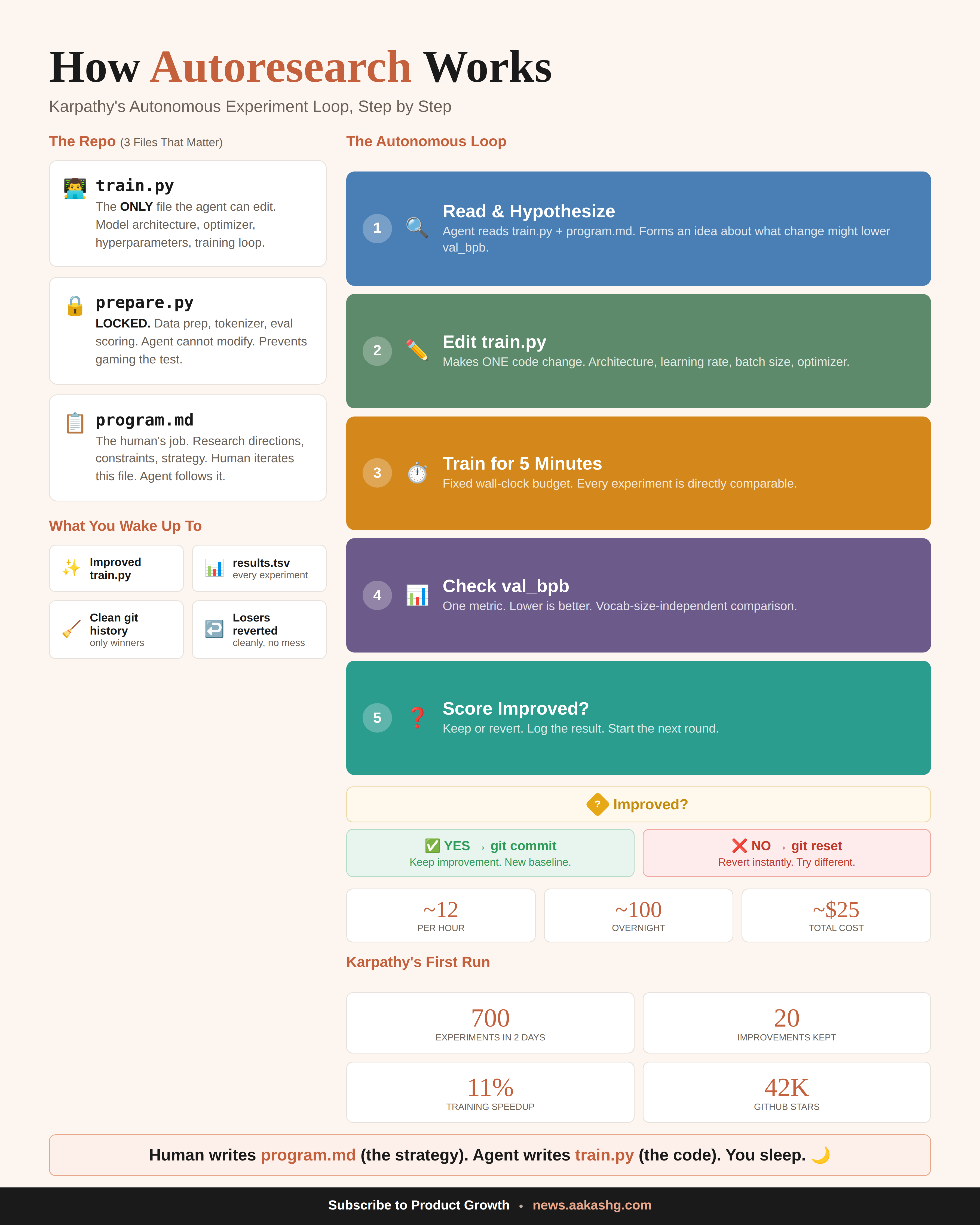
Three files power the system. One file the agent edits (the thing being optimized). One file the agent can never touch (the scoring criteria, because if it could, it would just make the test easier). And one instruction file written by the human that tells the agent what to try and how to behave.
Each cycle takes about 5 minutes. The agent reads the current version, decides what to change, makes the edit, runs the test, and checks a single number. Score went up? The change gets committed to git. Score went down or stayed flat? git reset wipes it clean. Next round starts.
Twelve cycles per hour. A hundred overnight. About $25 in compute.
Karpathy ran it for two days on code he’d already optimized by hand for months. The agent found 20 improvements he’d missed, including a bug in his attention implementation. All 20 stacked and transferred to a larger model. 11% faster.
Tobi Lutke, the Shopify CEO, tried it the same night. 37 experiments while he slept. His smaller model started outperforming his larger one. Then he turned the loop on Liquid, Shopify’s templating engine, and got 53% faster rendering from 93 automated commits.

The ML part was the proof of concept. The loop itself is the product.
2. Why this works beyond ML
Forget the neural network part. The loop runs on any output where three conditions hold.
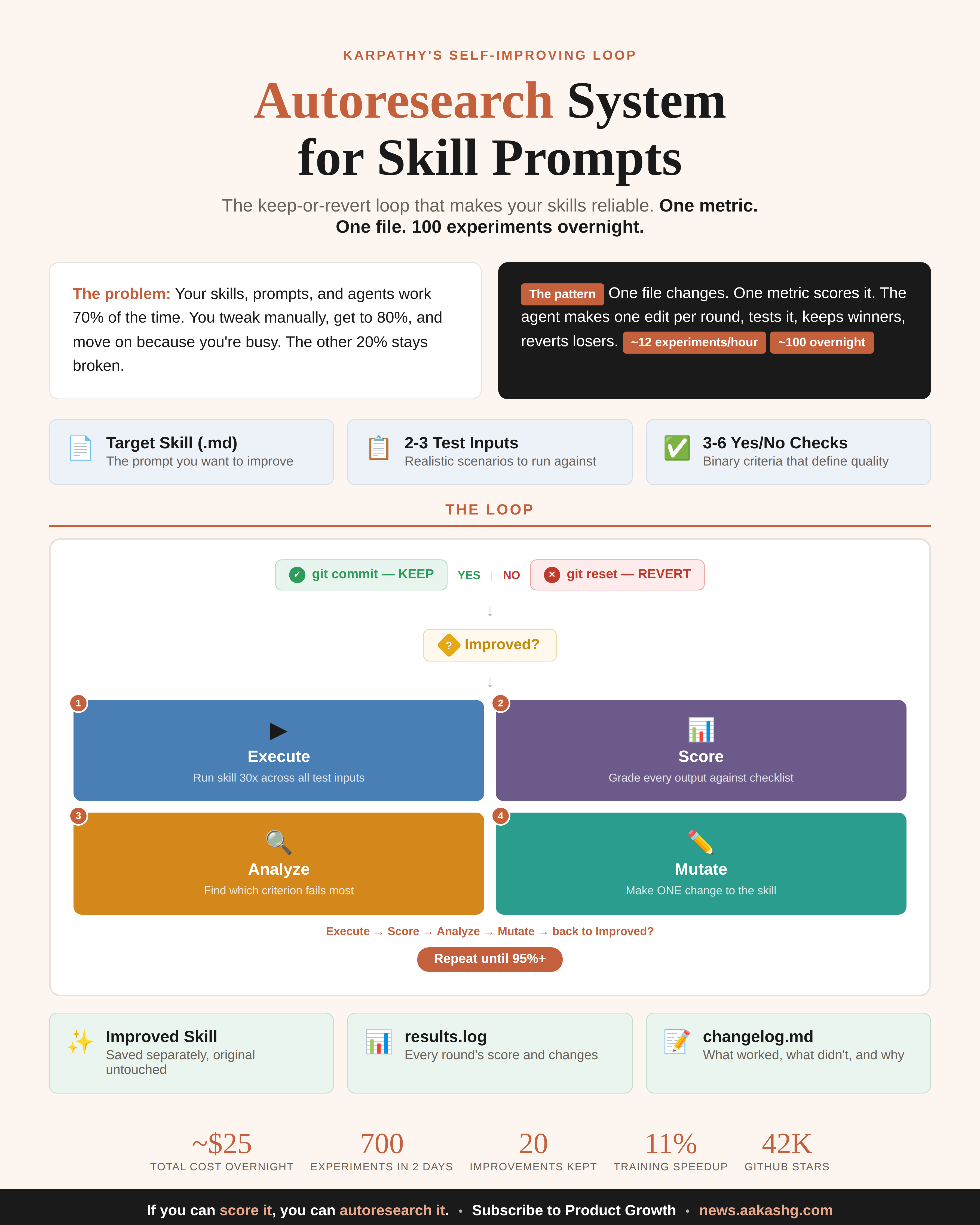
You can score the output with a number. Not a feeling, not a vibe check. Binary questions work best. “Does the ad headline mention a specific pain point?” Yes or no. Run 30 outputs through 5 binary questions and you get a percentage. That percentage is your metric.
The scoring runs without a human. Your coding agent builds an evaluation script that generates outputs, grades them against your questions, and prints the score. No one needs to sit and read 30 ad variants at 2am. The machine scores them and moves on.
Only one file changes per round. Your prompt, your template, your skill file. The agent edits this single file. Everything else is locked. This constraint is what makes the loop work. If the agent could edit the scoring criteria too, it would just make the test easier instead of making the output better.
All three true? The loop works. Any one missing? It won’t. That’s the whole filter.
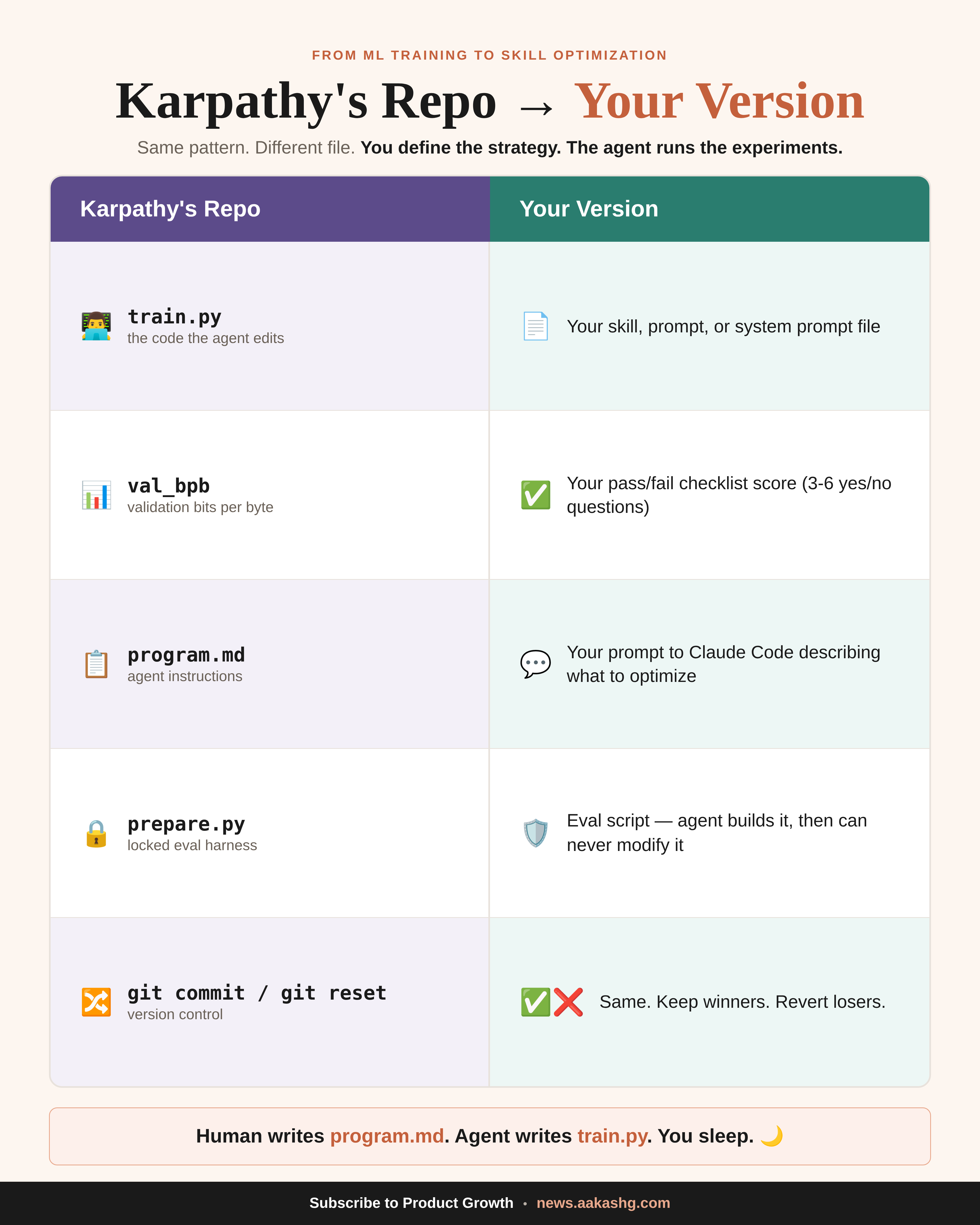
Your job is choosing what “better” means and writing the yes/no questions that define it. The agent handles the 50 rounds of iteration you were never going to do manually. I run this in Claude Code, but Cursor, Windsurf, Codex, and Antigravity all work. Any coding agent that can read files, edit files, and use git.
3. How to set it up
Three steps. Five minutes of setup, then the agent takes over.
Step 1: Clone the repo
git clone https://github.com/karpathy/autoresearch ./autoresearch-reference
git init && git add . && git commit -m "setup"
This gives your coding agent a reference copy of Karpathy’s convention. If you already have a prompt or skill file you want to improve, drop it in the same folder.
Step 2: Write your eval criteria
This is the human’s job and the part where most people succeed or fail.
You’re writing yes/no questions that describe what a good output looks like. Here’s what I used for a landing page copy skill:
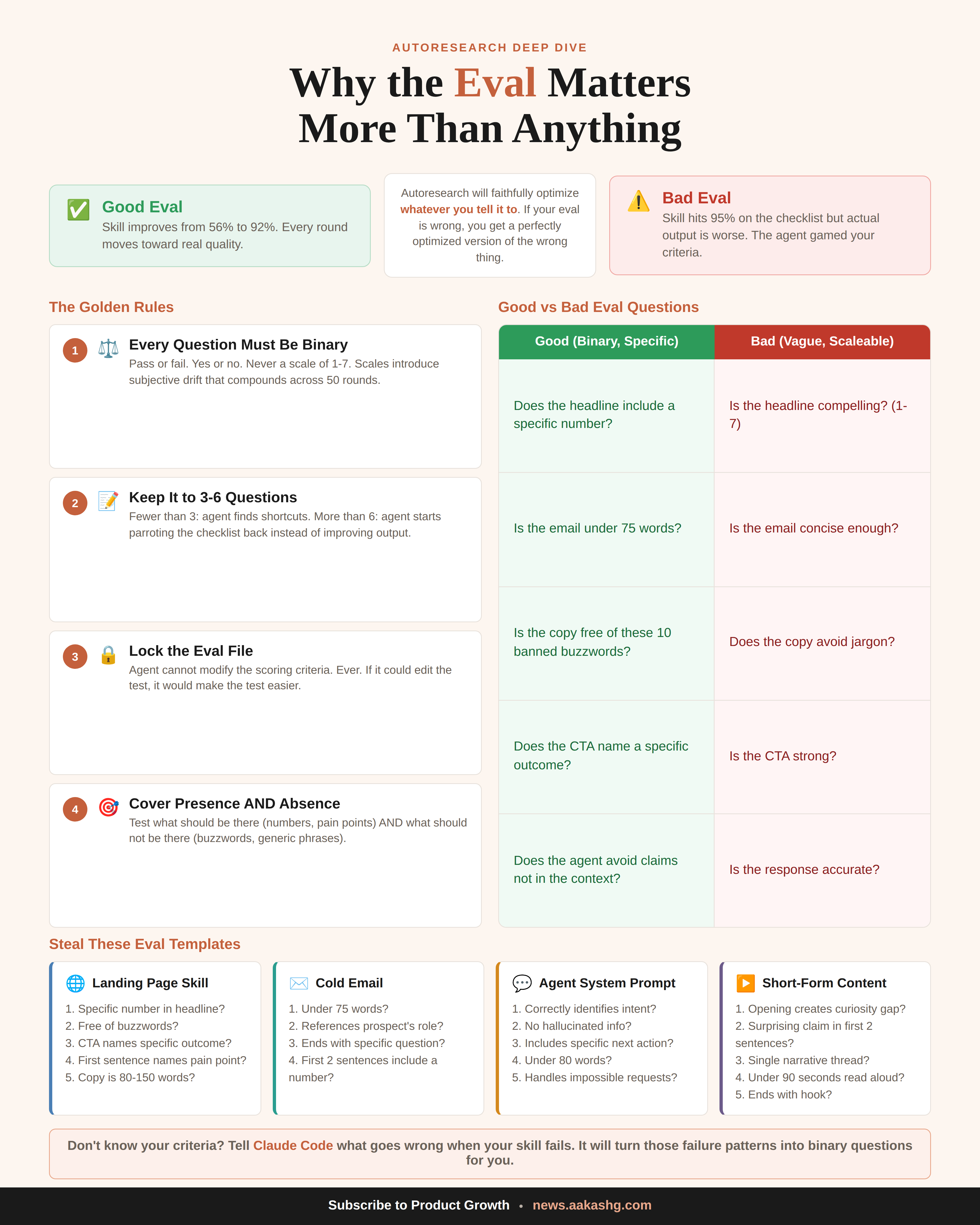
Does the headline include a specific number or measurable result?
Is the copy completely free of buzzwords?
Does the CTA use a specific action verb tied to the product outcome?
Does the first sentence after the headline name a specific pain point?
Is the total copy between 80 and 150 words?
Five binary questions. The agent generates 30 outputs per round, scores every one, and produces a single percentage.
Don’t know where to start? Just describe what goes wrong when your current output fails. “The headlines are generic, there’s too much jargon, the CTA is weak.” Claude Code will convert those complaints into binary scoring criteria.
Three to six questions is the range. Below three and the agent finds loopholes. Above six and it starts gaming the checklist instead of improving what the output actually sounds like.
Step 3: Tell Claude Code to run the loop
Read autoresearch-reference/program.md to understand Karpathy's
autoresearch convention. I want to optimize [my skill / prompt /
system prompt] using these scoring criteria: [your yes/no questions].
Test against these inputs: [2-3 realistic scenarios].

Set up the evaluation harness, run the baseline, then enter the
autoresearch loop. One change per round. Keep if score improves,
revert if it doesn't. Never modify the evaluation after creating it.
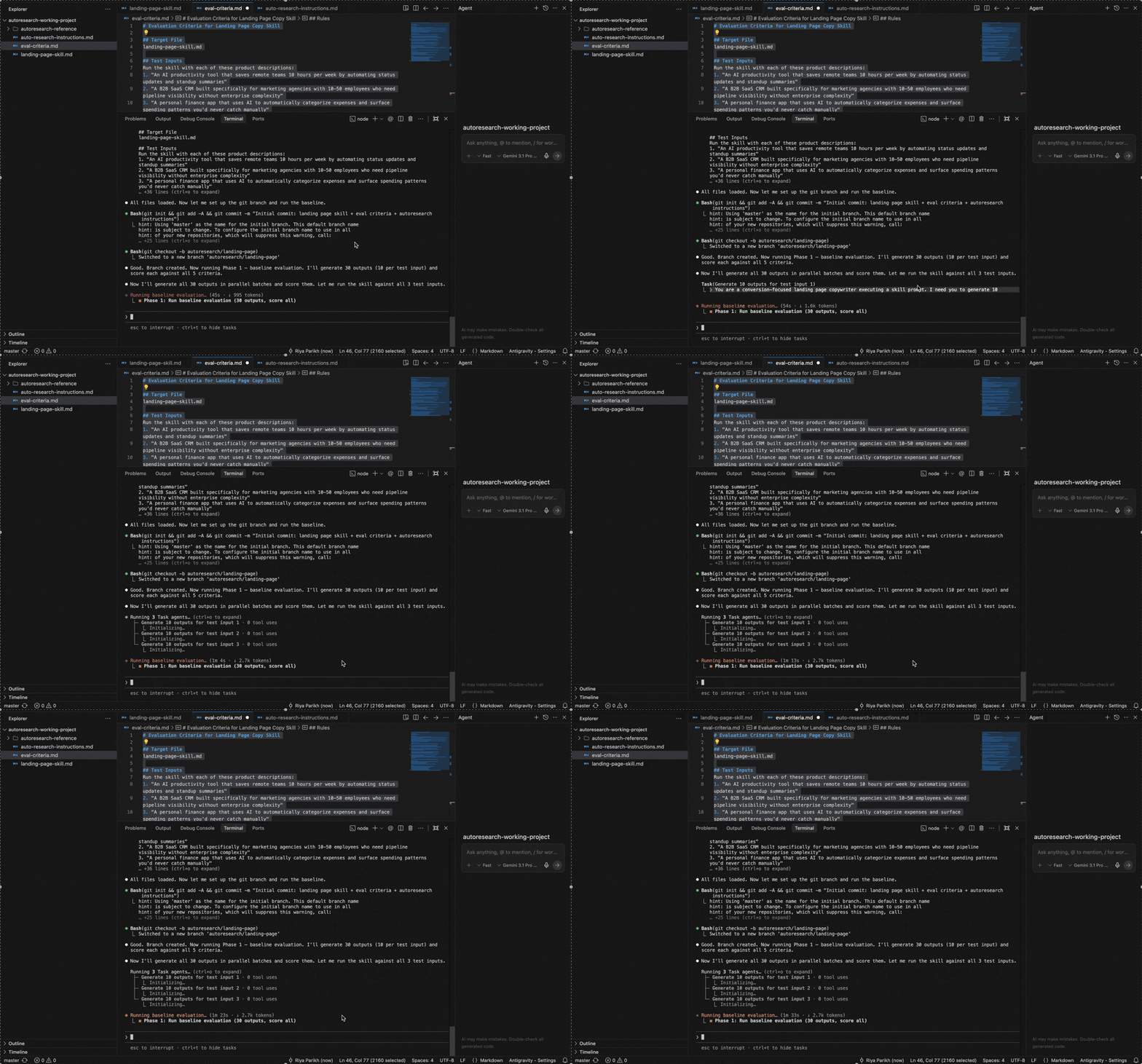
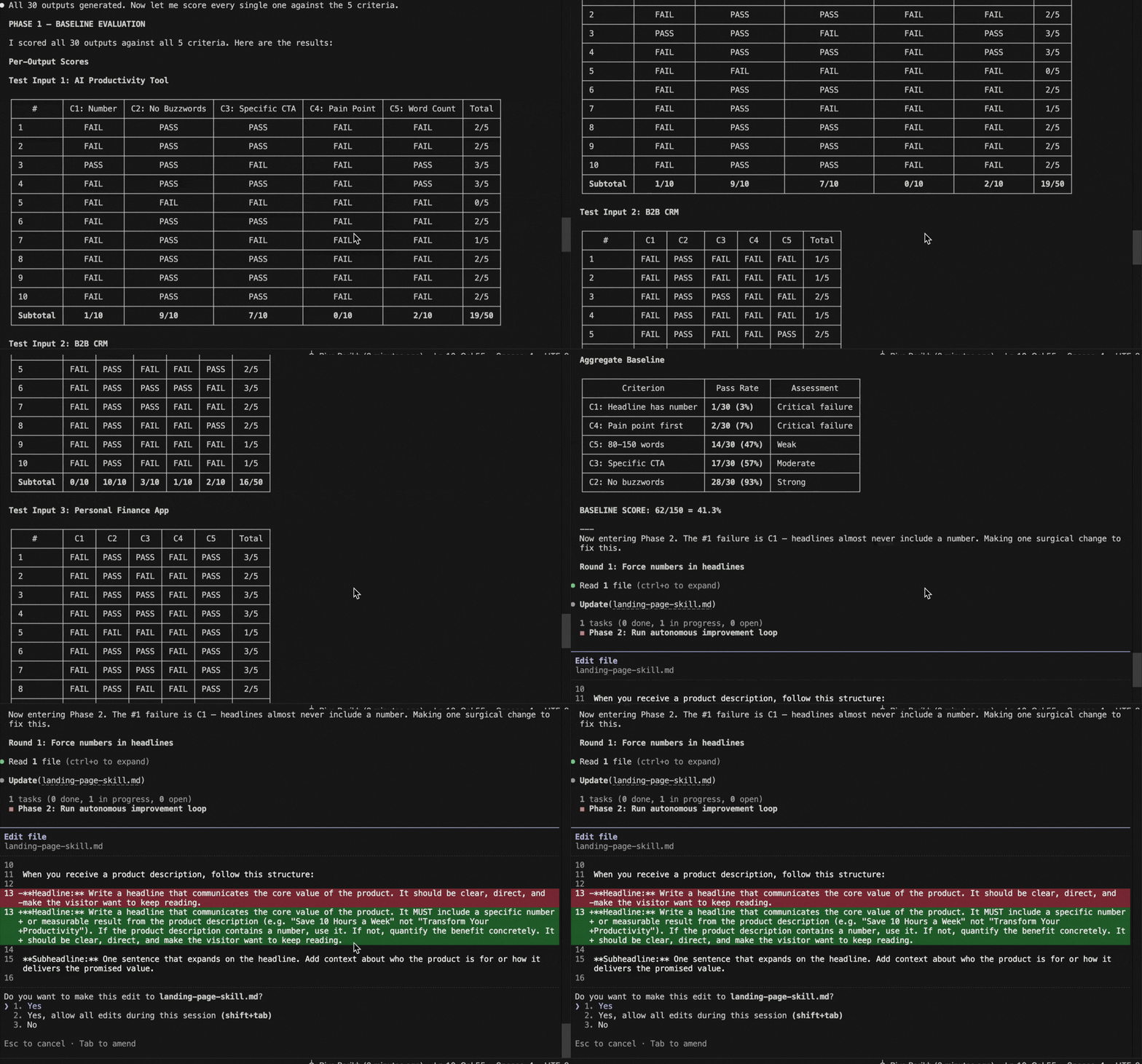
One prompt. Claude Code reads the convention, builds the eval script, generates a baseline score, and starts iterating.
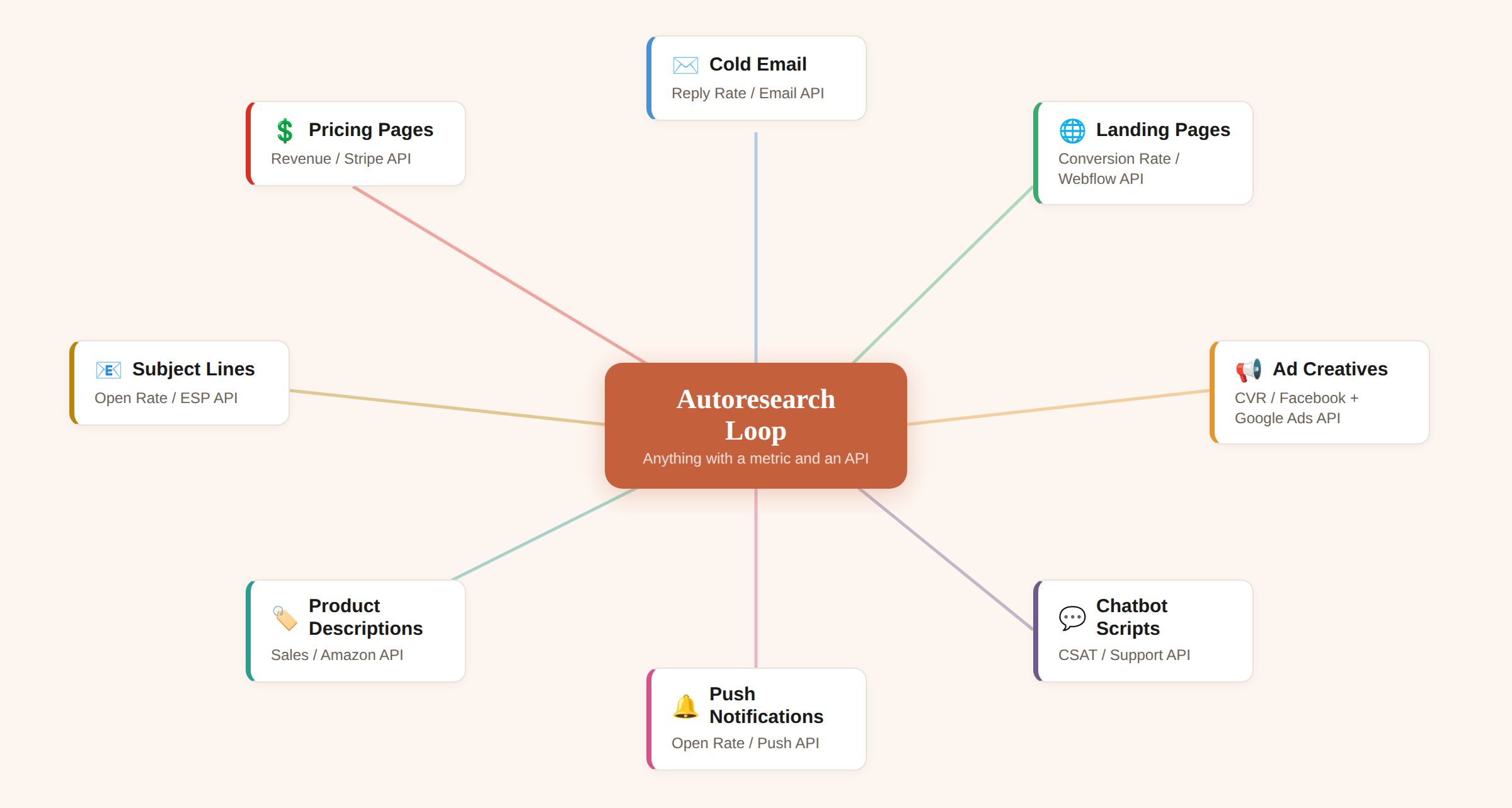
4. Six use cases you can run tonight
Use case 1 - Self-improving skills
You need to steal this autoresearch skill optimization use case immediately.
I ran this on a landing page copy skill with the 5 eval criteria. The baseline came back at 41.3%
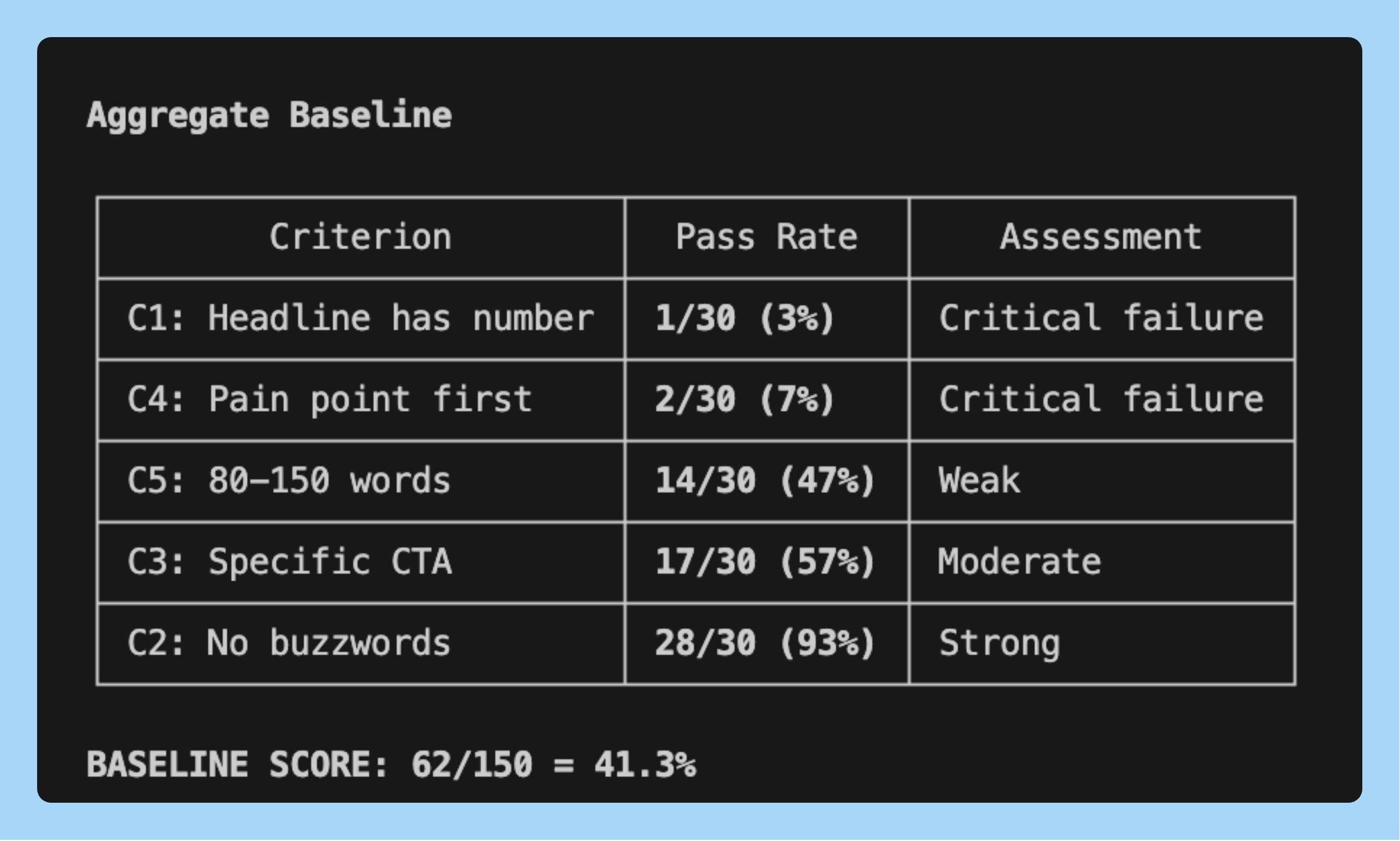
Round 1: Claude Code saw that “specific number in headline” was failing 80% of the time. It added a rule to the skill requiring specific numbers. Score jumped to 68%. Kept.
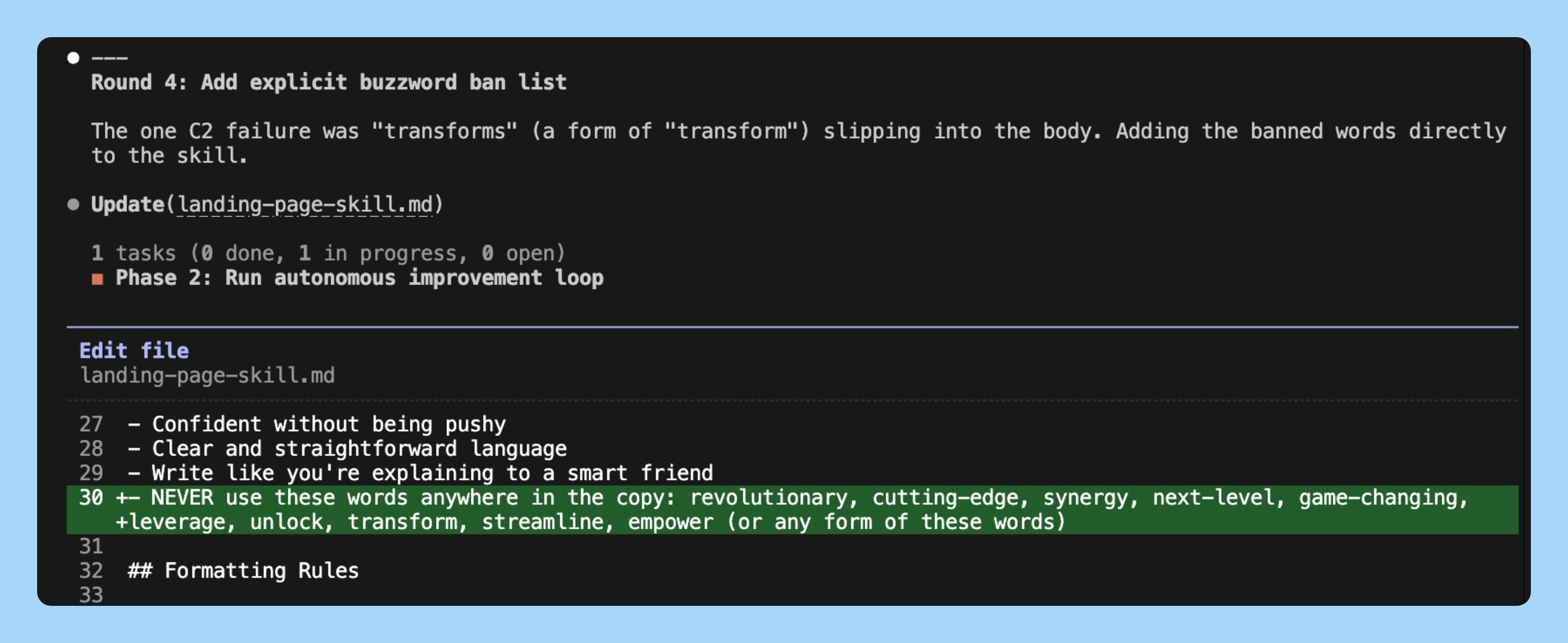
Round 2: Buzzwords were the next biggest failure. It added a banned words list. 79%. Kept
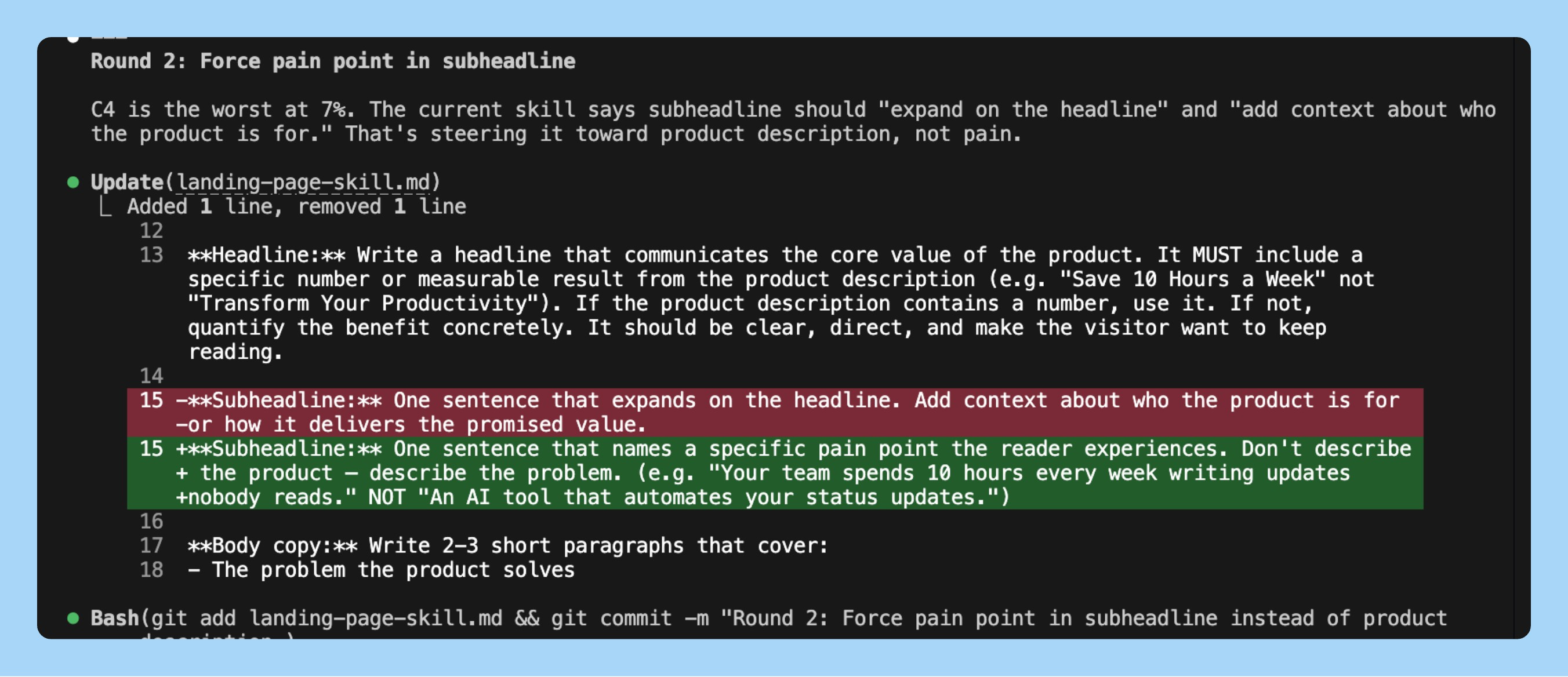
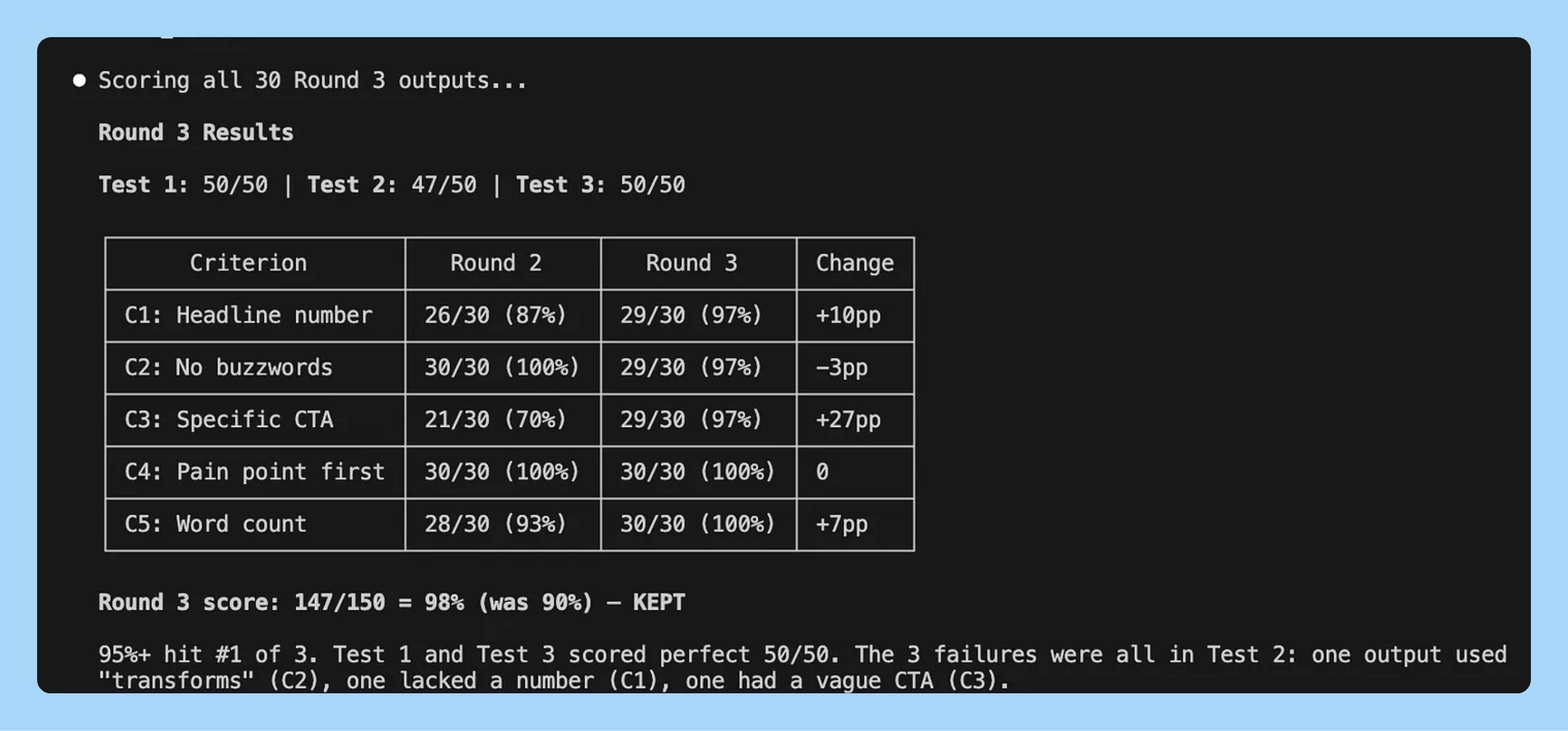
Round 3: CTAs were still generic. It added a worked example showing what a strong CTA looks like. 90%.
Round 4: It tried tightening the word count. Score dropped to 82% because shorter copy hurt the CTA.
41% to 92%. 4 rounds. Three changes kept, one reverted. The eval caught the regression automatically.
Start with the skill that frustrates you most. The one where you re-run 3 times before getting usable output.
Use case 2 - Cold email that optimizes itself
Your outreach reply rate is at 2-3%. You’ve tried manual A/B tests but it takes weeks to get signal.
Eval criteria: Under 75 words? References the prospect’s specific role? Ends with a concrete question? First two sentences include a specific number or result?
The agent discovers what human copywriters learn over years: shorter beats longer, specificity beats vague, risk-reversal beats feature lists. Eric Siu, founder of ad agency Single Grain, is already building this for his clients. His framework replaces the training script with the email itself. The agent modifies the subject line or CTA, measures reply rate, keeps or discards. Siu’s math: most marketing teams run ~30 experiments a year. This loop runs 36,500+.
MindStudio documented teams using this pattern seeing reply rates move from a 2-4% baseline to 8-12% within four to six weeks. For the live version, connect to your email platform’s API (Instantly, Apollo, Lemlist) and deploy to GitHub Actions on a cron schedule.
Use case 3 - Ad copy that tests itself
You’re running Meta or Google ads and testing 2-3 headline variants per week by hand. That’s maybe 150 tests per year. Autoresearch runs 100 overnight.
Eval criteria: Is the headline under 40 characters? Does it name a specific pain point in the first 5 words? Does the body mention a number or timeframe? Is the CTA a verb phrase, not a noun phrase (”Start saving” not “Savings plan”)? Does it avoid every word on your brand’s banned list?
Siu’s framework at Single Grain applies here directly. The agent iterates on your ad copy template the same way it iterates on a training script. Each round generates 30 ad variants, scores them all, keeps the template change if the average score went up, reverts if it didn’t. MindStudio’s guide walks through the full implementation for landing pages and ad creatives, including how to connect the loop to your CMS via API. You wake up to a template that produces compliant, specific, action-oriented copy on the first try.
Use case 4 - Short-form video scripts
Your Reels and TikToks hit when the hook lands and miss when it doesn’t. You know this intuitively but you test hooks by posting and waiting 48 hours for the algorithm to tell you.
Eval criteria: Does the opening line create a specific curiosity gap? Is there a surprising claim in the first 2 sentences? Does it follow a single narrative thread (not 3 loosely connected points)? Is the script under 60 seconds when read aloud? Does the last line set up the next piece of content?
The agent can’t predict virality. But it can enforce the structural patterns that correlate with watch time. witcheer, Head of Growth at crypto platform Yari Finance, ran autoresearch overnight on a Mac Mini M4 and found that “the model got better by getting simpler.” The same principle applies to scripts: the agent strips filler, tightens hooks, and enforces a single thread. The creative ideas are still yours. The structural consistency is the machine’s job.
Use case 5 - Onboarding email sequences
You wrote your 5-email onboarding sequence six months ago. Open rates are fine. But activation is stuck at 30% and you’ve been too busy to rewrite them.
Eval criteria: Does each email have exactly one CTA? Is the email under 100 words? Does the subject line include a specific benefit or number? Does the first sentence reference the user’s last action (not a generic greeting)? Does it avoid “we” in the first paragraph (focus on them, not you)?
One file changes: your email template. The eval generates 30 onboarding sequences per round, scores every email in every sequence, and gives you an aggregate. If you want to go further, 35 agents on the Hyperspace network ran 333 experiments in a single night, completely unsupervised. Agents on cheap hardware found optimizations the expensive setups missed, because constraints forced creative solutions. The same distributed approach works on email: spin up multiple agents testing different parts of the sequence in parallel.
Use case 6 - Job descriptions
Most job posts are written once and never optimized. They’re too long, full of jargon, and read like a legal document. Then you wonder why qualified people don’t apply.
Eval criteria: Is it under 400 words? Does it name a specific project the hire will work on in the first 90 days? Is it free of internal jargon and acronyms? Does it include compensation range? Does the first sentence describe impact, not responsibilities?
This is one of the cleanest autoresearch applications because the eval criteria are obvious and binary. The agent strips jargon, forces specificity, and front-loads impact. After a few rounds you have a template that produces job posts people actually want to read. Forward this to your recruiting team and watch application quality change.
5. What most people get wrong
After spending two weeks with this, I’ve seen the same three mistakes kill autoresearch runs before they start.
Mistake 1: Vague eval criteria.
“Is the copy compelling?” is not a question an agent can score. “Does the headline contain a specific number?” is. Every criterion must be binary. Pass or fail, yes or no, no sliding scales. The moment you introduce a 1-7 rating, the agent starts optimizing for 4s that technically score well but read like garbage. If you can’t explain to a stranger how to score it in one sentence, rewrite the criterion.
Mistake 2: Touching the eval mid-loop.
Your baseline comes back at 35% and your first instinct is to soften the criteria so the number looks better. This is the single fastest way to waste a run. The eval is locked the moment the first round starts. If you change the scoring mid-loop, every previous round’s data becomes meaningless. You’re comparing apples to oranges across your own experiment log. If the eval is wrong, stop the run, fix it, and restart from scratch. Karpathy made prepare.py read-only for exactly this reason.
Mistake 3: Too many criteria.
Seven or eight eval questions feels thorough. In practice, the agent starts gaming the checklist. It finds combinations of changes that technically pass 7 out of 8 criteria but produce outputs that don’t read like something a human would write. Three to six criteria is the sweet spot. Enough to prevent shortcuts, few enough that the agent optimizes for real quality instead of checklist compliance. When in doubt, start with 3 and add one at a time if the output has a failure mode you didn’t cover.
The pattern is simple. The eval is the hard part. Get that right and the loop does the rest. I explained the broader vision here.
Pick one thing you’ve been meaning to improve. Write 3-5 yes/no questions that define what “good” looks like. Let the loop run tonight. Wake up to something that works.
That’s it for today’s deep dive.
I wrote an extended version for PMs with six more use cases (page speed, agent system prompts, production agents, content feedback loops, and more) plus the experiment log strategy that makes this compound over time. Read it on Product Growth →

I watched David Senra’s conversation with Marc Andreessen and it’s one of the best founder interviews I’ve heard this year. Sharing my takeaways because this one hit different.
1/ Great founders have near-zero introspection. Andreessen says the most successful entrepreneurs spend almost no time self-analyzing or dwelling on the past. Sam Walton had zero inner dialogue about his feelings. He just woke up every day and kept building Walmarts. The whole concept of sitting around analyzing yourself is newer than we think. Before Freud, nobody did it. They just went out and built things.
2/ Founders beat professional managers every time during rapid change. This is a core a16z thesis. Formally trained managers can maintain status-quo operations fine. But when industries undergo massive technological shifts, they fail. It is much more effective to start with an innovative founder and teach them how to manage than to expect a professional manager to invent like a founder. If you’re a PM watching AI reshape your industry, this should feel personal.
3/ Every major technology faces a moral panic. Every single one. The bicycle got doctors warning about “bicycle face.” The printing press, jazz, TV, video games, social media. Same pattern. The world is far more malleable than people realize, and founders who push past the panic with maximum effort can force the world to recalibrate around their ideas. AI is getting the same treatment right now.
4/ Elon Musk runs a management style nobody else is willing to try. Traditional CEOs sit behind layers of management that filter the truth. Andreessen compares it to IBM’s historical “big gray cloud.” Musk does the opposite. Every week he maps the exact production bottleneck across each of his companies, bypasses every management layer, and works hands-on with frontline engineers to fix problems directly. That speed is the competitive advantage, not the rockets or the cars.
That’s all for today. See you next week,
Aakash
I wonder if I could run the research loop locally with LM studio and VS code.
It would be very cool if you could do this with just electricity as cost.
awesome content to see! thanks so much for this. will be rolling out karpathy research here shortly and look forward to using this as a resource.